Complete Guide to ASUS B31N1708 42Wh Battery Replacement for Your Laptop
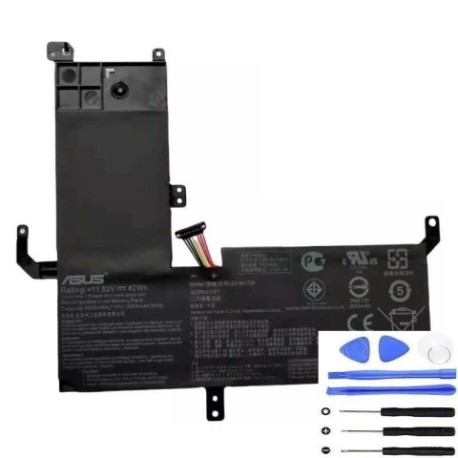
If you’re experiencing battery issues with your ASUS VivoBook Flip 15 or TP510 series laptop, you’ve come to the right place. This comprehensive guide covers everything Australian and New Zealand consumers need to know about replacing their laptop battery with the genuine ASUS B31N1708 42Wh model.
Battery models & part numbers
| Reference / P/N |
|---|
| 0B200-02720000 |
| Asus-B31N1708-42Wh |
Compatible models
| Model |
|---|
| ASUS VivoBook Flip TP510 TP510U |
| Asus TP510 |
| Asus TP510UA |
| Asus TP510UF |
| Asus TP510UQ |
| Asus VivoBook Flip 15 TP510UA |
| Asus VivoBook Flip 15 TP510UF |
| Asus VivoBook Flip 15 TP510UQ |
Introduction
Your ASUS VivoBook Flip 15 or TP510 series laptop is designed for mobility and productivity, but when the battery starts failing, it can significantly impact your daily workflow. The ASUS B31N1708 42Wh battery is the official replacement that ensures your device maintains optimal performance and safety standards. This guide provides Australian and New Zealand consumers with expert advice on identifying battery issues, ensuring compatibility, and making an informed purchase decision.
Common signs you need a replacement
| Symptoms | Causes | Verification | Recommendation |
|---|---|---|---|
| Battery drains quickly (under 1 hour) | Ageing cells, reduced capacity | Check battery health in Windows Power Report | Replace if capacity below 60% |
| Laptop shuts down unexpectedly | Voltage drops, cell failure | Monitor battery percentage during use | Immediate replacement needed |
| Battery won’t charge past certain percentage | Charging circuit issues, worn cells | Test with different charger | Replace battery if issue persists |
| Battery swelling or bulging | Gas buildup, internal damage | Visual inspection, measure thickness | Stop using immediately and replace |
| Overheating during charging | Internal resistance increase | Check temperature with monitoring software | Replace to prevent safety hazards |
| Inaccurate battery percentage | Calibration issues, sensor failure | Compare reported vs actual runtime | Replace if calibration fails |
How to check compatibility
Ensuring you purchase the correct battery replacement is crucial for both performance and safety. Here’s how to verify compatibility for your ASUS laptop:
Finding your laptop model information
Locate the model number on the bottom casing of your laptop, typically near the regulatory labels. For ASUS VivoBook Flip 15 and TP510 series, you should see model numbers like TP510UA, TP510UF, or TP510UQ. The exact positioning varies, but it’s usually printed in white or silver text on a black background.
Using ASUS official tools
Visit the ASUS Australia or New Zealand support website and use their product identification tool. Enter your serial number (found on the same label as the model number) to access detailed specifications and compatible accessories. The official ASUS support centre can also verify compatibility over the phone.
Physical verification
Remove your current battery (if comfortable doing so) and compare the part number printed on it. The ASUS B31N1708-42Wh should match exactly, including the hyphen placement and capitalisation. Also check the physical dimensions – the replacement should have identical mounting points and connector placement.
Cross-referencing part numbers
Note that ASUS sometimes uses multiple part numbers for the same battery. The B31N1708-42Wh may also be referenced as 0B200-02720000 in some documentation or retail systems. Both refer to the same 42Wh battery compatible with your TP510 series laptop.
When to replace your battery
Timing your battery replacement correctly can save you from unexpected downtime and potential data loss. Consider replacement when:
- Battery health drops below 70%: Most laptops show significant performance degradation below this threshold
- After 2-3 years of regular use: Lithium-ion batteries naturally degrade over time, even with proper care
- Before important projects or travel: Proactive replacement ensures reliability when you need it most
- When warranty is about to expire: Some retailers offer installation services with purchase
- Seasonal changes affect performance: Cold Australian winters can exacerbate existing battery issues
Installation guide
Replacing your ASUS VivoBook Flip 15 battery is straightforward with the right tools and precautions. Always disconnect the power adapter and shut down the computer completely before beginning.
Tools required
- Phillips head screwdriver (size #00 or #0)
- Plastic spudger or guitar pick
- Anti-static wrist strap (recommended)
- Clean, well-lit workspace
Step-by-step installation
- Power down and disconnect: Shut down your laptop and unplug the power adapter. Remove any peripherals.
- Remove bottom cover: Locate and remove all screws from the bottom casing. Some may be hidden under rubber feet, so check carefully.
- Disconnect old battery: Locate the battery connector on the motherboard. Gently pull the connector straight out – avoid twisting or bending.
- Remove mounting screws: Unscrew the 4-6 screws securing the battery to the chassis. Note their positions as they may vary in length.
- Install new battery: Position the ASUS B31N1708-42Wh battery in place and secure with the original screws.
- Reconnect battery: Firmly push the battery connector into the motherboard socket until it clicks into place.
- Reassemble and test: Replace the bottom cover, reconnect power, and power on. The system should recognise the new battery immediately.
Common installation challenges
Some TP510 models have slightly different internal layouts. If you encounter resistance when removing the battery connector, use a plastic tool to gently pry it loose rather than pulling on the wires. The connector is designed to be snug to prevent accidental disconnection during transport.
Usage & care tips
Maximise your new battery’s lifespan with these evidence-based care practices tailored for Australian and New Zealand conditions:
Optimal charging practices
- Avoid deep discharges: Try to recharge when battery reaches 20-30% rather than waiting for complete drain
- Partial charging is fine: Modern lithium-ion batteries don’t require full discharge cycles
- Temperature management: Never charge in direct sunlight or in vehicles during hot Australian summers
- Storage recommendations: If storing long-term, charge to 50-60% and store in cool, dry conditions
Performance optimisation
- Use ASUS Battery Health Charging software (available in MyASUS app) to set charging limits
- Enable battery saver mode in Windows when working on battery power
- Reduce screen brightness and close unnecessary applications to extend runtime
- Update BIOS and battery firmware through ASUS official support channels
Seasonal considerations
Australian summers can reach temperatures that accelerate battery degradation. Avoid leaving your laptop in hot cars or direct sunlight. During winter, allow the battery to warm to room temperature before charging if it’s been in cold conditions.
Safety & recycling in AU/NZ
Proper handling and disposal of laptop batteries is regulated in both Australia and New Zealand to protect the environment and public safety.
Safety precautions
- Never attempt to open or modify the battery casing
- Avoid exposing batteries to temperatures above 45°C or below 0°C
- Do not puncture, crush, or immerse in water
- Only use ASUS-approved chargers and accessories
Recycling options
In Australia, most electronics retailers offer free battery recycling services. Officeworks, JB Hi-Fi, and Harvey Norman participate in the B-cycle battery recycling program. In New Zealand, check with Noel Leeming, PB Tech, or your local council for e-waste collection points. Never dispose of lithium-ion batteries in household rubbish bins due to fire risk.
Transport regulations
When shipping or travelling with spare batteries, ensure they’re properly packaged to prevent short circuits. Airlines have specific regulations regarding spare lithium batteries in carry-on and checked luggage.
FAQ
How long does the ASUS B31N1708 42Wh battery typically last?
With normal usage patterns, expect 2-3 years of reliable performance. Heavy users might see reduced lifespan, while occasional users could get 4+ years. The battery is rated for approximately 500 full charge cycles before capacity drops to 80% of original.
Will replacing my battery void my ASUS warranty?
In Australia and New Zealand, replacing the battery with a genuine ASUS part typically doesn’t void your remaining warranty, provided the installation doesn’t cause damage to other components. However, any damage occurring during self-installation may not be covered. Check your specific warranty terms or consult ASUS support for confirmation.
How can I verify I’m purchasing a genuine ASUS battery?
Genuine ASUS batteries feature specific security markings, including holographic labels and precise printing quality. Purchase from authorised retailers like the linked supplier, and avoid suspiciously low prices from unknown sellers. Genuine batteries should come in official ASUS packaging with Australian compliance markings.
What’s the difference between the various TP510 model variants?
The TP510UA, TP510UF, and TP510UQ variants primarily differ in processor, graphics, and memory configurations. However, they share the same chassis design and battery compatibility. The B31N1708-42Wh battery is designed to work across all TP510 series models regardless of internal specifications.
Can I use a higher capacity battery than the original 42Wh?
No, the physical dimensions and electrical specifications are precisely matched to the TP510 chassis. Using a higher capacity battery could cause fitment issues, overheating, or damage to the charging circuitry. Stick with the official 42Wh replacement for safety and compatibility.
How do I calibrate my new battery for accurate reporting?
After installation, charge the battery to 100% without interruption, then use the laptop normally until it automatically shuts down due to low power. Recharge completely to 100% again. This process helps the battery management system learn the new capacity characteristics.
What should I do with my old battery?
Never dispose of lithium-ion batteries in household waste. Take them to authorised battery recycling points at most electronics retailers or council waste facilities. Some retailers may offer trade-in discounts when purchasing replacement batteries.
Replacing your ASUS VivoBook Flip 15 battery doesn’t have to be stressful. With the genuine ASUS B31N1708 42Wh battery and this comprehensive guide, you can restore your laptop’s mobility and reliability. Remember to purchase from reputable suppliers and follow proper installation procedures for the best results.