ASUS B31N1635 42Wh Laptop Battery Replacement Guide
If your ASUS laptop is struggling to hold a charge or won’t power on without being plugged in, you’ve come to the right place. This comprehensive guide covers everything Australian and New Zealand customers need to know about replacing their ASUS laptop battery with the genuine B31N1635 42Wh model.
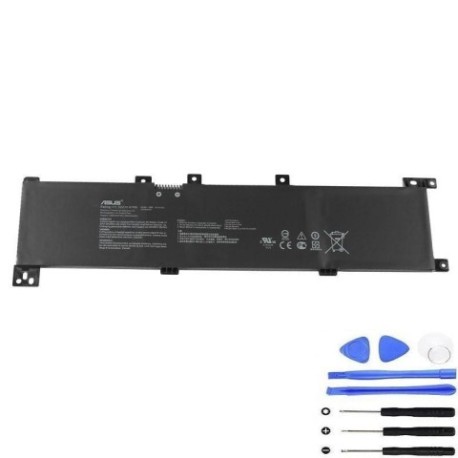
Battery models & part numbers
| Reference / P/N |
|---|
| 0B200-02560000 |
| 0B200-02560100 |
| Asus-B31N1635-42Wh |
| B31Bl9H |
| B31BmE1 |
Compatible models
| Model |
|---|
| Asus R702MA |
| Asus R702MA-BX005T |
| Asus R702MA-BX089T |
| Asus R702MA-BX102T |
| Asus R702UA |
| Asus R702UA-BX378T |
| Asus R702UA-BX490T |
| Asus R702UA-GC219T |
| Asus R702UA-GC721T |
| Asus R702UA-R702UA |
| Asus R702UB |
| Asus R702UB-GC116T |
| Asus R702UB-GC117T |
| Asus R702UF |
| Asus R702UF-GCC156T |
| Asus R702UV |
| Asus R702UV-BX222T |
| Asus VivoBook 14 F441MA |
| Asus VivoBook 14 F441MA-FA074T |
| Asus VivoBook 14 F441MA-GA073T |
| Asus VivoBook 17 A705UA |
| Asus VivoBook 17 A705UA-GC218T |
| Asus VivoBook 17 D705BA |
| Asus VivoBook 17 D705BA-BX041T |
| Asus VivoBook 17 F705NA |
| Asus VivoBook 17 F705NA-BX016T |
| Asus VivoBook 17 F705UA-BX1064T |
| Asus VivoBook 17 M705BA |
| Asus VivoBook 17 P1700UF |
| Asus VivoBook 17 P1700UF-GC048R |
| Asus VivoBook 17 R702QA |
| Asus VivoBook 17 R702QA-BX075T |
| Asus VivoBook 17 X705MA |
| Asus VivoBook 17 X705MA-BX014T |
| Asus VivoBook 17 X705MA-BX042T |
| Asus VivoBook 17 X705MA-BX058T |
| Asus VivoBook 17 X705MA-BX068 |
| Asus VivoBook 17 X705MA-BX162 |
| Asus VivoBook 17 X705MA-BX1620 |
| Asus VivoBook 17 X705MA-BX197T |
| Asus VivoBook 17 X705MA-FD004TS |
| Asus VivoBook 17 X705MA-GC064T |
| Asus VivoBook 17 X705MB |
| Asus VivoBook 17 X705MB-BX042T |
| Asus VivoBook 17 X705NA |
| Asus VivoBook 17 X705NA-BX001T |
| Asus VivoBook 17 X705NA-BX033T |
| Asus VivoBook 17 X705NA-BX044T |
| Asus VivoBook 17 X705NA-BX106T |
| Asus VivoBook 17 X705NC |
| Asus VivoBook 17 X705NC-BX014T |
| Asus VivoBook 17 X705QA |
| Asus VivoBook 17 X705QA-BX027T |
| Asus VivoBook 17 X705QA-GC096T |
| Asus VivoBook 17 X705QR |
| Asus VivoBook 17 X705UA |
| Asus VivoBook 17 X705UA-BX022T |
| Asus VivoBook 17 X705UA-BX033T |
| Asus VivoBook 17 X705UA-BX065T |
| Asus VivoBook 17 X705UA-BX075T |
| Asus VivoBook 17 X705UA-BX080T |
| Asus VivoBook 17 X705UA-BX1002T |
| Asus VivoBook 17 X705UA-BX1012T |
| Asus VivoBook 17 X705UA-BX121T |
| Asus VivoBook 17 X705UA-BX141T |
| Asus VivoBook 17 X705UA-BX162T |
| Asus VivoBook 17 X705UA-BX163T |
| Asus VivoBook 17 X705UA-BX203T |
| Asus VivoBook 17 X705UA-BX205T |
| Asus VivoBook 17 X705UA-BX206T |
| Asus VivoBook 17 X705UA-BX213T |
| Asus VivoBook 17 X705UA-BX249T |
| Asus VivoBook 17 X705UA-BX305T |
| Asus VivoBook 17 X705UA-BX317T |
| Asus VivoBook 17 X705UA-BX318 |
| Asus VivoBook 17 X705UA-BX321T |
| Asus VivoBook 17 X705UA-BX478T |
| Asus VivoBook 17 X705UA-BX499T |
| Asus VivoBook 17 X705UA-BX840 |
| Asus VivoBook 17 X705UA-GC079T |
| Asus VivoBook 17 X705UA-GC139T |
| Asus VivoBook 17 X705UA-GC160T |
| Asus VivoBook 17 X705UA-GC161T |
| Asus VivoBook 17 X705UA-GC164T |
| Asus VivoBook 17 X705UA-GC331T |
| Asus VivoBook 17 X705UB |
| Asus VivoBook 17 X705UB-GC046T |
| Asus VivoBook 17 X705UB-GC047T |
| Asus VivoBook 17 X705UB-GC049T |
| Asus VivoBook 17 X705UB-GC209T |
| Asus VivoBook 17 X705UB-GC211T |
| Asus VivoBook 17 X705UF |
| Asus VivoBook 17 X705UF-BX086T |
| Asus VivoBook 17 X705UF-GC010 |
| Asus VivoBook 17 X705UF-GC017 |
| Asus VivoBook 17 X705UF-GC094T |
| Asus VivoBook 17 X705UQ |
| Asus VivoBook 17 X705UQ-GC097T |
| Asus VivoBook 17 X705UQ-GC122T |
| Asus VivoBook 17 X705UV |
| Asus VivoBook 17 X705UV-BX021T |
| Asus VivoBook 17 X705UV-BX086T |
| Asus VivoBook 17 X705UV-BX111T |
| Asus VivoBook 17 X705UV-BX134T |
| Asus VivoBook 17 X705UV-BX175T |
| Asus VivoBook 17 X705UV-BX187T |
| Asus VivoBook 17 X705UV-BX230T |
| Asus VivoBook 17 X705UV-GC107T |
| Asus VivoBook F705MA |
| Asus VivoBook F705MA-BX028T |
| Asus VivoBook F705MA-BX029 |
| Asus VivoBook F705MA-BX029T |
| Asus VivoBook F705MA-BX080 |
| Asus VivoBook F705MA-BX121T |
| Asus VivoBook F705MA-BX166 |
| Asus VivoBook F705MA-BX917T |
| Asus VivoBook F705MA-GC033T |
| Asus VivoBook F705QA |
| Asus VivoBook F705QA-BX140T |
| Asus VivoBook F705QA-GC011T |
| Asus VivoBook F705QA-GC068T |
| Asus VivoBook F705UA |
| Asus VivoBook F705UA-BX033T |
| Asus VivoBook F705UA-BX082T |
| Asus VivoBook F705UA-BX1093T |
| Asus VivoBook F705UA-BX121T |
| Asus VivoBook F705UA-BX127T |
| Asus VivoBook F705UA-BX205T |
| Asus VivoBook F705UA-BX206T |
| Asus VivoBook F705UA-BX207T |
| Asus VivoBook F705UA-BX304T |
| Asus VivoBook F705UA-BX305T |
| Asus VivoBook F705UA-BX825T |
| Asus VivoBook F705UA-BX968 |
| Asus VivoBook F705UA-GC365T |
| Asus VivoBook F705UA-GC428T |
| Asus VivoBook F705UA-GC568T |
| Asus VivoBook F705UA-GC866T |
| Asus VivoBook F705UB |
| Asus VivoBook F705UB-BX070T |
| Asus VivoBook F705UV |
| Asus VivoBook F705UV-BX186T |
| Asus VivoBook F705UV-BX187T |
| Asus VivoBook F705UV-GC107T |
| Asus VivoBook P1700UA |
| Asus VivoBook P1700UA-BX817R |
| Asus VivoBook P1700UA-GC159R |
| Asus VivoBook P1700UQ |
| Asus VivoBook P1700UQ-GC105R |
| Asus VivoBook Pro 17 N705FD |
| Asus VivoBook Pro 17 N705FD-GC005T |
| Asus VivoBook Pro 17 N705FD-GC009T |
| Asus VivoBook Pro 17 N705FD-GC012T |
| Asus VivoBook Pro 17 N705FD-GC014T |
| Asus VivoBook Pro 17 N705FD-GC023T |
| Asus VivoBook Pro 17 N705FD-GC068T |
| Asus VivoBook Pro 17 N705FN |
| Asus VivoBook Pro 17 N705FN-GC008R |
| Asus VivoBook Pro 17 N705FN-GC008T |
| Asus VivoBook Pro 17 N705FN-GC038R |
| Asus VivoBook Pro 17 N705FN-GC039T |
| Asus VivoBook Pro 17 N705FN-GC081R |
| Asus VivoBook Pro 17 N705UD |
| Asus VivoBook Pro 17 N705UD-GC005T |
| Asus VivoBook Pro 17 N705UD-GC020T |
| Asus VivoBook Pro 17 N705UD-GC021T |
| Asus VivoBook Pro 17 N705UD-GC058T |
| Asus VivoBook Pro 17 N705UD-GC106T |
| Asus VivoBook Pro 17 N705UD-GC108T |
| Asus VivoBook Pro 17 N705UD-GC111T |
| Asus VivoBook Pro 17 N705UD-GC112T |
| Asus VivoBook Pro 17 N705UD-GC133T |
| Asus VivoBook Pro 17 N705UD-GC159T |
| Asus VivoBook Pro 17 N705UD-GC181T |
| Asus VivoBook Pro 17 N705UD-GC187T |
| Asus VivoBook Pro 17 N705UD-GC188T |
| Asus VivoBook Pro 17 N705UD-GC233T |
| Asus VivoBook Pro 17 N705UD-GC946T |
| Asus VivoBook Pro 17 N705UD-GC967T |
| Asus VivoBook Pro 17 N705UD-GCJ28T |
| Asus VivoBook Pro 17 N705UN |
| Asus VivoBook Pro 17 N705UN-GC023T |
| Asus VivoBook Pro 17 N705UN-GC078T |
| Asus VivoBook Pro 17 N705UN-GC080T |
| Asus VivoBook Pro 17 N705UN-GC100T |
| Asus VivoBook Pro 17 N705UN-GC736R |
| Asus VivoBook Pro 17 N705UN-GCE37T |
| Asus VivoBook Pro 17 N705UQ |
| Asus VivoBook Pro 17 N705UQ-BX175T |
| Asus VivoBook Pro 17 N705UQ-BXS39T |
| Asus VivoBook Pro 17 N705UQ-GC058T |
| Asus VivoBook Pro 17 N705UQ-GC064T |
| Asus VivoBook Pro 17 N705UQ-GC101T |
| Asus VivoBook Pro 17 N705UQ-GC159T |
| Asus X705BA |
| Asus X705FD |
| Asus X705FN |
| Asus X705UD |
| Asus X705UN |
Common signs you need a replacement
| Symptom | Cause | Verification | Recommendation |
|---|---|---|---|
| Battery drains quickly (under 1 hour) | Ageing cells, reduced capacity | Check battery health in Windows | Replace battery immediately |
| Laptop won’t power on without charger | Battery no longer holds charge | Remove charger – laptop shuts off | Urgent replacement needed |
| Battery swelling or bulging | Gas buildup from cell degradation | Visual inspection, uneven surface | Stop using immediately – safety risk |
| Overheating during charging | Internal resistance increased | Battery feels hot to touch | Replace to prevent damage |
| Percentage jumps erratically | Faulty battery management system | Monitor percentage changes | Replace for accurate monitoring |
How to check compatibility
Finding your exact ASUS model number is crucial for battery compatibility. Check the bottom label of your laptop for the complete model number, which typically includes both the series (like R702MA or X705UA) and the specific variant code. You can also find this information in Windows by pressing Windows Key + R, typing “msinfo32”, and looking for “System Model”. For ASUS VivoBook and Pro series laptops, ensure the replacement battery matches both the physical dimensions (approximately 260mm x 70mm x 20mm) and the connector type. The B31N1635 battery uses a standard 4-pin connector common across most ASUS 17-inch models.
When to replace your battery
Most laptop batteries last 2-4 years with regular use. If your battery health shows less than 60% of original capacity in Windows battery report, or if you experience any of the warning signs mentioned above, it’s time for replacement. Don’t wait until complete failure – a degraded battery can affect overall system performance and potentially damage your laptop’s charging circuit.
Installation guide
Replacing your ASUS battery is straightforward. First, shut down your laptop and disconnect the charger. Flip it over and remove the battery compartment screws (usually 4-6 Phillips head screws). Gently lift the old battery out, being careful not to damage the connector. Align the new B31N1635 battery with the connector and press firmly until it clicks into place. Replace the compartment cover and screws. Charge fully before first use for optimal performance.
Usage & care tips
To extend your new battery’s lifespan: avoid frequent full discharges, keep your laptop in cool environments (ideal 15-25°C), and calibrate your battery monthly by fully charging then discharging. For ASUS VivoBook models, use the ASUS Battery Health Charging software to optimise charging patterns. Store your laptop with 40-60% charge if not using for extended periods.
Safety & recycling in AU/NZ
Never dispose of lithium-ion batteries in household waste. In Australia, use Battery Recycling services at Officeworks, ALDI, or Battery World. In New Zealand, take old batteries to specialised recycling centres or transfer stations. Damaged or swollen batteries should be handled with care – place in a fire-proof container and take to a hazardous waste facility immediately.
FAQ
How long does the B31N1635 battery last on a single charge?
Depending on your specific VivoBook model and usage, expect 4-6 hours of typical use. Pro series models may get slightly less due to higher performance components.
Is this battery genuine ASUS?
Yes, the B31N1635 is the original ASUS part number with full compatibility and safety certifications.
What’s the warranty period?
Most authorised retailers offer 12-24 months warranty on genuine ASUS batteries in Australia and New Zealand.
Can I replace the battery myself?
Absolutely – most ASUS VivoBook and Pro models have user-replaceable batteries requiring only basic screwdrivers.
How do I check my current battery’s health?
In Windows, open Command Prompt as administrator and type “powercfg /batteryreport” to generate a detailed health report.
Will this battery work with my specific model?
Check the compatibility tables above – if your exact model number is listed, you’re good to go.
What if my laptop isn’t charging after replacement?
Ensure the battery connector is fully seated. Try resetting your laptop’s EC (Embedded Controller) by holding the power button for 40 seconds with battery and charger removed.