ASUS B31N1346 48Wh Battery Replacement Guide for Australian & New Zealand Users
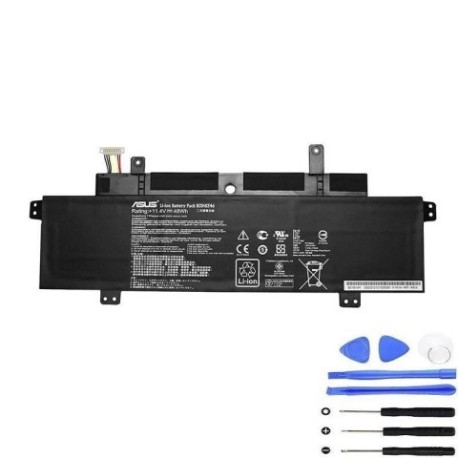
Introduction
If you’re an ASUS Chromebook user in Australia or New Zealand experiencing battery issues with your C300MA or C300SA series device, you’ve come to the right place. The ASUS B31N1346 48Wh battery is the genuine replacement solution designed specifically for these popular Chromebook models. Whether you’re a student, professional, or casual user, understanding your battery replacement options is crucial for maintaining your device’s performance and longevity in our unique climate conditions.
Battery models & part numbers
| Reference / P/N |
|---|
| 0B200-01010000 |
| 0B200-01010000M |
| Asus-B31N1346-48Wh |
| B31Bn9h |
Compatible models
| Model |
|---|
| Asus C300MA Chromebook |
| Asus C300MA-2A |
| Asus C300MA-2B |
| Asus C300MA-2C |
| Asus C300MA-2D |
| Asus C300MA-2E |
| Asus C300MA-BBCLN10 Chromebook |
| Asus C300MA-DB01 Chromebook |
| Asus C300MA-DH02 Chromebook |
| Asus C300MA-EDU Chromebook |
| Asus C300MA-RO003 Chromebook |
| Asus C300MA-RO005 Chromebook |
| Asus C300MA-XB11 Chromebook |
| Asus C300MA_C-2A |
| Asus C300SA-2A |
| Asus C300SA-2C |
| Asus C300SA-2D |
| Asus C300SA-3A |
| Asus Chromebook C300SA |
| Asus Chromebook C300SA-DS02 |
Common signs you need a replacement
| Symptom | Cause | Verification | Recommendation |
|---|---|---|---|
| Rapid battery drain | Ageing cells, reduced capacity | Check battery health in Chrome OS | Consider replacement if below 60% capacity |
| Swollen battery case | Gas buildup from chemical degradation | Visual inspection, uneven surface | Immediate replacement required for safety |
| Device shutting down unexpectedly | Voltage drops under load | Monitor during intensive tasks | Replace to prevent data loss |
| Long charging times | Internal resistance increase | Time full charge cycle | Replace if charging takes 4+ hours |
| Battery not holding charge | Cell degradation, memory effect | Unplug and monitor discharge rate | Replace if unable to complete work session |
How to check compatibility
Finding your exact ASUS Chromebook model in Australia and New Zealand is straightforward. Check the bottom label of your device for the model number, which typically starts with “C300MA” or “C300SA”. You can also access Chrome OS settings by clicking your account photo in the bottom right, selecting the settings gear, then navigating to “About Chrome OS” > “Additional details” where your device model will be displayed. For ASUS-specific verification, visit the official ASUS support website and enter your serial number or use their compatibility checker tool. The B31N1346 battery is specifically engineered for the C300 series Chromebooks with 11.6-inch displays and Intel Celeron processors commonly used in AU/NZ educational and business environments.
When to replace
In the Australian and New Zealand climate, laptop batteries typically last 2-3 years with regular use. Consider replacement when your battery health drops below 70% capacity, you experience noticeable performance degradation, or your device can’t complete a standard work or school day on a single charge. The tropical northern regions and temperate southern climates affect battery longevity differently – higher temperatures accelerate degradation while moderate climates may extend battery life. Monitor your battery’s performance seasonally as temperature fluctuations impact charge cycles.
Installation guide
Replacing your ASUS Chromebook battery requires careful attention to detail. Begin by powering off your device completely and disconnecting the charger. Use a precision Phillips screwdriver to remove the 10 screws securing the bottom case – keep these organised as they vary in length. Gently pry the bottom case starting from the corners using a plastic spudger to avoid damaging the clips. Locate the battery connector near the centre of the motherboard and carefully disconnect it by lifting the retention clip. Remove the 4 screws securing the battery, then lift the battery out at a 30-degree angle. Install your new B31N1346 battery by reversing this process, ensuring all connections are secure before reassembling. First boot may take longer as the system recognises the new battery.
Usage & care tips
Maximise your new battery’s lifespan in Australian and New Zealand conditions by avoiding extreme temperatures – never leave your Chromebook in a hot car or direct sunlight. Ideal operating temperature is 10°C to 35°C. Practice partial discharges rather than full cycles; aim to keep battery between 20-80% for daily use. Calibrate your battery monthly by allowing a full discharge followed by uninterrupted charging. Use only ASUS-approved chargers as incompatible power supplies can damage battery circuitry. During extended storage (common during university breaks), charge to 50% and store in a cool, dry place. The 48Wh capacity provides approximately 8-10 hours of typical use – adjust brightness and close unused tabs to extend runtime.
Safety & recycling in AU/NZ
Battery safety is paramount in our region. Never attempt to open or modify the battery casing as lithium-ion cells can pose fire risk if damaged. If you notice swelling, overheating, or leakage, immediately power down the device and contact professional disposal services. In Australia, recycle old batteries through Batteryback.org.au drop-off points available at most Officeworks, Bunnings, and ALDI stores. New Zealand residents can use the Reclaim programme with collection points at Mitre 10, PlaceMakers, and Noel Leeming stores. These programmes ensure proper handling and prevent environmental contamination. Never dispose of batteries in household waste due to fire risk in garbage trucks and landfill sites.
FAQ
How long does the B31N1346 battery typically last?
With proper care, expect 2-3 years of daily use or approximately 500 full charge cycles before noticeable capacity reduction.
Will this battery work with my ASUS Chromebook purchased in Australia?
Yes, the B31N1346 is compatible with all regional variants of C300MA and C300SA Chromebooks sold in AU/NZ markets.
How do I check my current battery’s health?
In Chrome OS, type “chrome://system” in the address bar, then find “battery_info” for detailed health metrics including cycle count and capacity.
Is professional installation recommended?
While DIY installation is possible, users uncomfortable with electronics should seek authorised ASUS service centres in major cities like Sydney, Melbourne, Auckland or Wellington.
What warranty applies to replacement batteries?
Genuine ASUS batteries typically carry 12-month warranties, while third-party options may vary – always check supplier terms.
Can I use my Chromebook while charging the new battery?
Yes, modern charging circuits allow simultaneous use, though intensive tasks may slow charging slightly.
How should I dispose of my old battery responsibly?
Use the authorised recycling programmes mentioned above – never in household waste due to fire and environmental hazards.