Asus A43 G73 74Wh Battery Replacement Guide for AU/NZ Users
If your Asus gaming laptop is struggling to hold a charge, you’ve come to the right place. This comprehensive guide covers everything AU/NZ consumers need to know about the Asus A43 G73 74Wh battery replacement, including compatible models, part numbers, installation tips, and local recycling information.
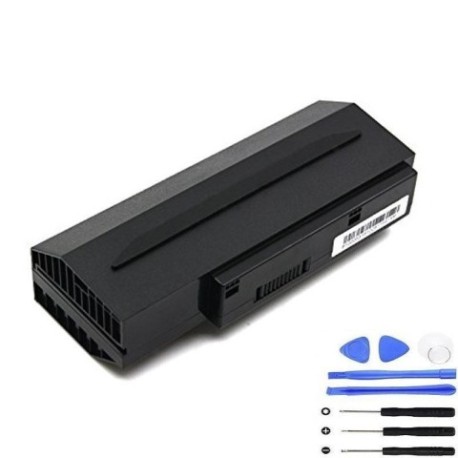
Battery models & part numbers
| Reference / P/N |
|---|
| 07G016DH1875 |
| 07G016HH1875 |
| 0B20-00PQ0AS |
| 70-NY81B1000Z |
| 90-NY81B1000Y |
| 90NY81B1000Y |
| Asus-A43-G73-74Wh |
Compatible models
| Model |
|---|
| Asus A43-G73 |
| Asus G53J |
| Asus G53JW |
| Asus G53SX |
| Asus G53SX-1A |
| Asus G73-52 |
| Asus G73JH |
| Asus G73JW |
| Asus G73L89 |
| Asus G73SW |
| Asus Lamborghini VX7 |
| Asus Lamborghini VX7S |
| Asus Lamborghini VX7SX |
| Asus VX7 |
| Asus VX7SX |
Introduction
Asus gaming laptops like the A43-G73 and G73 series are known for their powerful performance, but even the best machines need battery replacements eventually. The Asus A43 G73 74Wh battery is designed specifically for these high-performance models, providing reliable power for gaming, work, and entertainment. In Australia and New Zealand, where reliable technology is essential for both professional and personal use, having a properly functioning battery ensures you can work or play without interruption.
Common signs you need a replacement
| Symptom | Cause | Verification | Recommendation |
|---|---|---|---|
| Battery drains quickly (under 1 hour) | Ageing lithium-ion cells losing capacity | Check battery health in Windows Power Options | Replace battery if capacity below 60% |
| Laptop shuts down unexpectedly | Voltage drops below operating threshold | Monitor battery percentage during use | Immediate replacement recommended |
| Battery won’t charge to 100% | Charging circuit protection activated | Check charging status in system tray | Replace to restore full capacity |
| Battery swelling or overheating | Internal chemical degradation | Visual inspection and temperature check | Replace immediately for safety |
| Inconsistent battery percentage | Faulty battery management system | Compare reported vs actual runtime | Replace for accurate monitoring |
How to check compatibility
Before purchasing a replacement battery for your Asus laptop, it’s crucial to verify compatibility. Start by locating your laptop’s model number, typically found on the bottom case, under the battery compartment, or in the system information (press Windows Key + R, type “msinfo32”, and check System Model). For Asus gaming models like the G73 and VX7 series, you can also check the original battery for part numbers like 07G016DH1875 or 70-NY81B1000Z. The Asus support website offers compatibility checking tools where you can enter your serial number or model to verify battery requirements. Remember that physical dimensions matter too – the A43 G73 battery measures approximately 210mm x 50mm x 20mm and must fit your laptop’s battery bay properly.
When to replace
Replace your Asus battery when you notice consistent performance degradation, typically after 2-3 years of regular use or 300-500 charge cycles. Gaming laptops like the G73 series tend to experience faster battery wear due to high power demands during gaming sessions. If your battery health shows less than 60% of original capacity in Windows battery reports, or if you’re experiencing any safety concerns like swelling or overheating, replacement should be immediate. For AU/NZ users, consider replacing before the summer months when higher temperatures can accelerate battery degradation.
Installation guide
Replacing the battery in your Asus gaming laptop is straightforward with the right tools and precautions. First, ensure the laptop is powered off and disconnected from all power sources. For most Asus G73 and compatible models, you’ll need a Phillips #00 screwdriver. Remove the bottom panel screws (typically 10-12 screws) and carefully lift the panel. Locate the battery connector – it’s usually a white or black plug near the centre of the motherboard. Gently disconnect the battery by pulling the connector straight out, not by tugging on the wires. Remove any screws securing the battery (usually 2-4 screws) and lift the old battery out. Place the new Asus A43 G73 74Wh battery in position, secure with screws, reconnect the battery connector, replace the bottom panel, and power on. The entire process takes 15-20 minutes for most users.
Usage & care tips
To maximise your new battery’s lifespan, avoid extreme temperatures – don’t leave your laptop in hot cars or direct sunlight, especially during Australian summers. Ideal operating temperature is 10°C to 35°C. For gaming laptops like the G73 series, consider removing the battery during extended gaming sessions while connected to power, as continuous high temperatures during heavy gaming can accelerate battery degradation. Calibrate your new battery by charging to 100%, then discharging to about 10% before recharging – repeat this monthly for optimal performance. Avoid deep discharges below 10% regularly, and store your laptop with 40-60% charge if not using for extended periods.
Safety & recycling in AU/NZ
Battery safety is paramount. Never attempt to open, puncture, or modify lithium-ion batteries. If you notice swelling, leaking, or overheating, stop using immediately and contact professional disposal services. In Australia, used laptop batteries can be recycled through Batteryback.org.au or at designated collection points at Officeworks, Bunnings, and Aldi stores. In New Zealand, check with your local council for e-waste recycling programmes or use services like Computer Recycling Ltd. Proper recycling helps recover valuable materials and prevents environmental contamination. Always transport used batteries in their original packaging or insulated containers to prevent short circuits.
FAQ
How long does the Asus A43 G73 74Wh battery typically last?
With normal use, expect 2-3 years or 300-500 charge cycles before noticeable capacity loss. Gaming usage may shorten this timeframe.
Can I use this battery with newer Asus models?
No, this battery is specifically designed for the compatible models listed above. Using it with incompatible models may cause damage.
Is the battery genuine Asus or compatible?
This is a high-quality compatible battery meeting or exceeding original specifications, tested for safety and performance.
What warranty comes with the battery?
Most reputable suppliers offer 12-24 month warranties covering manufacturing defects and premature failure.
How do I know if my battery is charging properly?
Check the battery indicator light on your laptop – it should glow amber while charging and turn white when fully charged.
Can I replace the battery myself without voiding warranty?
For out-of-warranty laptops, self-replacement is fine. For in-warranty devices, check Asus policy as self-replacement may void coverage.
What should I do with my old battery?
Never dispose of in household waste. Use authorised recycling centres in AU/NZ as mentioned in the safety section.