ASUS A42N1608 71Wh Laptop Battery Replacement Guide
If you’re experiencing battery issues with your ASUS laptop, you’ve come to the right place. This comprehensive guide covers everything Australian and New Zealand consumers need to know about replacing their ASUS A42N1608 71Wh battery, including compatible models, installation instructions, and local safety standards.
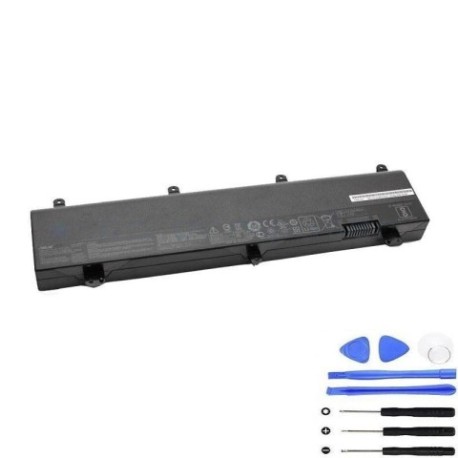
Battery models & part numbers
| Reference / P/N |
|---|
| 0B110-00460000 |
| A42Li5H |
| A42N1608 |
| Asus-A42N1608-71Wh |
| G800VI |
| GX800V |
| GX800VH |
| ROG G800VI |
| ROG GX800VH |
| ROG GX800VHK |
| U5800GE |
| X Pro U5800GE |
| ZenBook Pro 15 U5800GE |
Compatible models
| Model |
|---|
| Asus 0B110-00460000 |
| Asus A42Li5H |
| Asus A42N1608 |
| Asus G800VI |
| Asus GX800V |
| Asus GX800VH |
| Asus ROG G800VI |
| Asus ROG GX800VH |
| Asus ROG GX800VHK |
| Asus U5800GE |
| Asus X Pro U5800GE |
| Asus ZenBook Pro 15 U5800GE |
Introduction
Laptop batteries are consumable components with a finite lifespan, typically lasting 2-4 years with regular use. The ASUS A42N1608 71Wh battery serves multiple high-performance ASUS models, including ROG gaming laptops and ZenBook Pro devices. Understanding when and how to replace your battery can save you from unexpected downtime and maintain your laptop’s optimal performance.
Common signs you need a replacement
| Symptom | Cause | Verification | Recommendation |
|---|---|---|---|
| Reduced battery life | Natural degradation of lithium-ion cells | Check battery health in Windows Power Settings | Replace if capacity drops below 60% |
| Laptop shuts down unexpectedly | Voltage drops under load | Monitor during intensive tasks | Immediate replacement recommended |
| Battery not charging fully | Charging circuit or cell failure | Check charging percentage in system tray | Replace battery and check charger |
| Physical swelling or bulging | Gas buildup from cell degradation | Visual inspection of battery compartment | Replace immediately – safety hazard |
| Overheating during charging | Internal resistance increase | Monitor temperature with software | Replace to prevent damage to laptop |
How to check compatibility
Finding your exact laptop model is crucial for battery compatibility. For ASUS devices, check the bottom case for a model number sticker, typically near the serial number and regulatory information. You can also find this information in Windows by pressing Windows Key + R, typing “msinfo32”, and looking under “System Model”. ASUS provides official support tools on their website where you can enter your serial number to verify compatible parts. The A42N1608 battery specifically fits the models listed in our compatibility table, covering ROG gaming series and ZenBook Pro models with similar power requirements.
When to replace
Replace your ASUS battery when you notice consistent performance degradation, typically when your laptop lasts less than an hour on battery power or shows warning signs in the operating system. Most ASUS laptops will display battery health warnings when capacity drops significantly. For gaming laptops like the ROG series, consider replacement sooner as high-performance components drain batteries faster. If your laptop is over three years old and you rely on portable use, proactive replacement can prevent unexpected failures.
Installation guide
Replacing the battery in compatible ASUS models requires careful handling. First, power off your laptop and disconnect all cables. For most ASUS laptops, you’ll need to remove the bottom panel using a Phillips screwdriver. Locate the battery connector – it’s typically a multi-pin connector near the centre of the motherboard. Gently disconnect the old battery by pulling the connector straight out, not by tugging on the wires. Remove any screws securing the battery and lift it out. Install the new A42N1608 battery in reverse order, ensuring all connections are secure. For ROG models with more complex cooling systems, take extra care around thermal components.
Usage & care tips
Maximise your new battery’s lifespan with proper care. Avoid frequent full discharges – lithium-ion batteries prefer partial discharges between 20-80%. Don’t leave your laptop plugged in constantly at 100% charge, as this stresses the battery. Store your laptop in temperatures between 10°C and 35°C for optimal battery health. If storing long-term, charge to about 50% and power off completely. For gaming laptops like the ROG series, use performance modes sparingly on battery power to extend runtime.
Safety & recycling in AU/NZ
Battery safety is regulated under Australian and New Zealand consumer protection laws. Never attempt to open or modify lithium-ion batteries, as this can cause thermal runaway and fire. Damaged or swollen batteries should be handled with care and recycled immediately. In Australia, use Batteryback.org.au to find your nearest battery recycling drop-off point. In New Zealand, check with your local council for e-waste recycling facilities. Many electronics retailers like Officeworks and JB Hi-Fi offer free battery recycling services. Proper disposal helps protect our environment and complies with local regulations.
FAQ
How long does the A42N1608 battery typically last?
With normal use, expect 2-4 years or 500-800 charge cycles before significant capacity loss.
Will replacing my battery void my ASUS warranty?
In Australia and New Zealand, consumer law protects your right to use compatible replacement parts, but check your specific warranty terms.
Can I use this battery if my original had different specifications?
Only if your laptop model is listed in our compatibility table. Using incompatible batteries can damage your device.
How do I calibrate my new battery?
Charge to 100%, use until it shuts down, then charge uninterrupted to 100% again. Repeat monthly for accurate readings.
What’s the difference between OEM and compatible batteries?
OEM batteries come from ASUS, while compatible ones meet specifications but may have different warranties.
Is installation difficult for beginners?
Most ASUS models have user-replaceable batteries, but if unsure, seek professional help from authorised service centres.
Can I recycle my old battery with household waste?
No – lithium-ion batteries must be recycled separately through designated e-waste programs.