Asus A42 M70 73Wh Laptop Battery Replacement Guide
If your Asus laptop is struggling to hold a charge or won’t power on without being plugged in, you’ve come to the right place. This comprehensive guide covers everything Australian and New Zealand consumers need to know about replacing their Asus laptop battery with the genuine A42 M70 73Wh model.
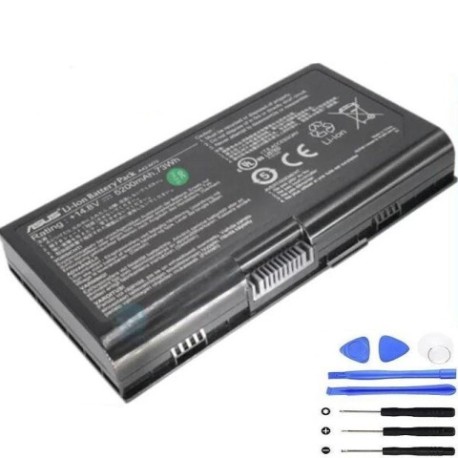
Battery models & part numbers
| Reference / P/N |
|---|
| Asus-A42-M70-73Wh |
Compatible models
| Model |
|---|
| Asus 07G016541875M |
| Asus 07G0165A1875 |
| Asus 07G0165E1875 |
| Asus 07G016WQ1865 |
| Asus 0B20-00BX000M |
| Asus 0B20-00BX0ASM |
| Asus 15G10-04EP000 |
| Asus 15G10N3792T0 |
| Asus 15G10N3792Y0 |
| Asus 15G10N3792YO |
| Asus 70-NFU1B1000Z |
| Asus 70-NFU1B1100Z |
| Asus 70-NFU1B1300Z |
| Asus 70-NSQ1B1100PZ |
| Asus 70-NSQ1B1100Z |
| Asus 70-NSQ1B1200PZ |
| Asus 70-NSQ1B1200Z |
| Asus 70-NU51B1000Z |
| Asus 70-NU51B2100PZ |
| Asus 70-NU51B2100Z |
| Asus 90-NFU1B1000Y |
| Asus 90R-NTC2B1000Y |
| Asus A32-F70 |
| Asus A32-M70 |
| Asus A32-N70 |
| Asus A41-M70 |
| Asus ASM70144-PBT |
| Asus F70SL |
| Asus F70SL-TY065C |
| Asus F70SL-TY066C |
| Asus F70SL-TY076C |
| Asus F70SL-TY128C |
| Asus F70SL-TY129C |
| Asus F70SL-TY149E |
| Asus G71G |
| Asus G71G-1B |
| Asus G71G-A1 |
| Asus G71G-A2 |
| Asus G71GX |
| Asus G71GX-1C |
| Asus G71GX-1E |
| Asus G71GX-7S008K |
| Asus G71GX-7S018K |
| Asus G71GX-7S022K |
| Asus G71GX-7S023K |
| Asus G71GX-7S042K |
| Asus G71GX-7S050K |
| Asus G71V |
| Asus G71V-1A |
| Asus G71V-1B |
| Asus G71V-7S033C |
| Asus G71V-7S036C |
| Asus G71V-7S122K |
| Asus G71V-7T025C |
| Asus G71V-7T032G |
| Asus G71V-7T043G |
| Asus G72GX |
| Asus G72GX-1A |
| Asus G72GX-TY009V |
| Asus G72GX-TY011V |
| Asus G72GX-TY013V |
| Asus G72GX-TY014V |
| Asus L0690LC |
| Asus L082036 |
| Asus L0890E6 |
| Asus M70L896 |
| Asus M70SA |
| Asus M70SA-1A |
| Asus M70SA-7U011C |
| Asus M70SA-7U088C |
| Asus M70SR |
| Asus M70SV |
| Asus M70VM |
| Asus M70VM-1A |
| Asus M70VM-7S048C |
| Asus M70VM-7U047C |
| Asus M70VN |
| Asus M70VN-1A |
| Asus M70VN-1B |
| Asus M70VN-7S066C |
| Asus M70VN-7S067C |
| Asus M70VN-7T068C |
| Asus M70VR |
| Asus M70VR-1A |
| Asus M70VR-7S015C |
| Asus M70VR-7S022C |
| Asus M70VR-7S044C |
| Asus M70VR-7U021C |
| Asus N70 |
| Asus N70SV |
| Asus N70SV-1A |
| Asus N70SV-1G |
| Asus N70SV-TY043C |
| Asus N70SV-TY081C |
| Asus N70SV-TY127C |
| Asus N70SV-X1 |
| Asus N90 |
| Asus N90SC-1A |
| Asus N90SC-UZ008V |
| Asus N90SC-UZ024V |
| Asus N90SV-1A |
| Asus N90SV-UZ022C |
| Asus N90SV-UZ058C |
| Asus N90SV-UZ102C |
| Asus N90SV-X1 |
| Asus P0004440 |
| Asus Pro72Q |
| Asus Pro72Q-7S029E |
| Asus Pro72S |
| Asus Pro72VN |
| Asus Pro72VN-7S030C |
| Asus Pro73VN |
| Asus Pro73VN-7S077C |
| Asus Pro76SL |
| Asus Pro76SL-TY037C |
| Asus Pro76SL-TY043C |
| Asus Pro77SV |
| Asus Retail-M70SR-1A |
| Asus Retail-M70SR-2F |
| Asus X71 |
| Asus X71A |
| Asus X71A-2H |
| Asus X71A-7D007C |
| Asus X71A-7S007C |
| Asus X71A-7S01C |
| Asus X71A-7S031E |
| Asus X71Q |
| Asus X71Q-2H |
| Asus X71Q-7S003e |
| Asus X71Q-7S052e |
| Asus X71Q-7S059C |
| Asus X71Q-7S066C |
| Asus X71Q-7S092C |
| Asus X71SL |
| Asus X71SL-2H |
| Asus X71SL-7S096C |
| Asus X71SL-7S109C |
| Asus X71SL-7S188C |
| Asus X71SR |
| Asus X71SR-2F |
| Asus X71SR-7S043C |
| Asus X71SR-7S046C |
| Asus X71T |
| Asus X71TL |
| Asus X71TL-2H |
| Asus X71TL-7S002C |
| Asus X71TL-7S004C |
| Asus X71TL-7S011C |
| Asus X71TL-7S013C |
| Asus X71TL-7S0228C |
| Asus X71TL-7S022C |
| Asus X71TL-7S036C |
| Asus X71TP |
| Asus X71TP-2H |
| Asus X71TP-7S015C |
| Asus X71V |
| Asus X71VN |
| Asus X71VN-2H |
| Asus X71VN-7S009C |
| Asus X71VN-7S010C |
| Asus X71VN-7S051C |
| Asus X71VN-7S057C |
| Asus X72T |
| Asus X72TL |
| Asus X72TL-7S002C |
| Asus X72V |
| Asus X72VN |
| Asus X72VN-7S051C |
| Asus X72VN-7S116C |
| Asus X72VN-7T088C |
| Asus X73SL |
| Asus X73SL-TY030C |
| Asus X73SL-TY031C |
| Asus X73SL-TY042C |
| Asus X75S |
| Asus X75SV |
| Asus X75SV-TY091C |
| Asus X90S |
| Asus X90SV |
| Asus X90SV-UZ056C |
Common Signs You Need a Replacement Battery
| Symptom | Cause | Verification | Recommendation |
|---|---|---|---|
| Battery drains quickly (under 1 hour) | Reduced capacity from age/cycles | Check Windows battery report | Replace if capacity below 60% |
| Laptop won’t power on without charger | Battery no longer holds charge | Remove charger, try to power on | Immediate replacement needed |
| Battery percentage jumps erratically | Faulty battery management system | Monitor percentage changes | Replace to prevent damage |
| Battery swelling or bulging | Gas buildup from degradation | Visual inspection of battery | Replace immediately – safety risk |
| Overheating during charging | Internal resistance increased | Feel battery temperature | Replace to prevent damage |
How to Check Compatibility
Finding your exact Asus model number is crucial for compatibility. Check these locations:
- Bottom sticker: Look for the model number on the bottom case label
- Under battery: Remove the battery to find the model printed underneath
- System Information: Press Windows Key + R, type “msinfo32” and check System Model
- Command Prompt: Open cmd and type “wmic csproduct get name”
For Asus laptops in the M70, G71, G72, X71, and X72 series, cross-reference your model with our comprehensive compatibility table above. The A42-M70-73Wh battery is specifically designed for these models and providesoptimal performance and safety.
When to Replace Your Asus Battery
Most Asus batteries last 2-3 years with regular use. Consider replacement when:
- Battery capacity drops below 60% of original
- You experience any of the warning signs mentioned above
- The battery is over 3 years old, even if performance seems adequate
- You notice reduced performance during demanding tasks
For Australian and New Zealand consumers, it’s recommended to replace before the battery completely fails to avoid unexpected downtime.
Installation Guide
Replacing your Asus battery is straightforward. Follow these steps for safe installation:
- Power down completely: Shut down your laptop and disconnect the AC adapter
- Ground yourself: Touch a metal object to discharge static electricity
- Remove old battery: Slide the battery release latch and carefully lift out the old battery
- Clean contacts: Use a dry cloth to clean the battery compartment contacts
- Insert new battery: Align the new A42-M70-73Wh battery and press firmly until it clicks
- Initial charge: Connect the AC adapter and charge for at least 4 hours before first use
Note: Some Asus models may require removing screws to access the battery compartment. Refer to your specific model’s service manual if unsure.
Usage & Care Tips
Extend your new battery’s lifespan with these practices:
- Avoid extreme temperatures: Don’t leave your laptop in cars or direct sunlight (ideal range: 15-25°C)
- Partial discharges: Avoid frequently draining to 0% – aim for 20-80% range for daily use
- Calibrate monthly: Fully discharge then recharge to 100% to maintain accurate battery readings
- Storage: If storing long-term, charge to 50% and store in a cool, dry place
- Update drivers: Keep your Asus power management drivers current for optimal performance
Safety & Recycling in AU/NZ
Safety First: Never attempt to open or puncture a lithium-ion battery. If you notice swelling, overheating, or damage, discontinue use immediately and contact a professional.
Australian Recycling: In Australia, used batteries can be recycled through Battery World stores, council recycling centres, or programs like B-cycle. Many office supply stores also accept old batteries.
New Zealand Recycling: In NZ, take used batteries to designated collection points at recycling centres, some retailers, or through the Reclaim programme. Never dispose of batteries in household waste.
Frequently Asked Questions
How long does the A42-M70-73Wh battery last on a single charge?
With normal use (web browsing, document editing), expect 3-5 hours. Gaming or intensive tasks will reduce this to 1-2 hours. Actual runtime depends on your specific model and usage patterns.
Is this battery genuine Asus quality?
Yes, the A42-M70-73Wh is an original specification replacement battery designed to meet Asus’s strict quality standards and ensure compatibility with your device.
My model isn’t in the compatibility list – will it work?
Only use this battery with models explicitly listed. Using incompatible batteries can damage your laptop and void warranties. Double-check your model number carefully.
How do I know if my battery is charging properly?
The battery indicator light should illuminate when connected to power. In Windows, check the battery icon in the system tray. A healthy battery should reach 100% within 2-4 hours.
What warranty comes with this battery?
Genuine replacement batteries typically include a 12-month warranty. Check with your supplier for specific warranty terms and conditions.
Can I use my laptop while charging the new battery?
Yes, you can use your laptop while the new battery charges. Modern laptops are designed to handle simultaneous use and charging safely.
How should I dispose of my old Asus battery?
Never throw lithium-ion batteries in household waste. Use the recycling options mentioned in the Safety & Recycling section above to dispose of your old battery responsibly.
Restore your Asus laptop’s mobility and performance with the genuine A42-M70-73Wh replacement battery. With proper installation and care, you’ll enjoy reliable power for your computing needs across Australia and New Zealand.