ASUS A42-G74-75Wh Laptop Battery Replacement Guide
When your ASUS ROG gaming laptop starts losing power faster than expected, it’s likely time for a battery replacement. Our comprehensive guide covers everything Australian and New Zealand users need to know about the A42-G74-75Wh battery, including compatible models, installation steps, and local recycling options.
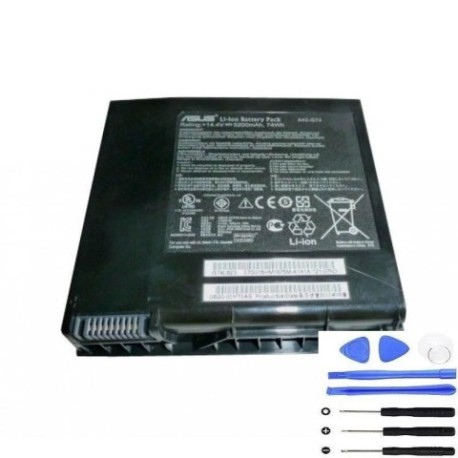
Battery models & part numbers
| Reference / P/N |
|---|
| Asus-A42-G74-75Wh |
Compatible models
| Model |
|---|
| Asus 07G016HM1875 |
| Asus 0B2000YT0AS |
| Asus 0B20-00YT0AS |
| Asus G74L823 |
| Asus LC42SD128 |
| Asus ROG G74SX |
| Asus ROG G74SX-91079V |
| Asus ROG G74SX-91093V |
| Asus ROG G74SX-91111V |
| Asus ROG G74SX-91131Z |
| Asus ROG G74SX-91261V |
| Asus ROG G74SX-91266V |
| Asus ROG G74SX-91333V |
| Asus ROG G74SX-91345V |
| Asus ROG G74SX-91354V |
| Asus ROG G74SX-91370V |
| Asus ROG G74SX-TZ024V |
| Asus ROG G74SX-TZ025V |
| Asus ROG G74SX-TZ055V |
| Asus ROG G74SX-TZ078V |
| Asus ROG G74SX-TZ097V |
| Asus ROG G74SX-TZ122V |
| Asus ROG G74SX-TZ136V |
| Asus ROG G74SX-TZ211V |
| Asus ROG G74SX-TZ227V |
| Asus ROG G74SX-TZ257V |
| Asus ROG G74SX-TZ289V |
| Asus ROG G74SX-TZ290V |
| Asus ROG G74SX-TZ293V |
| Asus ROG G74SX-TZ303V |
| Asus ROG G74SX-TZ344V |
| Asus ROG G74SX-TZ372V |
Introduction
The ASUS A42-G74-75Wh battery is specifically designed for ROG G74SX gaming laptops and compatible models. These high-performance machines demand reliable power sources, and when the original battery begins to fail, finding the right replacement becomes crucial for maintaining your gaming experience.
Common signs you need a replacement
| Symptom | Cause | Verification | Recommendation |
|---|---|---|---|
| Reduced battery life | Natural degradation over 300-500 cycles | Check power settings and run battery report | Consider replacement if under 50% original capacity |
| Laptop shuts down unexpectedly | Voltage drops under load | Monitor during gaming sessions | Immediate replacement recommended |
| Battery not charging fully | Cell imbalance or BMS issues | Check charging percentage in Windows | Replace if stuck below 80% capacity |
| Physical swelling or bulging | Gas buildup from chemical reactions | Visual inspection of battery compartment | Stop using immediately and replace |
| Overheating during use | Increased internal resistance | Monitor temperatures with HWMonitor | Replace to prevent damage to other components |
How to check compatibility
Finding your exact ASUS model number is straightforward. Check the bottom label of your laptop – it should display the complete model identifier. For ROG G74SX variants, the model typically starts with “ASUS ROG G74SX” followed by specific alphanumeric codes. You can also find this information in Windows by pressing Windows Key + R, typing “msinfo32”, and checking the System Model field. ASUS Australia’s support centre website offers compatibility checking tools where you can enter your serial number to verify battery requirements.
When to replace
Most ASUS gaming laptop batteries last 2-3 years with regular use. If you’re experiencing significant performance drops during gaming sessions or your laptop can’t hold charge for more than an hour of light use, it’s time for replacement. Australian summers can accelerate battery degradation due to higher ambient temperatures, so monitor your battery health more frequently during warmer months.
Installation guide
Replacing the battery in your ASUS ROG G74SX requires careful handling. First, ensure the laptop is completely powered off and disconnected from any power source. Flip the laptop over and locate the battery compartment – most G74SX models have an easily accessible battery bay. Remove the screws securing the battery cover (typically Phillips #1), then gently disconnect the battery connector from the motherboard. The A42-G74-75Wh uses a standard connector that should click into place securely. Avoid using excessive force during installation.
Usage & care tips
To maximise your new battery’s lifespan, avoid consistently draining it to 0%. For gaming laptops, it’s best to keep the battery between 20-80% when possible. Australian users should be particularly mindful of heat management – never leave your laptop in direct sunlight or in hot vehicles. The optimal operating temperature for lithium-ion batteries is between 10°C and 35°C. If you primarily use your laptop plugged in, consider setting a charge limit in ASUS Battery Health Charging software to preserve battery health.
Safety & recycling in AU/NZ
In Australia and New Zealand, lithium-ion batteries must be recycled properly through authorised collection points. Never dispose of laptop batteries in household waste. Major retailers like Officeworks and JB Hi-Fi offer free battery recycling services. In New Zealand, check with your local council for approved battery recycling facilities. Damaged or swollen batteries should be handled with extreme care – place them in a fire-proof container and take to a specialist recycling centre immediately.
FAQ
How long does the A42-G74-75Wh battery typically last?
With normal use, expect 2-3 years of reliable performance. Gaming sessions and high-performance applications will naturally reduce overall lifespan.
Will this battery work with all ROG G74SX models?
Yes, the A42-G74-75Wh is compatible with all variants listed in our compatibility table, including the numerous TZ and 91-series models.
How do I calibrate my new battery?
Charge to 100%, use until it shuts down naturally, then charge uninterrupted to 100% again. Repeat this process every 2-3 months.
Is installation difficult for beginners?
The process is straightforward with basic tools, but if you’re uncomfortable, consider seeking professional assistance from an authorised ASUS service centre.
What warranty comes with this battery?
Most reputable suppliers offer 12-month warranties, though terms may vary between Australian and New Zealand retailers.
Can I use my laptop while charging the new battery?
Yes, modern laptops are designed for simultaneous use and charging without damaging the battery.
How do I dispose of my old battery in Australia?
Take it to any B-cycle participating drop-off point, available at most major electronics retailers nationwide.