Asus A41N1424 48Wh Battery Replacement Guide for Australian & New Zealand Users
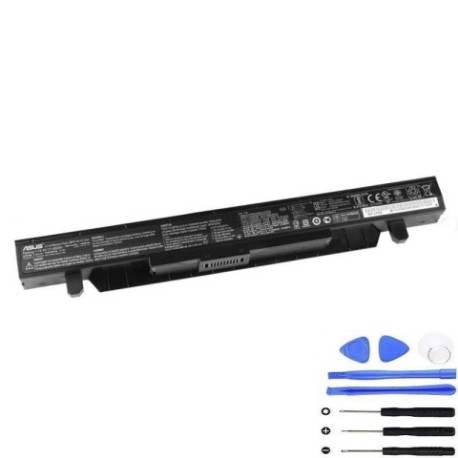
Battery models & part numbers
| Reference / P/N |
|---|
| 0B110-00231100 |
| 0B110-00231100M |
| 0B110-00350000 |
| Asus-A41N1424-48Wh |
Compatible models
| Model |
|---|
| Asus GL552JX |
| Asus GL552VL |
| Asus GL552VW |
| Asus GL552VX |
| Asus ROG GL552JX |
| Asus X55LM2H |
Introduction
If you’re an Asus laptop user in Australia or New Zealand experiencing battery issues with your GL552 series or X55LM2H model, you’ve come to the right place. The Asus A41N1424 48Wh battery is the genuine replacement solution that restores your laptop’s mobility and performance. This comprehensive guide will walk you through everything from recognising when you need a replacement to installation and proper care, specifically tailored for AU/NZ conditions and regulations.
Common signs you need a replacement
| Symptoms | Causes | Verification | Recommendation |
|---|---|---|---|
| Battery drains quickly (under 1 hour) | Ageing cells, reduced capacity | Check battery health in Windows | Replace if capacity below 60% |
| Laptop won’t hold charge | Failed battery circuitry | Test with power adapter removed | Immediate replacement needed |
| Battery swelling or bulging | Gas buildup from degradation | Visual inspection, uneven surfaces | Stop using immediately – safety risk |
| Overheating during charging | Internal short circuits | Monitor temperature with software | Replace to prevent damage |
| Inaccurate battery percentage | Faulty battery management system | Compare reported vs actual runtime | Replace for reliable usage |
How to check compatibility
Before purchasing any replacement battery for your Asus laptop, proper compatibility verification is essential. For GL552 series and X55LM2H owners, start by locating your laptop’s model information. Turn your laptop over and look for the white sticker near the battery compartment – you should see text like “GL552JX” or “X55LM2H” clearly printed. You can also check within Windows by pressing Windows Key + R, typing “msinfo32” and looking under “System Model”.
For Asus laptops specifically, the company provides excellent support resources. Visit the official Asus support website and enter your serial number or model to access detailed specifications. The A41N1424-48Wh battery is designed to be cross-compatible with multiple part numbers including 0B110-00231100, 0B110-00231100M, and 0B110-00350000, making it a versatile replacement option.
If you’re uncertain, contact Asus Australia or New Zealand support centres – they can verify compatibility based on your specific device’s manufacturing details. Remember that using incompatible batteries can damage your laptop’s charging circuitry and potentially void your warranty.
When to replace
Timing your battery replacement correctly ensures you get maximum value from your investment while maintaining laptop safety. For Asus GL552 and X55LM2H models, consider replacement when:
- Your battery lasts less than 60 minutes on a full charge
- The battery health report shows capacity below 50% of original
- Your laptop is 2-3 years old with regular daily use
- You notice physical swelling or deformation
- The battery no longer charges to 100% despite calibration attempts
- You experience sudden shutdowns even with reported charge remaining
In Australia’s varied climate conditions, from humid Queensland to dry South Australia, battery degradation can accelerate. The A41N1424-48Wh is specifically engineered to handle AU/NZ temperature ranges from 5°C to 35°C optimally.
Installation guide
Replacing the battery in your Asus GL552 or X55LM2H is straightforward with proper preparation. Begin by powering down your laptop completely and disconnecting the AC adapter. Place your laptop on a clean, static-free surface – an anti-static mat is ideal but a wooden table works fine.
Locate the battery release latches on the bottom of your laptop. For most GL552 models, you’ll find two sliding locks near the battery compartment. Slide both to the unlock position simultaneously. The battery should pop up slightly, allowing you to lift it out gently. Avoid using excessive force as this could damage the connector pins.
Take your new A41N1424-48Wh battery and align the connector carefully with the laptop’s socket. The connector is keyed to prevent incorrect insertion. Press firmly until you hear a click, indicating proper seating. Close the retention locks to secure the battery in place.
Before powering on, connect your AC adapter and allow the battery to charge for at least 30 minutes. This initial charge helps calibrate the battery management system. Once complete, power on your laptop and check the battery status in Windows to confirm proper recognition.
Usage & care tips
Maximising your new A41N1424-48Wh battery’s lifespan requires proper usage habits. Avoid frequent full discharges – lithium-ion batteries prefer partial discharges between 20-80%. For daily office use in Australian conditions, consider setting charge thresholds if your laptop supports this feature through Asus power management software.
Temperature management is crucial in our climate. Never leave your laptop in a hot car or direct sunlight, as temperatures above 45°C can permanently damage battery cells. Similarly, avoid using your laptop in very cold conditions below 5°C as this temporarily reduces capacity.
If you primarily use your laptop plugged in, consider removing the battery once charged to 60% and storing it in a cool, dry place. This practice is particularly beneficial for users in warmer regions like Northern Territory or Queensland where ambient temperatures can accelerate battery ageing.
Calibrate your battery monthly by allowing a full discharge followed by an uninterrupted charge cycle. This helps maintain accurate battery percentage reporting and extends overall service life.
Safety & recycling in AU/NZ
Battery safety is paramount, especially with lithium-ion technology. Never attempt to disassemble or puncture your A41N1424-48Wh battery. If you notice any swelling, overheating, or unusual odours, immediately power down your laptop, disconnect from power, and contact Asus support or a qualified technician.
In Australia, battery recycling is managed through the B-cycle program. Used laptop batteries should never go in household rubbish bins. Most Officeworks stores, Australia Post offices, and council waste facilities accept batteries for free recycling. In New Zealand, check with your local council for e-waste collection services or visit specialised recycling centres.
When transporting spare batteries, ensure terminals are protected from short circuits by covering them with insulating tape or keeping batteries in original packaging. Airlines have specific regulations for spare lithium batteries in carry-on luggage – always check with your carrier before travel.
FAQ
How long does the A41N1424-48Wh battery typically last?
With normal usage, expect 2-3 years of reliable performance. Heavy users might see reduced lifespan, while occasional users could get 4+ years. The 48Wh capacity provides approximately 3-5 hours of typical usage depending on screen brightness and applications running.
Will this battery work with my Asus GL552VW purchased in New Zealand?
Yes, the A41N1424-48Wh is fully compatible with all regional variants of the GL552 series, including those sold in New Zealand. The battery specifications are standardised globally for these models.
How do I know if my battery is genuine Asus?
Genuine Asus batteries feature precise moulding, clear laser-etched labelling, and proper packaging with holographic security seals. Purchase from authorised Asus retailers in Australia or New Zealand to guarantee authenticity.
Can I use my laptop while the new battery is charging for the first time?
Yes, modern lithium-ion batteries don’t require special initial charging procedures. However, for optimal calibration, we recommend allowing a full charge cycle without interruption when first installed.
What should I do with my old Asus battery?
Never dispose of lithium-ion batteries in household waste. Use Australia’s B-cycle program or New Zealand’s e-waste recycling services. Many computer retailers also accept old batteries for proper recycling.
Why does my battery percentage sometimes jump suddenly?
This is usually calibration-related. Perform a full discharge/charge cycle to recalibrate the battery management system. If issues persist after replacement, consult Asus support as it could indicate motherboard issues.
Is it safe to leave my laptop plugged in constantly with the new battery?
While modern batteries have protection circuits, continuous charging at 100% can slightly reduce long-term lifespan. For stationary use, consider charging to 80% and using AC power, or removing the battery entirely if you won’t need mobility.
Restoring your Asus laptop’s mobility with a genuine A41N1424-48Wh battery means regaining the freedom to work or play anywhere. With proper installation and care, your replacement battery will provide reliable performance through Australian summers and New Zealand winters alike. Trust in Asus quality and enjoy renewed laptop productivity.