Asus A33N1332 87Wh Laptop Battery Replacement Guide
If your Asus laptop is struggling to hold charge or showing battery warning signs, our comprehensive guide helps Australian and New Zealand users find the right replacement battery and installation support.
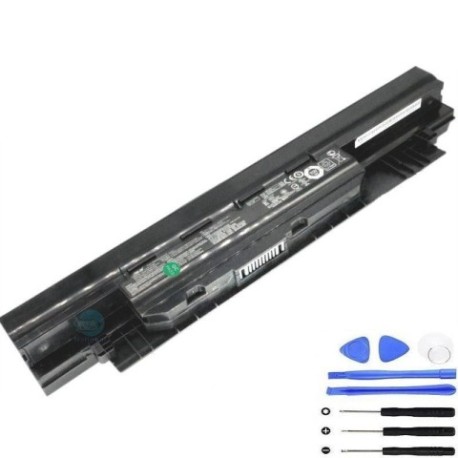
Battery models & part numbers
| Reference / P/N |
|---|
| Asus-A33N1332-87Wh |
Compatible models
| Model |
|---|
| Asus 450CA |
| Asus 450CD |
| Asus 450V |
| Asus 450VB |
| Asus A32N1331 |
| Asus E451 |
| Asus E451L |
| Asus E451LA |
| Asus E451LD |
| Asus E551 |
| Asus E551J |
| Asus E551JA |
| Asus E551JD |
| Asus E551JF |
| Asus E551JH |
| Asus E551L |
| Asus E551LA |
| Asus E551LD |
| Asus E551LG |
| Asus P2420LJ |
| Asus P2428U |
| Asus P2438U |
| Asus P2440UA |
| Asus P2528L |
| Asus P2540FB |
| Asus P2540NV |
| Asus P2540UA |
| Asus P2540UB |
| Asus P2540UV |
| Asus PRO450 |
| Asus PRO450C |
| Asus PRO450CD |
| Asus PRO450V |
| Asus PRO450VB |
| Asus PU450 |
| Asus PU450C |
| Asus PU450CD |
| Asus PU450V |
| Asus PU450VB |
| Asus PU451 |
| Asus PU451J |
| Asus PU451JF |
| Asus PU451JH |
| Asus PU451L |
| Asus PU451LA |
| Asus PU451LD |
| Asus PU550 |
| Asus PU550C |
| Asus PU550CA |
| Asus PU550CC |
| Asus PU551 |
| Asus PU551J |
| Asus PU551JA |
| Asus PU551JD |
| Asus PU551JF |
| Asus PU551JH |
| Asus PU551L |
| Asus PU551LA |
| Asus PU551LD |
Introduction
Laptop batteries naturally degrade over time, and when your Asus laptop starts showing signs of battery fatigue, it can disrupt your work and productivity. The Asus A33N1332 87Wh battery serves numerous Asus business and consumer laptop models across the 400, E, P, and PRO series. Understanding when to replace your battery and how to choose the correct replacement can save you time and money while extending your laptop’s useful life.
Common signs you need a replacement
| Symptom | Cause | Verification | Recommendation |
|---|---|---|---|
| Rapid discharge (less than 1 hour) | Battery cell degradation | Check battery health in Windows Power Report | Replace if capacity below 60% |
| Laptop won’t power on without charger | Dead battery cells | Remove charger – if laptop turns off immediately | Immediate replacement needed |
| Battery swelling or bulging | Gas buildup from chemical reactions | Visual inspection of battery compartment | Replace immediately – safety hazard |
| Overheating during charging | Internal resistance increase | Touch test – battery feels unusually hot | Replace to prevent damage |
| Inconsistent charge percentage | Faulty battery management system | Monitor charge level fluctuations | Replace for reliable performance |
How to check compatibility
Before purchasing any replacement battery, verifying compatibility is crucial. For Asus laptops, start by locating your model number on the bottom casing or under the battery compartment. The model number typically appears as something like “ASUS P2540UA” or “ASUS E551LA”. Cross-reference this number with our compatibility table above. You can also check your original battery’s part number – it should match “A33N1332” for 87Wh capacity. Asus provides official support documentation on their website where you can enter your serial number to verify compatible parts. Many Australian computer repair centres offer free compatibility checks if you’re uncertain.
When to replace
Most laptop batteries last 2-4 years with regular use. Consider replacement when your battery capacity drops below 70% of its original specification, when you experience sudden shutdowns, or if your laptop becomes unreliable for mobile use. For business users with Asus PRO or P series models, proactive replacement at the 2-year mark can prevent unexpected downtime during important presentations or meetings.
Installation guide
Replacing the battery in compatible Asus models is generally straightforward. First, ensure your laptop is powered off and disconnected from any power source. For most models in the compatibility list, the battery is externally accessible – simply slide the locking mechanisms and remove the old battery. Align the new A33N1332 battery with the connectors, ensuring proper orientation, then slide it into place until it clicks. Some PRO series models may require removing a few screws from the battery compartment. After installation, connect your charger and allow the battery to charge fully before first use. The initial charge may take several hours as the battery management system calibrates.
Usage & care tips
To maximise your new battery’s lifespan, avoid consistently draining it to 0%. Instead, try to keep it between 20-80% for daily use. Lithium-ion batteries perform best at room temperature (around 20-25°C) – avoid leaving your laptop in hot cars or direct sunlight. If you primarily use your laptop plugged in, consider setting a maximum charge limit to 60% in your power settings if available, or occasionally run on battery power to keep the cells active. For Asus business models used in office environments, a monthly full discharge and recharge cycle can help calibrate the battery indicator.Safety & recycling in AU/NZ
Battery safety is paramount. Never attempt to open, puncture, or modify your laptop battery. If you notice any swelling, overheating, or unusual odours, discontinue use immediately and contact a professional. In Australia and New Zealand, never dispose of lithium-ion batteries in household rubbish. Most council transfer stations and many electronics retailers offer free battery recycling services. Programs like ‘Bcycle’ in Australia and ‘e-waste’ collections at Mitre 10 and Bunnings in NZ ensure proper disposal. Always tape the battery terminals before recycling to prevent short circuits.
FAQ
How long does the Asus A33N1332 87Wh battery typically last on a full charge?
Depending on your specific model and usage (screen brightness, applications running), the 87Wh capacity should provide 5-8 hours of typical use. Power-saving modes can extend this further.
Is this battery compatible with my Asus laptop if it’s not explicitly listed?
Always check your original battery’s part number. While our list is comprehensive, some regional variants may use different model numbers. The physical dimensions and connector type must match.
Does this replacement battery come with a warranty?
Yes, reputable suppliers typically offer at least 12 months warranty. Check the product page for specific warranty details applicable to Australian and New Zealand consumers.
How can I verify this is a genuine Asus battery and not a counterfeit?
Purchase from authorised resellers, check for proper branding and serial numbers, and verify the weight and build quality match original specifications. Genuine batteries will have precise fitment without modification.
My laptop shows ‘plugged in, not charging’ with the new battery – what should I do?
This is often a calibration issue. Try a full power cycle: shut down, remove charger and battery, hold power button for 30 seconds, then reassemble and reconnect power. If persistent, check for BIOS updates from Asus.
Can I use a higher capacity battery than the original?
Only if it’s specifically designed as compatible. Higher capacity batteries may have different physical dimensions or voltage requirements that could damage your laptop.
Where can I get professional installation help in Australia or New Zealand?
Most computer repair stores and authorised Asus service centres can perform battery replacements. Many offer same-day service for simple external battery replacements on compatible models.