Asus A32-K93-56Wh Battery Replacement: Complete Guide for Australian & New Zealand Users
If your Asus laptop is struggling to hold a charge or showing battery warning signs, you’ve come to the right place. This comprehensive guide covers everything Australian and New Zealand consumers need to know about the Asus A32-K93-56Wh replacement battery, including compatible models, installation steps, and local safety standards.
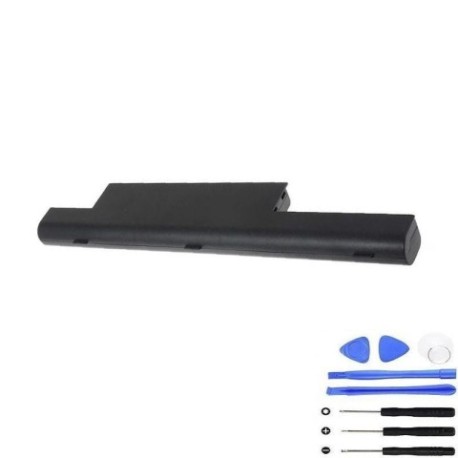
Battery models & part numbers
| Reference / P/N |
|---|
| Asus-A32-K93-56Wh |
Compatible models
| Model |
|---|
| Asus 07G016J11875 |
| Asus 07G016J11875P |
| Asus 0B110-00160000 |
| Asus 0B110-00160100 |
| Asus 0B20-00X50A |
| Asus 0B20-01020AS |
| Asus 90-N6S2B3000C |
| Asus A41-K93 |
| Asus A42-K93 |
| Asus A95VJ |
| Asus K95VB |
| Asus K95VJ |
| Asus K95VM |
| Asus R900VB |
| Asus R900VJ |
| Asus R900VM |
| Asus X93 |
| Asus X93S |
| Asus X93SM |
| Asus X93SV |
Introduction
The Asus A32-K93-56Wh battery is a high-quality replacement power solution designed specifically for various Asus laptop models commonly used across Australia and New Zealand. This 56Wh lithium-ion battery provides reliable performance and extended usage time, making it ideal for students, professionals, and home users who depend on their laptops for work, study, and entertainment.
Many Asus laptop owners in AU/NZ face battery degradation issues due to our unique climate conditions and typical usage patterns. High temperatures, frequent charging cycles, and extended usage can all contribute to reduced battery life over time. Understanding when and how to replace your battery can save you from unexpected shutdowns and maintain your laptop’s optimal performance.
Common signs you need a replacement
| Symptom | Cause | Verification | Recommendation |
|---|---|---|---|
| Rapid battery drain | Reduced capacity from age/cycles | Check battery health in Windows | Consider replacement if below 60% |
| Laptop won’t power on without charger | Battery no longer holds charge | Remove charger and try to start | Immediate replacement needed |
| Battery swelling/bulging | Internal chemical breakdown | Visual inspection of battery compartment | Replace immediately – safety hazard |
| Overheating during charging | Failing battery cells | Monitor temperature during charge cycle | Replace to prevent damage |
| Inconsistent charge percentage | Faulty battery management system | Observe charge level fluctuations | Replace for reliable performance |
| Battery not detected by system | Connection issues or dead battery | Check Device Manager battery status | Replace if connections are clean |
How to check compatibility
Before purchasing any replacement battery for your Asus laptop, it’s crucial to verify compatibility to ensure optimal performance and safety. Here’s how Australian and New Zealand users can confirm their laptop model matches the A32-K93-56Wh battery:
Finding Your Asus Model Number:
Locate the model number sticker on the bottom of your laptop. For Asus models compatible with the A32-K93-56Wh, you should see one of the model numbers listed in our compatibility table. The sticker is typically found near the battery compartment or on the main chassis. Common locations include:
- Under the battery (remove battery to see)
- Bottom case near ventilation grills
- Inside the battery compartment
- On the original packaging or documentation
Using Asus Official Tools:
Asus provides several official methods to identify your exact model:
- MyASUS app: This utility pre-installed on most Asus laptops can display detailed system information including exact model numbers
- Asus Support website: Enter your serial number on the official Asus support portal for precise model identification
- System Information: Press Windows Key + R, type “msinfo32” and check System Model
Physical Verification:
Remove your current battery and compare the part number. The A32-K93-56Wh should match the dimensions and connector type of your original battery. Measure the battery compartment to ensure proper fit – approximately 205mm x 55mm x 20mm for compatible models.
When to replace
Understanding the right time to replace your laptop battery can save you from unexpected downtime and potential data loss. Here are the key indicators for Australian and New Zealand users:
Performance-Based Replacement:
Most lithium-ion batteries, including the A32-K93-56Wh, typically last 2-3 years with regular use. However, several factors specific to AU/NZ conditions can affect this timeline:
- Climate Impact: High temperatures in Australian summers can accelerate battery degradation. If you regularly use your laptop in temperatures above 35°C, expect reduced battery lifespan
- Usage Patterns: Frequent full discharge cycles common among students and mobile professionals will shorten battery life
- Charge Cycles: After 300-500 complete charge cycles, battery capacity typically drops to 60-70% of original
Capacity Thresholds:
Consider replacement when your battery capacity falls below these levels:
- Below 70% capacity: Noticeable reduction in usage time
- Below 50% capacity: Significantly impacts productivity
- Below 30% capacity: Essentially unusable without constant charging
Check your battery health through Windows Battery Report (run “powercfg /batteryreport” in Command Prompt) to monitor degradation over time.
Installation guide
Replacing your Asus battery with the A32-K93-56Wh is a straightforward process that most users can complete in 10-15 minutes. Follow these steps carefully for a successful installation:
Preparation:
- Turn off your laptop completely and disconnect the AC adapter
- Work on a clean, static-free surface
- Have a small Phillips screwdriver ready
- Ensure you have at least 30 minutes of uninterrupted time
Step-by-Step Installation:
- Power Down: Shut down your laptop properly and disconnect all peripherals
- Remove Old Battery: Turn the laptop upside down and locate the battery release latches. Most compatible Asus models have two sliding latches – slide both to the unlock position simultaneously
- Disconnect Battery: Gently lift the battery out of its compartment. If your model has a connector cable, carefully unplug it by pulling straight out (don’t wiggle)
- Prepare New Battery: Remove the A32-K93-56Wh from its packaging and inspect for any damage. If there’s a protective film on the contacts, remove it
- Install New Battery: Align the new battery with the compartment, ensuring the connectors match. For models with cables, connect the cable first before seating the battery
- Secure Battery: Press down firmly until you hear a click or feel the battery lock into place. Slide any locking mechanisms back to the locked position
- Initial Charge: Connect your AC adapter and charge the battery for at least 4 hours before first use, even if it shows full charge
Troubleshooting Common Issues:
- Battery Not Detected: Ensure connectors are clean and properly seated. Try removing and reinstalling the battery
- Laptop Won’t Power On: Check that the battery is fully inserted and locked in place. Try powering on with AC adapter connected
- Battery Not Charging: Allow the battery to charge for at least 30 minutes before checking status. Some systems require this initialisation period
Usage & care tips
Proper battery maintenance can significantly extend the life of your Asus A32-K93-56Wh replacement battery. Follow these expert tips tailored for Australian and New Zealand conditions:
Optimal Charging Practices:
- Avoid Deep Discharges: Unlike older battery technologies, lithium-ion batteries prefer partial discharges. Try to recharge when battery level drops to 20-30% rather than waiting for complete discharge
- Temperature Management: Never charge your laptop in direct sunlight or in hot cars. Ideal charging temperature is between 10°C and 35°C. Australian summer heat can permanently damage battery cells
- Storage Guidelines: If storing your laptop for extended periods, charge the battery to 50-60% and store in a cool, dry place. Check every 3 months and recharge if necessary
Daily Usage Recommendations:
- Power Settings: Use Asus Power Management utilities to optimise battery life. The “Power Saver” mode can extend usage time by up to 30%
- Background Processes: Close unnecessary applications and browser tabs to reduce power consumption
- Screen Brightness: Reduce screen brightness to 50-70% for optimal balance between visibility and battery conservation
- Peripheral Management: Disconnect USB devices, external drives, and turn off Bluetooth/Wi-Fi when not in use
Safety & recycling in AU/NZ
Battery safety and proper disposal are critical considerations for Australian and New Zealand consumers. Follow these guidelines to ensure safe usage and environmentally responsible disposal:
Safety Precautions:
- Never Attempt Repair: Lithium-ion batteries contain hazardous materials and should never be opened, punctured, or modified
- Avoid Extreme Conditions: Don’t expose batteries to temperatures above 60°C or below -20°C. Don’t leave laptops in hot cars during Australian summers
- Use Authorised Chargers: Only use Asus-approved AC adapters with correct voltage specifications for your region (AU/NZ: 230-240V)
- Recognise Warning Signs: Immediately stop using any battery that shows swelling, leaking, unusual odour, or excessive heat
Australian Recycling Options:
- Battery Recycling Programs: Most office supply stores (Officeworks, Harvey Norman) and electronics retailers offer free battery recycling
- Council Collection: Many local councils provide battery recycling at household waste centres
- MobileMuster: This program accepts laptop batteries along with mobile phone batteries
New Zealand Recycling Options:
- eWaste Programmes: Check with local council transfer stations for battery disposal options
- Retailer Take-Back: Many electronics stores participate in product stewardship schemes
- Recycling Centres: Facilities like Sustainable Coastlines and community recycling centres accept batteries
Never dispose of lithium-ion batteries in regular household waste due to fire risk and environmental contamination.
FAQ
1. How long does the Asus A32-K93-56Wh battery typically last?
Under normal usage conditions, expect 2-3 years of service life or 300-500 complete charge cycles. Actual lifespan depends on usage patterns, charging habits, and environmental conditions. Australian users in hotter climates may experience slightly shorter battery life.
2. Will this battery work with my Asus laptop if it’s not in the compatibility list?
We strongly recommend against using this battery with non-listed models. Compatibility depends on physical dimensions, connector type, voltage requirements, and communication protocols. Using an incompatible battery can damage your laptop and void warranties.
3. How do I calibrate my new battery for accurate charge readings?
After installation, fully charge the battery without interruption, then use the laptop until it automatically shuts down due to low battery. Recharge completely without interruption. Repeat this process every 2-3 months for optimal accuracy.
4. Is the A32-K93-56Wh covered by warranty in Australia and New Zealand?
Yes, genuine replacement batteries typically come with 12-month warranties that are valid throughout Australia and New Zealand. Keep your purchase receipt and contact the retailer for warranty claims.
5. Why does my new battery not last as long as the original did when new?
Battery performance can vary between manufacturers. The A32-K93-56Wh is designed to meet or exceed original specifications, but factors like age of the laptop, power settings, and usage patterns affect perceived performance. Allow 3-5 charge cycles for optimal performance.
6. Can I use my laptop while charging the new battery?
Yes, modern laptops are designed to support simultaneous charging and usage. However, for best battery health, avoid intensive tasks (gaming, video editing) while charging as the combined heat can stress battery cells.
7. What should I do if my battery swells or shows signs of damage?
Immediately stop using the battery and laptop. Don’t attempt to charge or use the device. Contact the retailer for replacement under warranty and follow proper disposal procedures. Swollen batteries can be fire hazards and should be handled with extreme care.
Replacing your Asus laptop battery with the genuine A32-K93-56Wh model will restore your device’s mobility and reliability. With proper installation and care, your new battery will provide dependable performance for your computing needs across Australia and New Zealand.