Asus A32-K56-44Wh Laptop Battery Replacement Guide
If your Asus laptop is struggling to hold a charge or suddenly shutting down, you might need a replacement battery. Our comprehensive guide covers everything Australian and New Zealand users need to know about the Asus A32-K56-44Wh battery replacement.
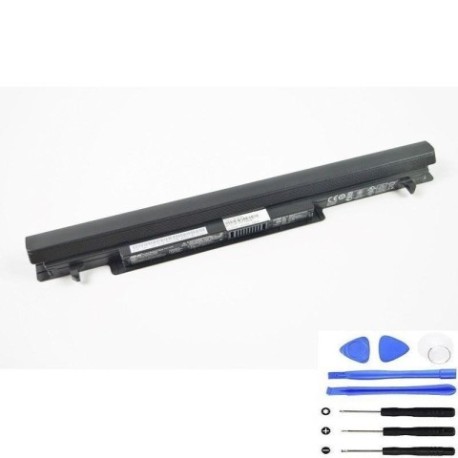
Battery models & part numbers
| Reference / P/N |
|---|
| Asus 0B110-00180000 |
| Asus 0B110-00180100 |
| Asus 0B110-00180200 |
| Asus 0B110-00180200M |
| Asus 0B110-00210000 |
| Asus 90-NUH1B1100Y |
| Asus A31-K56 |
| Asus A41-K56 |
| Asus A42-K56 |
| Asus ICR18650-30B Simplo |
| Asus-A32-K56-44Wh |
Compatible models
| Model |
|---|
| Asus A45VM |
| Asus A56CA |
| Asus A56CB |
| Asus A56CM |
| Asus K45VM |
| Asus K46CM |
| Asus K56CA |
| Asus K56CB |
| Asus K56CM |
| Asus K56LM2H |
| Asus K75VJ |
| Asus P56CB |
| Asus R505CB |
| Asus R505CM |
| Asus S405CA |
| Asus S56CA |
| Asus S56CB |
| Asus S56CM |
| Asus VivoBook S550CA |
| Asus VivoBook S550CM |
Introduction
Laptop batteries are consumable components that naturally degrade over time. The Asus A32-K56-44Wh battery is a common replacement for numerous Asus laptop models popular in Australia and New Zealand. Understanding when and how to replace your battery can save you from unexpected shutdowns and extend your laptop’s usable life.
Common signs you need a replacement
| Symptom | Cause | Verification | Recommendation |
|---|---|---|---|
| Battery drains quickly | Reduced capacity from age/cycles | Check battery health in Windows | Replace if under 50% capacity |
| Laptop shuts down unexpectedly | Battery can’t deliver stable power | Monitor shutdown percentages | Immediate replacement needed |
| Battery won’t charge fully | Charging circuit or cell failure | Check charging indicator lights | Replace battery first, then charger |
| Battery swelling/bulging | Gas buildup from chemical breakdown | Visual inspection, uneven surfaces | Stop using immediately and replace |
| Overheating during use | Internal resistance increasing | Monitor temperature with software | Replace if consistently over 45°C |
How to check compatibility
Finding your exact laptop model is crucial for battery compatibility. For Asus laptops in the AU/NZ market, check the bottom label for the model number – it’s typically near the serial number and regulatory markings. You can also find it in Windows by pressing Windows Key + R, typing “msinfo32” and looking under “System Model”. For these specific Asus models, the A32-K56-44Wh battery is designed as a direct replacement for the original batteries listed above.
If you’re unsure, visit the official Asus support website and enter your serial number to verify compatible parts. Many Australian computer repair centres can also confirm compatibility using their parts databases.
When to replace
Most laptop batteries last 2-4 years with regular use. Consider replacement when your battery health drops below 60% capacity, you experience sudden shutdowns above 20% charge, or the physical battery shows signs of swelling. In Australia’s warmer climates, battery degradation can accelerate, so monitor your battery health more frequently if you live in northern regions.
Installation guide
Replacing the battery in compatible Asus models is generally straightforward. First, ensure your laptop is completely powered off and disconnected from power. Flip the laptop over and locate the battery release latches – most of these models have external batteries with slide locks. Slide the locks to the unlock position and gently lift the battery out. Align the new A32-K56-44Wh battery with the connectors, press firmly until it clicks into place, then slide the locks back to secure it.
For models with internal batteries (less common in this series), you’ll need to remove the bottom panel using the appropriate screwdriver. Always ground yourself before handling internal components and work on a clean, static-free surface.
Usage & care tips
To maximise your new battery’s lifespan in Australian conditions: avoid leaving your laptop in hot cars or direct sunlight; try to keep battery levels between 20-80% for daily use; perform full discharge cycles monthly to recalibrate the battery meter; and store at around 50% charge if not using for extended periods. The 44Wh capacity provides good balance between runtime and weight for these Asus models.
Safety & recycling in AU/NZ
Lithium-ion batteries require proper handling. Never puncture or disassemble batteries, and avoid exposing them to temperatures above 60°C. In Australia and New Zealand, don’t dispose of old batteries in household waste. Most electronics retailers offer free battery recycling services, or you can take them to authorised recycling centres. Some councils provide battery recycling at household waste centres – check your local council’s website for details.
FAQ
How long does the A32-K56-44Wh battery typically last?
With normal use, expect 2-4 years or 300-500 full charge cycles before significant capacity loss.
Will this battery work with my Asus laptop if it’s not in the compatible list?
No, only use with verified compatible models to avoid damage to your device.
How do I check my current battery’s health?
In Windows, open Command Prompt as administrator and type “powercfg /batteryreport” to generate a detailed battery health report.
Can I use my laptop while charging the new battery?
Yes, modern laptops are designed for simultaneous use and charging without harming the battery.
What’s the warranty on replacement batteries?
Quality replacements typically come with 12-24 month warranties – check with your supplier for specific terms.
How long does installation take?
Most external battery replacements take 2-5 minutes, while internal replacements may take 15-30 minutes for experienced users.
Where can I get professional installation help in Australia?
Most computer repair shops and some office supply stores offer battery replacement services, typically costing $30-80 AUD for labour.