ASUS A31N1730 36Wh Laptop Battery Replacement Guide
If you’re experiencing battery issues with your ASUS laptop, finding the right replacement battery is crucial. The ASUS A31N1730 36Wh battery serves multiple ASUS models, and this comprehensive guide will help you identify compatibility, understand when to replace, and provide essential care tips for Australian and New Zealand users.
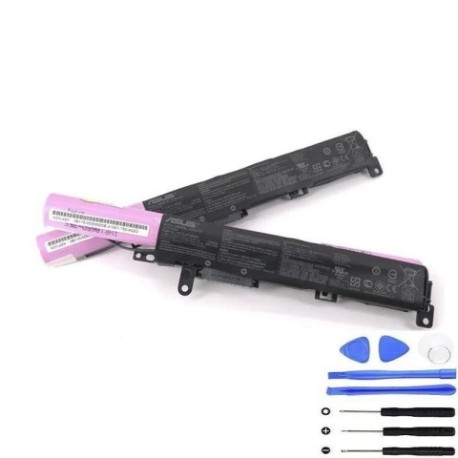
Battery models & part numbers
| Reference / P/N |
|---|
| 0B110-00550100 |
| Asus-A31N1730-36Wh |
Compatible models
| Model |
|---|
| Asus A560UD |
| Asus F560 |
| Asus F560UD |
| Asus K560UD |
| Asus R562UD |
| Asus VivoBook 15 K560UD |
| Asus VivoBook 15 X560UD |
| Asus X560 |
| Asus X560U |
| Asus X560UD |
Introduction
Laptop batteries are consumable components that naturally degrade over time. For ASUS laptop owners in Australia and New Zealand, understanding battery replacement options is essential for maintaining optimal performance. The ASUS A31N1730 36Wh battery provides reliable power for various ASUS models, particularly those in the VivoBook and standard laptop series.
Common signs you need a replacement
| Symptom | Cause | Verification | Recommendation |
|---|---|---|---|
| Reduced battery life | Natural degradation of lithium-ion cells | Check battery health in Windows Power Report | Replace if capacity drops below 60% |
| Laptop shuts down unexpectedly | Battery can’t maintain voltage under load | Monitor shutdown patterns | Immediate replacement needed |
| Battery won’t charge fully | Charging circuit or cell failure | Check charging indicator and percentage | Replace battery and check charger |
| Battery swelling or overheating | Internal short circuit or gas buildup | Visual inspection and temperature check | Replace immediately for safety |
| Laptop only works when plugged in | Complete battery failure | Remove charger to test battery operation | Urgent replacement required |
How to check compatibility
Before purchasing any replacement battery, verifying compatibility is essential. For ASUS laptops, you can check compatibility through several methods:
Finding Your Model Information: Locate the model number on the bottom casing of your laptop, typically near the serial number and regulatory labels. For ASUS VivoBook and standard series, this information is clearly printed and should match exactly with our compatibility list.
Using ASUS Official Tools: Visit the ASUS support website and enter your serial number or model to access official compatibility information. The ASUS Battery Health Charging utility in MyASUS software can also provide detailed battery information.
Physical Inspection: Remove your current battery (if user-replaceable) and compare the part number with our listed references. The A31N1730 battery features specific connector types and physical dimensions designed for ASUS laptops.
Cross-Reference Verification: Always cross-reference both the part number (A31N1730 or 0B110-00550100) and your laptop model to ensure perfect compatibility.
When to replace
Battery replacement timing depends on usage patterns and environmental factors. Consider replacement when:
- Battery capacity drops below 60% of original specification
- You experience consistent power interruptions during normal use
- The battery shows physical signs of swelling or damage
- Your laptop is 2-3 years old with regular daily use
- Battery runtime no longer meets your mobile computing needs
For Australian and New Zealand climates, consider that extreme temperatures can accelerate battery degradation. Batteries typically last 300-500 charge cycles before significant capacity loss occurs.
Installation guide
Replacing the battery in compatible ASUS models is generally straightforward. Follow these steps for safe installation:
- Power Down: Shut down your laptop completely and disconnect the AC adapter.
- Ground Yourself: Use an anti-static wrist strap or touch a grounded metal object to prevent static discharge.
- Access Battery Compartment: For most ASUS models, turn the laptop over and locate the battery release latches. Some models may require removing the bottom panel.
- Remove Old Battery: Slide the battery release latches to unlock the battery, then carefully lift it out of the compartment.
- Install New Battery: Align the new A31N1730 battery with the connector and compartment, ensuring proper orientation.
- Secure Battery: Press firmly until the locking mechanism engages and the battery is securely in place.
- Initial Charge: Connect the AC adapter and charge the battery completely before first use.
Important Note: Some ASUS models may have internal batteries requiring professional installation. If unsure, consult ASUS service centres in Australia or New Zealand.
Usage & care tips
Proper battery maintenance extends lifespan and maintains performance:
- Optimal Charging: Keep battery between 20-80% charge for daily use. Avoid frequent full discharges.
- Temperature Management: Operate between 10°C and 35°C. Avoid leaving in hot cars or direct sunlight.
- Storage Guidelines: If storing long-term, charge to 50-60% and store in cool, dry conditions.
- Power Settings: Use ASUS Battery Health Charging in MyASUS to optimise charging patterns.
- Regular Calibration: Fully discharge and recharge every 2-3 months to maintain accurate battery reporting.
Safety & recycling in AU/NZ
Battery safety and proper disposal are regulated in Australia and New Zealand:
Safety Precautions:
- Never attempt to open or modify lithium-ion batteries
- Discontinue use if battery shows swelling, leakage, or overheating
- Use only authorised ASUS replacement batteries and chargers
- Keep away from water and extreme temperatures
Recycling Requirements: In Australia, contact Battery Recycling programmes or drop at designated collection points. In New Zealand, use accredited e-waste recyclers. Never dispose of lithium-ion batteries in household waste due to fire risk and environmental concerns.
Regulatory Compliance: Replacement batteries must meet Australian Communications and Media Authority (ACMA) and New Zealand Electrical Safety Service requirements.
FAQ
How long does the A31N1730 battery typically last?
With normal use, expect 2-3 years of reliable performance or 300-500 charge cycles before significant capacity reduction.
Can I use this battery if my original was a different part number?
Only if your laptop model appears in our compatibility list. The A31N1730 is designed specifically for the listed ASUS models.
Will replacing the battery void my ASUS warranty?
In Australia and New Zealand, using non-genuine parts may affect warranty coverage. Check your warranty terms and consider ASUS authorised service centres for warranty-protected replacements.
How do I know if my battery needs replacement versus other issues?
Run Windows Battery Report (powercfg /batteryreport) to check battery health. If design capacity is significantly below full charge capacity, replacement is recommended.
Can I install this battery myself?
Most compatible ASUS models have user-replaceable batteries. However, if your model requires disassembly beyond basic battery compartment access, professional installation is recommended.
What’s the difference between A31N1730 and 0B110-00550100?
These are different reference numbers for the same battery component, both compatible with the listed ASUS laptop models.
How should I dispose of my old ASUS battery in Australia?
Contact your local council’s e-waste programme or use Batteryback.org.au drop-off locations. Many electronics retailers also accept old batteries for recycling.
Remember that proper battery maintenance and timely replacement ensure your ASUS laptop continues to provide reliable mobile computing performance. The A31N1730 36Wh battery offers genuine compatibility and performance for your specific ASUS model, restoring your laptop’s mobility and convenience.