Acer AS10C7E 65Wh Battery Replacement: Complete Guide for Australian & New Zealand Users
| Reference / P/N |
|---|
| Acer AS10C5E |
| Acer BT.00805.015 |
| Acer BT.00807.028 |
| Acer-AS10C7E-65Wh |
Compatible models
| Model |
|---|
| Acer 934T2086F |
| Acer Aspire 5943G |
| Acer Aspire 5950G |
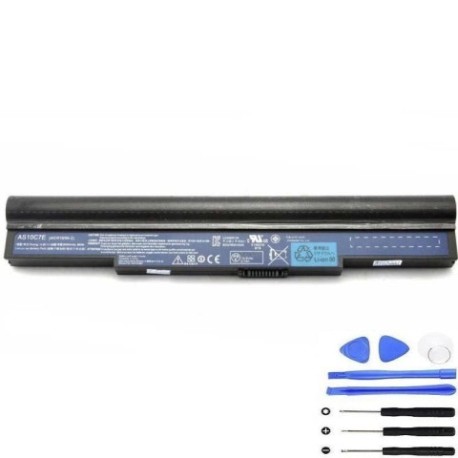
Introduction
If you’re experiencing battery issues with your Acer laptop in Australia or New Zealand, you’re not alone. The Acer AS10C7E 65Wh battery serves multiple Acer models across different series, making it one of the most commonly replaced laptop batteries in our region. This comprehensive guide covers everything from identifying compatibility to installation and proper care, specifically tailored for AU/NZ consumers.
Common signs you need a replacement
| Symptom | Possible Cause | Verification | Recommendation |
|---|---|---|---|
| Battery won’t hold charge | Ageing cells, deep discharge cycles | Check battery health in Windows Power Report | Replace if capacity below 50% |
| Laptop shuts down unexpectedly | Voltage drops under load | Monitor during intensive tasks | Immediate replacement needed |
| Battery swelling or bulging | Internal gas buildup | Visual inspection, uneven surface | Stop use immediately – safety hazard |
| Charging indicator issues | Battery communication failure | Check device manager for errors | Replace battery and retest |
| Reduced usage time | Natural degradation over 2-3 years | Compare to original runtime | Consider replacement if below 60 minutes |
How to check compatibility
Finding your exact Acer model information is crucial for battery compatibility. For Australian and New Zealand users, start by checking the bottom label of your laptop – look for the model number near the regulatory markings. You can also access System Information in Windows (press Windows key + R, type ‘msinfo32’) to find your exact system model. For Acer devices specifically, the Aspire series often has the model printed near the keyboard or screen hinge.
If you’re unsure, use Acer’s official support website with your serial number, which can be found on the original packaging or purchase receipt. Many Australian computer repair centres can also verify compatibility using their parts databases. Remember that while the AS10C7E battery fits multiple models, always double-check against your specific device to avoid compatibility issues.
When to replace
Most Acer laptop batteries in our climate conditions last 2-3 years with regular use. The tropical and temperate zones across Australia and New Zealand can affect battery longevity differently. If your battery health shows less than 60% of original capacity in Windows battery reports, or if you’re getting less than an hour of usage on a full charge, it’s time to consider replacement. Seasonal temperature variations in cities like Sydney, Melbourne, Auckland or Wellington can accelerate battery degradation, so monitor performance changes throughout the year.
Installation guide
Replacing your Acer battery is generally straightforward. First, ensure you’re working in a static-free environment and have turned off the laptop completely. Unplug the AC adapter and remove any peripherals. For most Acer models compatible with the AS10C7E battery, you’ll need a Phillips head screwdriver to remove the bottom panel. Locate the battery connector – it’s usually secured with a small latch or ribbon cable. Gently disconnect the old battery, being careful not to force any connectors.
Align the new AS10C7E battery with the mounting points and reconnect the power cable securely. Replace the bottom panel and screws, then connect the AC adapter. Allow the battery to charge for at least 4 hours before first use. Many Australian users find it helpful to perform a battery calibration by charging to 100%, then discharging completely, and recharging to full capacity.
Usage & care tips
To maximise your new battery’s lifespan in Australian and New Zealand conditions, avoid exposing your laptop to extreme temperatures – don’t leave it in hot cars during summer or in direct sunlight. Ideal operating temperatures are between 10°C and 35°C. For daily use, try to keep your battery between 20% and 80% charge rather than constantly charging to 100%. If you’re primarily using your laptop plugged in, consider setting a charge limit if your Acer software supports it.
During hotter months in regions like Queensland or Northern Territory, ensure proper ventilation to prevent overheating. In cooler southern areas like Tasmania or South Island NZ, allow the battery to warm to room temperature before charging if it’s been in cold conditions. Regular use helps maintain battery health – if storing for extended periods, charge to around 50% and store in a cool, dry place.
Safety & recycling in AU/NZ
Battery safety is particularly important in our region. Never attempt to open or modify the battery casing, and avoid puncturing or crushing the battery. If you notice any swelling, overheating, or unusual odours, discontinue use immediately and contact a professional. In Australia, damaged batteries can be taken to authorised collection points like Officeworks or Battery World for safe disposal. New Zealand residents can use the Recycle Mate app to find local battery recycling facilities.
Both countries have strict regulations about lithium-ion battery disposal – never place them in household bins. Many council recycling centres accept old laptop batteries free of charge. When purchasing your replacement, ensure the supplier complies with Australian Consumer Law and New Zealand Consumer Guarantees Act for warranty protection.
FAQ
How long does the Acer AS10C7E battery typically last?
With normal use in Australian conditions, expect 2-3 years of good performance or approximately 500 full charge cycles before noticeable degradation occurs.
Can I use this battery with newer Acer models?
No, the AS10C7E is specifically designed for compatible models listed above. Always check your laptop’s exact requirements before purchasing.
What warranty should I expect in Australia?
Reputable suppliers typically offer 12-24 month warranties that comply with Australian Consumer Law protections.
How do I know if my battery is genuine?
Look for proper branding, regulatory markings, and purchase from authorised Australian resellers with local customer support.
Can heat affect my battery performance?
Yes, Australian summers can reduce battery life. Avoid leaving your laptop in hot cars and ensure proper ventilation during use.
What’s the delivery time to regional NZ areas?
Most suppliers offer 3-7 business day delivery across New Zealand, though remote areas may take longer.
Do I need special tools for installation?
Generally just a Phillips head screwdriver, though some models may require specific screwdriver sizes available at most hardware stores.