Acer AS07B51 48Wh Battery Replacement Guide for Australian & New Zealand Users
If your Acer laptop is struggling to hold charge or suddenly shutting down, you’ve come to the right place. This comprehensive guide covers everything Australian and New Zealand users need to know about replacing their laptop battery with the genuine Acer AS07B51 48Wh model.
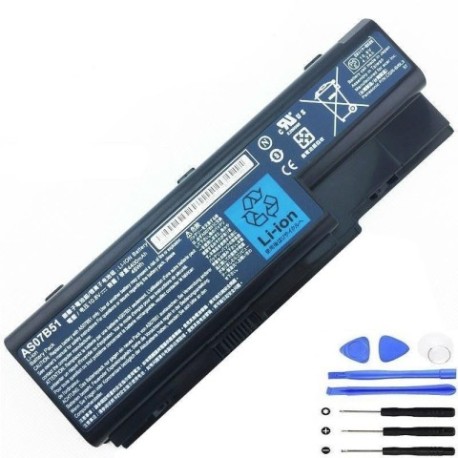
Battery models & part numbers
| Reference / P/N |
|---|
| Acer AS074B31 |
| Acer AS07B31 |
| Acer AS07B41 |
| Acer AS07B51-48Wh |
| Acer AS07B61 |
| Acer BT.00603.033 |
| Acer BT.00604.018 |
| Acer BT.00605.015 |
| Acer BT.00605.021 |
| Acer BT.00607.010 |
| Acer BT.00607.016 |
| Acer LC.BTP00.008 |
Compatible models
| Model |
|---|
| Acer Aspire 5220 |
| Acer Aspire 5220G |
| Acer Aspire 5230 |
| Acer Aspire 5310 |
| Acer Aspire 5315 |
| Acer Aspire 5320 |
| Acer Aspire 5330 |
| Acer Aspire 5520 |
| Acer Aspire 5520G |
| Acer Aspire 5530 |
| Acer Aspire 5530-5824 |
| Acer Aspire 5530-823G25 |
| Acer Aspire 5530G |
| Acer Aspire 5710 |
| Acer Aspire 5710G |
| Acer Aspire 5710G-JDW50 |
| Acer Aspire 5710Z |
| Acer Aspire 5715 |
| Acer Aspire 5715Z |
| Acer Aspire 5720 |
| Acer Aspire 5720G |
| Acer Aspire 5720Z |
| Acer Aspire 5720ZG |
| Acer Aspire 5730 |
| Acer Aspire 5730-4353 |
| Acer Aspire 5730Z |
| Acer Aspire 5730ZG |
| Acer Aspire 5739 |
| Acer Aspire 5739G |
| Acer Aspire 5920 |
| Acer Aspire 5920G |
| Acer Aspire 5921 |
| Acer Aspire 5922 |
| Acer Aspire 5930 |
| Acer Aspire 5930G |
| Acer Aspire 5930Z |
| Acer Aspire 5935 |
| Acer Aspire 5935G |
| Acer Aspire 5940G |
| Acer Aspire 5942G |
| Acer Aspire 6530G |
| Acer Aspire 6920 |
| Acer Aspire 6920G |
| Acer Aspire 6930 |
| Acer Aspire 6930-6082 |
| Acer Aspire 6930-6455 |
| Acer Aspire 6930-6771 |
| Acer Aspire 6930-6809 |
| Acer Aspire 6930G |
| Acer Aspire 6930G-Entertain.B |
| Acer Aspire 6930ZG |
| Acer Aspire 6935 |
| Acer Aspire 6935-6052 |
| Acer Aspire 6935-6486 |
| Acer Aspire 6935-6924 |
| Acer Aspire 6935-6929 |
| Acer Aspire 6935G |
| Acer Aspire 7220 |
| Acer Aspire 7230 |
| Acer Aspire 7320 |
| Acer Aspire 7330 |
| Acer Aspire 7520 |
| Acer Aspire 7520-403 |
| Acer Aspire 7520G |
| Acer Aspire 7520G ICY70 |
| Acer Aspire 7530 |
| Acer Aspire 7530G |
| Acer Aspire 7535 |
| Acer Aspire 7535G |
| Acer Aspire 7540 |
| Acer Aspire 7540G |
| Acer Aspire 7720G |
| Acer Aspire 7720ZG |
| Acer Aspire 7730G |
| Acer Aspire 7730Z |
| Acer Aspire 7730ZG |
| Acer Aspire 7735 |
| Acer Aspire 7735G |
| Acer Aspire 7735Z |
| Acer Aspire 7735ZG |
| Acer Aspire 7736 |
| Acer Aspire 7736G |
| Acer Aspire 7736Z |
| Acer Aspire 7736ZG |
| Acer Aspire 7738G |
| Acer Extensa 7230E |
| Acer Extensa 7230EZ |
| Acer Extensa 7630 |
| Acer Extensa 7630EZ |
| Acer Extensa 7630G |
| Acer Extensa 7630Z |
| Acer TravelMate 7330 |
| Acer TravelMate 7530 |
| Acer TravelMate 7530G |
| Acer TravelMate 7730 |
| Acer TravelMate 7730G |
| Packard Bell EasyNote DT85 |
| Packard Bell EasyNote DT85 (MS2281) |
| Packard Bell EasyNote DT85-CM-072 |
| Packard Bell EasyNote DT85-CM-075 |
| Packard Bell EasyNote DT85-CM-210 |
| Packard Bell EasyNote DT85-CT-070 |
| Packard Bell EasyNote LJ61 |
| Packard Bell EasyNote LJ65 |
| Packard Bell EasyNote LJ67 |
| Packard Bell EasyNote LJ71 |
| Packard Bell EasyNote LJ75 |
| Packard Bell EasyNote LJ77 |
| Packard Bell Model KBYF0 |
Introduction
Welcome to your complete guide for replacing the battery in your Acer laptop. If you’re experiencing shorter battery life, unexpected shutdowns, or your laptop won’t hold charge at all, this guide will walk you through everything you need to know as an Australian or New Zealand user.
Common signs you need a replacement
| Symptom | Cause | How to Verify | Recommendation |
|---|---|---|---|
| Battery drains quickly (under 1 hour) | Natural degradation after 2-3 years of use | Check battery health in Windows Power Options | Replace battery immediately |
| Laptop shuts down unexpectedly | Battery can’t maintain consistent voltage | Monitor if it happens at specific charge levels | Urgent replacement needed |
| Battery won’t charge past certain percentage | Damaged battery cells or charging circuit | Try different power adapter first | Replace battery if issue persists |
| Battery feels hot or swollen | Serious safety hazard – potential fire risk | Visual inspection and temperature check | STOP USING IMMEDIATELY and replace |
| Laptop only works when plugged in | Battery completely failed or disconnected | Remove battery and try power adapter only | Replace battery to restore portability |
How to check compatibility
Finding the right battery replacement is crucial for your Acer laptop’s performance and safety. Here’s how to ensure compatibility:
Locate Your Model Number: Turn your laptop over and look for the white sticker that shows your exact model number. For Acer Aspire and TravelMate models, this is typically found near the battery compartment. The model number should match exactly with our compatibility list above.
Check Your Current Battery: Remove your current battery and note the part number printed on it. Compare this with our reference part numbers list. The Acer AS07B51-48Wh is compatible with multiple part numbers, so even if your current battery shows a different number, it may still be compatible.
Use Acer’s Official Tools: Visit the Acer support website and enter your serial number or model to find genuine replacement parts. This can help verify compatibility for your specific device.
Physical Compatibility: The AS07B51 battery measures approximately 207mm x 44mm x 21mm. Ensure your battery compartment can accommodate these dimensions.
When to replace your battery
Most laptop batteries last 2-3 years with regular use. If your battery capacity has dropped below 60% of its original capacity, it’s time for replacement. You can check this in Windows by generating a battery report through Command Prompt (type “powercfg /batteryreport”). For Australian and New Zealand users, consider replacing before the summer months when higher temperatures can further degrade battery performance.
Installation guide
Replacing your Acer battery is straightforward. Follow these steps carefully:
- Power down completely and disconnect the AC adapter
- Flip the laptop over and locate the battery release latches
- Slide the latches to unlock position – most Acer models have two sliding locks
- Remove the old battery by lifting it out gently
- Clean the battery contacts with a dry cloth
- Insert the new AS07B51 battery aligning the connectors properly
- Slide the locking latches back to secure the battery
- Connect the AC adapter and charge for at least 4 hours before first use
Note for Acer Aspire 5xxx and 7xxx series: These models typically have external battery compartments making replacement particularly easy without opening the laptop case.
Usage & care tips
Extend your new battery’s lifespan with these expert tips tailored for AU/NZ conditions:
- Avoid extreme temperatures – Don’t leave your laptop in hot cars (common in Australian summers) or in direct sunlight
- Partial discharges are better than full discharges – try to keep between 20-80% charge
- Calibrate monthly by fully discharging then fully charging to maintain accurate battery readings
- Store properly if not using for extended periods – charge to 50% and store in cool, dry place
- Use power saving modes when on battery to extend runtime between charges
Safety & recycling in AU/NZ
Battery safety and proper disposal are regulated in Australia and New Zealand. Never dispose of lithium-ion batteries in household waste. In Australia, use Batteryback or similar programs available at most electronics retailers. In New Zealand, take used batteries to designated collection points at recycling centres or retailers. If your battery shows any swelling, overheating, or damage, stop using immediately and recycle responsibly.
FAQ
How long does the AS07B51 battery last on a single charge?
Under normal usage conditions, the 48Wh capacity provides approximately 2-4 hours of runtime depending on your laptop model and usage patterns.
Is this battery genuine Acer quality?
Yes, the AS07B51 meets original Acer specifications and is compatible with all listed models without requiring additional drivers or software.
What warranty comes with this battery?
Genuine replacement batteries typically come with 12-month warranty covering manufacturing defects.
Can I use this battery for my Packard Bell laptop?
Yes, this battery is compatible with specific Packard Bell EasyNote models as listed in our compatibility table.
How do I know if the battery is charging properly?
The charging indicator light on your laptop should illuminate, and your operating system should show charging status. Allow 2-4 hours for full initial charge.
Will replacing the battery improve my laptop’s performance?
While it won’t increase processing speed, it will restore portability and prevent unexpected shutdowns, making your laptop more reliable.
Is installation difficult for beginners?
Most Acer models designed for user-replaceable batteries make installation straightforward without technical expertise required.