Acer AP16B4J 37Wh Battery Replacement Guide for Australian & New Zealand Users
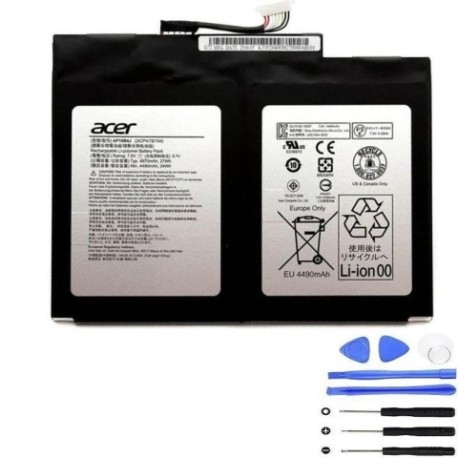
If you’re experiencing battery issues with your Acer convertible or tablet laptop, this comprehensive guide covers everything Australian and New Zealand users need to know about the AP16B4J 37Wh replacement battery.
Battery models & part numbers
| Reference / P/N |
|---|
| Acer-AP16B4J-37Wh |
Compatible models
| Model |
|---|
| Acer Enduro T1 (ET110-31W) |
| Acer KT.00204.003 |
| Acer KT.00204.005 |
| Acer Switch (SW713-51GNP) |
| Acer Switch 5 (SW512-52) |
| Acer Switch 5 (SW512-52P) |
| Acer Switch 7 BE (SW713-51GNP) |
| Acer Switch Alpha 12 (SA5-271) |
| Acer Switch Alpha 12 (SA5-271P) |
Introduction
The Acer AP16B4J 37Wh battery is specifically designed for Acer’s convertible and tablet-style laptops, providing reliable power for devices that need to balance performance with portability. This 37Wh capacity battery offers sufficient runtime for everyday computing tasks while maintaining the slim profile required by Acer’s innovative 2-in-1 designs.
For Australian and New Zealand users, understanding when and how to replace your laptop battery is crucial for maintaining device performance and avoiding unexpected shutdowns during important work or study sessions. Lithium-ion batteries like the AP16B4J typically last 2-3 years with regular use, though this can vary based on usage patterns and environmental conditions.
Common signs you need a replacement
| Symptoms | Causes | Verification | Recommendation |
|---|---|---|---|
| Battery drains quickly (less than 1 hour) | Reduced capacity from age/cycles | Check battery health in Windows | Consider replacement if below 60% capacity |
| Laptop shuts down unexpectedly | Voltage drops under load | Monitor during intensive tasks | Replace to prevent data loss |
| Battery won’t charge past certain percentage | Cell imbalance or BMS issues | Observe charging patterns | Replace for full functionality |
| Laptop bulging or case separation | Gas buildup from degraded cells | Visual inspection | Replace immediately – safety risk |
| Battery overheating during use/charge | Internal resistance increase | Touch test, monitor temps | Replace to prevent damage |
How to check compatibility
Before purchasing any replacement battery, verifying compatibility is essential. For Acer devices, you can find your exact model number in several locations:
Physical locations to check: Look on the bottom casing of your device, inside the battery compartment (if removable), on the original battery itself, or in the system information within Windows Settings.
Using Acer’s official tools: Visit the Acer support website and use their product identification tool. You can also download Acer Care Centre, which provides detailed system information including battery specifications and compatible part numbers.
For convertible models specifically: Acer Switch and Switch Alpha models typically have the model number printed near the kickstand or along the device’s edge. The AP16B4J battery is designed specifically for the convertible form factor, so it’s crucial to match your exact model from the compatibility list above.
Cross-referencing part numbers: Always compare the part number from your original battery with replacement options. The AP16B4J designation ensures proper fit and electrical compatibility with your Acer device’s power management system.
When to replace
Timing your battery replacement correctly can save you from inconvenient shutdowns and potential data loss. Consider replacement when:
Battery health drops below 70%: Most Acer devices will show battery health in their power management software. Once capacity significantly degrades, replacement becomes cost-effective compared to reduced productivity.
After 2-3 years of regular use: Lithium-ion batteries naturally degrade over time, even with careful use. If your device is approaching this age and you rely on battery power, proactive replacement is wise.
Before important projects or travel: Don’t wait for complete failure. If you have critical work coming up or plan to travel, replacing an aging battery prevents unexpected issues.
When physical changes occur: Any swelling, bulging, or case separation requires immediate replacement for safety reasons.
Installation guide
Installing the AP16B4J battery in your Acer device requires careful attention to detail. The process varies slightly between models but follows general principles:
Safety first: Always power off the device completely and disconnect from any power source. Use an anti-static wrist strap if available, and work on a clean, static-free surface.
For convertible models (Switch series): These typically require removing the back cover. Use plastic opening tools to carefully pry the casing, starting from the seams. Avoid using metal tools that could damage the casing or internal components.
Battery removal: Locate the battery connector and gently disconnect it from the motherboard. Remove any screws securing the battery, then lift it out carefully. Note the orientation for the replacement.
Installation: Place the new AP16B4J battery in position, secure with screws, and reconnect the battery connector. Ensure all connections are firm but not forced.
Reassembly and testing: Replace the back cover, power on the device, and check that the battery is recognised in system information. Allow the battery to charge fully before first use.
Usage & care tips
Proper battery maintenance extends the life of your AP16B4J replacement and ensures optimal performance:
Charging practices: Avoid frequently draining the battery to 0%. Instead, try to keep it between 20-80% for daily use. Complete discharge cycles (0-100%) are only necessary occasionally to recalibrate the battery meter.
Temperature management: Lithium-ion batteries perform best between 15°C and 25°C. Avoid leaving your device in hot cars or direct sunlight, and don’t use intensive applications while charging if the device becomes excessively warm.
Storage considerations: If storing your device for extended periods, charge the battery to about 50% and power off completely. Store in a cool, dry place away from direct sunlight.
Power management settings: Use Acer’s power management software to optimise battery life. The “Battery Saver” mode can significantly extend runtime when you need it most.
Safety & recycling in AU/NZ
Battery safety and proper disposal are particularly important in Australia and New Zealand:
Safety precautions: Never attempt to open or modify the battery casing. If you notice swelling, overheating, or unusual odours, stop using the battery immediately and dispose of it properly.
Australian recycling options: Most electronics retailers including Officeworks, JB Hi-Fi, and Harvey Norman offer battery recycling services. Council waste facilities also accept batteries for recycling through programs like BatteryBack or similar initiatives.
New Zealand recycling: The NZ Product Stewardship Scheme provides numerous drop-off locations for battery recycling. Retailers like Noel Leeming and PB Tech participate in battery take-back programs.
Legal requirements: Both countries prohibit disposing of lithium-ion batteries in regular household waste due to fire risks and environmental concerns. Always use authorised recycling channels.
FAQ
How long does the AP16B4J battery typically last on a full charge?
Under normal usage conditions (web browsing, document editing), expect 4-6 hours of runtime. Intensive tasks like video editing or gaming will reduce this to 2-3 hours.
Will this battery work with my Acer device if it’s not on the compatibility list?
No, we strongly recommend only using the AP16B4J with the models listed. Using incompatible batteries can cause damage to your device and void warranties.
How do I know if my battery needs replacement or if there’s another issue?
Check battery health in Windows Powercfg or Acer Care Centre. If health is below 70% or you’re experiencing the symptoms listed above, replacement is likely needed.
Can I replace the battery myself or should I seek professional help?
While the process is straightforward for technically confident users, if you’re uncomfortable with electronics disassembly, authorised Acer service centres throughout Australia and New Zealand can perform the replacement.
What warranty comes with the AP16B4J replacement battery?
Replacement batteries typically come with 12-month warranties. Always check the specific warranty terms from your supplier.
How should I dispose of my old Acer battery?
Use the recycling options mentioned in the Safety section above. Never dispose of lithium-ion batteries in household waste due to fire and environmental risks.
Will replacing the battery improve my laptop’s performance?
While it won’t directly increase processing speed, a healthy battery prevents performance throttling that occurs when the system detects a weak power source, and eliminates unexpected shutdowns during intensive tasks.