Acer AP11D3F 36Wh Battery Replacement & Compatibility Guide
If you’re experiencing battery issues with your Acer Aspire S3 laptop, you’ve come to the right place. This comprehensive guide covers everything Australian and New Zealand consumers need to know about the AP11D3F 36Wh replacement battery, including compatible models, installation tips, and local recycling information.
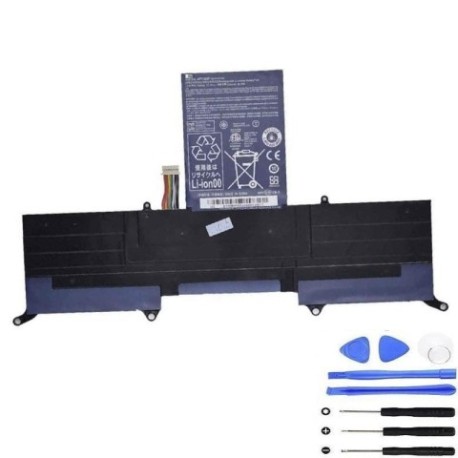
Battery models & part numbers
| Reference / P/N |
|---|
| Acer AP11D3F |
| Acer AP11D4F |
| Acer BT.00303.026 |
| Acer BT.00304.010 |
| Acer BT00303026 |
| Acer-AP11D3F-36Wh |
Compatible models
| Model |
|---|
| Acer Aspire S3-331 |
| Acer Aspire S3-371 |
| Acer Aspire S3-391 |
| Acer Aspire S3-951 |
Introduction
The Acer AP11D3F 36Wh battery is a high-quality replacement solution designed specifically for the Acer Aspire S3 ultrabook series. These slim, lightweight laptops were popular choices for Australian and New Zealand professionals and students seeking portability without sacrificing performance. Over time, lithium-ion batteries naturally degrade, and if you’re still getting good use from your Aspire S3, a battery replacement can extend its life significantly.
Common signs you need a replacement
| Symptom | Cause | Verification | Recommendation |
|---|---|---|---|
| Battery drains quickly (less than 1 hour) | Reduced capacity from age/cycles | Check battery health in Windows | Consider replacement if under 50% capacity |
| Laptop shuts down unexpectedly | Battery can’t maintain voltage | Monitor battery percentage drops | Replace immediately to prevent data loss |
| Battery won’t charge past certain percentage | Cell imbalance or BMS issues | Try different charger first | Battery replacement needed |
| Laptop only works when plugged in | Complete battery failure | Remove charger – does it power on? | Urgent replacement required |
| Battery swelling or bulging | Gas buildup from degradation | Visual inspection of battery compartment | Stop using immediately and replace |
How to check compatibility
Finding your exact Acer model information is crucial for battery compatibility. For Aspire S3 owners, check the bottom label of your laptop – it should clearly state “Aspire S3-XXX” where XXX represents the specific model number. You can also check within Windows by pressing Windows Key + R, typing “msinfo32”, and looking under System Model. The AP11D3F battery is specifically designed for the Aspire S3 series ultrabooks and is not compatible with other Acer laptop families. Always cross-reference your model number with our compatibility table above.
When to replace
Most lithium-ion batteries like the AP11D3F last 2-4 years with regular use. Consider replacement when your battery health drops below 60% of original capacity, when you experience sudden shutdowns, or if the battery shows physical swelling. For Australian and New Zealand users, extreme temperature variations can accelerate battery degradation, so monitor performance closely if you frequently move between air-conditioned and outdoor environments.
Installation guide
Replacing the battery in your Acer Aspire S3 is relatively straightforward. First, ensure the laptop is completely powered off and unplugged. Flip the laptop over and locate the battery compartment – for most S3 models, you’ll need to remove several Phillips head screws. Carefully disconnect the battery connector from the motherboard, noting its orientation. Remove the old battery and insert the new AP11D3F, reconnecting the cable securely. Reassemble the laptop and allow the new battery to charge fully before first use. The entire process typically takes 15-30 minutes with basic tools.
Usage & care tips
To maximise your new AP11D3F battery’s lifespan, avoid frequent complete discharges – lithium-ion batteries prefer partial discharges between 20-80%. Store your laptop in cool environments (ideally 15-25°C) and avoid leaving it in hot cars or direct sunlight. If you primarily use your laptop plugged in, consider removing the battery once charged to 60% for storage. Calibrate your battery monthly by allowing it to discharge fully then charging to 100% without interruption.
Safety & recycling in AU/NZ
In Australia and New Zealand, lithium-ion batteries must be recycled properly through authorised collection points. Never dispose of batteries in household waste due to fire risk. Major retailers like Officeworks, JB Hi-Fi, and Battery World offer free battery recycling services. Some local councils also provide battery recycling at waste transfer stations. If your old battery shows any swelling, handle with care and take it to a professional recycling centre immediately.
FAQ
How long does the AP11D3F 36Wh battery typically last?
With normal use, expect 2-4 years or 300-500 charge cycles before significant capacity loss.
Will this battery work with my Acer Aspire S3 that originally had a different part number?
Yes, the AP11D3F is cross-compatible with all part numbers and models listed in our tables above.
How do I know if my battery needs replacement or if it’s a charger issue?
Try your laptop with a known-good charger first. If it works only when plugged in, the battery likely needs replacement.
Is professional installation required?
No, most users can replace the battery themselves following our guide, but if uncomfortable, local computer repair shops can assist.
What’s the warranty on replacement batteries?
Quality replacement batteries typically come with 12-24 month warranties – check specific product details.
Can I use my laptop while the new battery charges?
Yes, modern laptops are designed for this, though charging may take slightly longer under heavy use.
How should I dispose of my old Acer battery in Australia?
Take it to any Batteryback collection point or authorised e-waste recycling facility – never in household bin.