Acer AP11B7F 36Wh Battery Replacement Guide for Australian & New Zealand Users
If you’re experiencing battery issues with your Acer Iconia tablet, you’ve come to the right place. This comprehensive guide covers everything AU/NZ consumers need to know about replacing their Acer battery with the genuine AP11B7F 36Wh model.
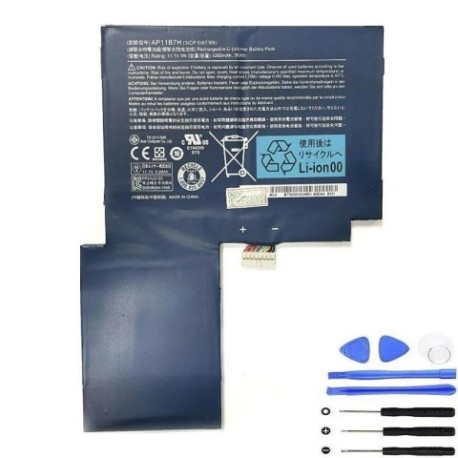
Battery models & part numbers
| Reference / P/N |
|---|
| Acer AP11B3F |
| Acer AP11B7F |
| Acer BT.00303.024 |
| Acer BT.00307.034 |
| Acer-AP11B7F-36Wh |
Compatible models
| Model |
|---|
| Acer Iconia W500 |
| Acer Iconia W500P |
| Acer Iconia W501 |
| Acer Iconia W501P |
Introduction
The Acer Iconia W500 and W501 series were innovative 2-in-1 tablets that offered both tablet convenience and laptop functionality. These devices were popular in Australia and New Zealand for their versatility and performance. However, like all lithium-ion batteries, they degrade over time and eventually need replacement. The AP11B7F 36Wh battery is the authorised replacement that ensures your device continues to perform optimally.
Common signs you need a replacement
| Symptom | Cause | Verification | Recommendation |
|---|---|---|---|
| Significantly reduced battery life | Natural battery degradation over 2-3 years | Check battery health in Windows settings | Replace if capacity drops below 60% |
| Device shuts down unexpectedly | Battery can’t maintain stable voltage | Monitor shutdown percentages | Immediate replacement recommended |
| Battery swelling or bulging | Internal chemical breakdown | Visual inspection of device casing | Stop using immediately and replace |
| Charging takes much longer | Increased internal resistance | Time charging from 0-100% | Replace if charging exceeds 4 hours |
| Battery percentage jumps erratically | Faulty battery management system | Observe percentage changes during use | Replace to prevent data loss |
How to check compatibility
Before purchasing any replacement battery for your Acer device, it’s crucial to verify compatibility. For Acer Iconia tablets, you can find your model information in several ways. Check the bottom casing of your device for a sticker that displays the exact model number. Alternatively, boot into Windows and navigate to System Information (press Windows key + R, type “msinfo32”, and press Enter). Look for “System Model” in the system summary. The AP11B7F battery is specifically designed for the W500 and W501 series tablets. If you own any of the compatible models listed above, this battery will fit perfectly. You can also use Acer’s official support website by entering your serial number to confirm compatibility.
When to replace
Most lithium-ion batteries like the AP11B7F have a lifespan of 2-3 years with regular use. If your Acer Iconia is over two years old and you’re noticing significantly reduced battery life, it’s likely time for a replacement. Other indicators include the battery not holding a charge, the device shutting down unexpectedly even when showing adequate charge, or physical swelling of the battery compartment. In Australia’s varied climate conditions, from humid coastal areas to dry inland regions, battery degradation can accelerate, so regular monitoring is essential.
Installation guide
Replacing the battery in your Acer Iconia tablet requires careful attention but is achievable for most users. First, ensure you have the right tools: a small Phillips screwdriver, plastic spudger or guitar pick, and an anti-static wrist strap. Power off the device completely and disconnect any cables. Place the tablet screen-down on a soft, clean surface. Remove the screws from the back cover – these are typically located around the edges. Use your plastic tool to gently pry open the back cover, starting from one corner and working your way around. Be patient as the clips can be delicate. Once inside, locate the battery connector and carefully disconnect it. Remove any screws securing the battery, then lift it out. Place your new AP11B7F battery in position, reconnect the battery cable, and reassemble the device. Test the device before fully securing all screws.
Usage & care tips
To maximise the lifespan of your new Acer battery, follow these best practices. Avoid exposing your device to extreme temperatures – don’t leave it in a hot car or direct sunlight for extended periods. Ideal operating temperatures are between 10°C and 35°C. Try to keep your battery between 20% and 80% charge for daily use rather than constantly charging to 100%. If storing the device for extended periods, charge it to around 50% first. Use only the original Acer charger or a high-quality replacement to ensure proper charging voltage and current. Regularly update your device’s firmware as Acer often releases battery optimisation improvements.
Safety & recycling in AU/NZ
Battery safety is paramount, especially in Australia and New Zealand where we have specific regulations. Never attempt to open or puncture a lithium-ion battery. If you notice any swelling, overheating, or unusual odours, stop using the device immediately and contact a professional. When your old battery reaches end-of-life, don’t dispose of it in household waste. In Australia, you can take used batteries to any Battery World store or participating Officeworks locations for proper recycling. In New Zealand, most electronic retailers accept old batteries for recycling. Many local councils also offer battery recycling services. Proper disposal helps protect our unique environment from hazardous materials.
FAQ
How long does the AP11B7F 36Wh battery typically last?
The AP11B7F battery should provide 4-6 hours of typical use depending on screen brightness and applications running. With power-saving settings enabled, you might achieve up to 7 hours.
Will replacing the battery void my warranty?
If your device is still under manufacturer’s warranty, having the battery replaced by an authorised Acer service centre is recommended. For out-of-warranty devices, self-replacement is acceptable.
How do I calibrate my new battery?
After installation, charge the battery to 100%, then use the device until it shuts down from low battery. Charge it uninterrupted back to 100%. This helps the battery management system accurately gauge capacity.
Can I use a higher capacity battery?
No, you should only use the specified 36Wh capacity. Higher capacity batteries may not fit physically and could damage your device’s charging circuitry.
My device won’t turn on after battery replacement – what should I do?
First, ensure the battery connector is properly seated. Try connecting the charger for 30 minutes, then attempt to power on. If still unresponsive, disconnect and reconnect the battery.
Is the AP11B7F compatible with later Iconia models?
No, this battery is specifically designed for the W500/W501 series. Later Iconia models use different battery configurations and connectors.
Where can I get professional installation help in Australia?
Most JB Hi-Fi service centres and authorised Acer repair partners can install the battery for you. Costs typically range from $50-$80 for labour.
Remember that investing in a genuine Acer AP11B7F battery ensures optimal performance and safety for your valuable device. With proper care and maintenance, your renewed Acer Iconia tablet should serve you well for years to come.