Acer AL10D56 63Wh Battery Replacement Guide for Australian & New Zealand Users
If you’re experiencing shorter battery life or sudden shutdowns with your Acer or Packard Bell laptop, this comprehensive guide covers everything you need to know about the AL10D56 63Wh replacement battery. We’ll walk you through compatible models, installation steps, and essential care tips specifically for AU/NZ conditions.
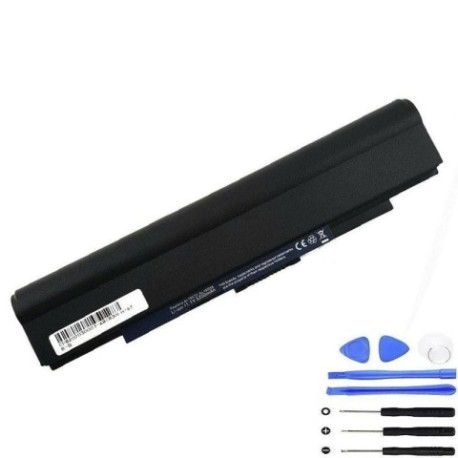
Battery models & part numbers
| Reference / P/N |
|---|
| Acer AL10C31 |
| Acer BT.00603.113 |
| Acer BT.00605.064 |
| Acer NCR-B/663 |
| Acer-AL10D56-63Wh |
Compatible models
| Model |
|---|
| Acer Aspire 1430 |
| Acer Aspire 1430Z |
| Acer Aspire 1551 |
| Acer Aspire 1830 |
| Acer Aspire 1830T |
| Acer Aspire 1830TZ |
| Acer Aspire 1830Z |
| Acer Aspire AO721 AO753s |
| Acer Aspire One 721 |
| Acer Aspire One 753 |
| Acer Aspire TimelineX 1830T |
| Packard Bell dot.A |
| Packard Bell dot.U |
Introduction
The Acer AL10D56 63Wh battery serves as a reliable power source for multiple Acer and Packard Bell laptop models popular in Australia and New Zealand. This lithium-ion battery provides up to 63 watt-hours of capacity, ensuring extended usage for work, study, or entertainment. Many users find their original batteries degrade after 2-3 years of regular use, particularly in our varied climate conditions across AU/NZ.
Common signs you need a replacement
| Symptom | Cause | Verification | Recommendation |
|---|---|---|---|
| Battery drains in under 1 hour | Reduced capacity from age/cycles | Check battery health in Windows | Consider replacement if below 50% |
| Laptop shuts down unexpectedly | Voltage drops under load | Monitor during intensive tasks | Replace immediately for data safety |
| Battery won’t charge past 80% | Charging circuit protection | Check charging indicator lights | Replace to restore full capacity |
| Battery feels warm when not in use | Internal short circuit | Touch test after 30 minutes idle | Replace urgently – safety risk |
| Physical swelling or bulging | Gas buildup from degradation | Visual inspection of battery compartment | Replace immediately – do not use |
How to check compatibility
Before purchasing any replacement battery, proper compatibility checking is essential. For Acer and Packard Bell laptops, start by locating your model number on the bottom casing or under the battery compartment. The AL10D56 battery specifically fits the models listed above. You can also check your current battery’s part number – if it matches any in our reference table, you’re good to go. For additional verification, use Acer’s official support website by entering your serial number, or consult with authorised service centres in Australia or New Zealand.
When to replace
Most laptop batteries need replacement after 300-500 complete charge cycles or approximately 2-3 years of regular use. In Australia and New Zealand’s climate, heat exposure can accelerate degradation. Consider replacement when your battery holds less than 60% of its original capacity, shows physical damage, or causes system instability. The AL10D56 replacement becomes necessary when you notice consistent performance issues across multiple compatible models.
Installation guide
Replacing your Acer battery is straightforward with proper preparation. First, power down your laptop completely and disconnect the AC adapter. Flip the device over and locate the battery release latch – most compatible models have a simple sliding mechanism. Slide the latch to unlock position and gently remove the old battery. Align the new AL10D56 battery with the connectors, ensuring proper orientation (the alignment pins should match). Press firmly until you hear a click, then slide the lock back into place. Power on your laptop and allow the system to recognise the new battery. For Aspire One models, you may need to remove a few screws from the battery compartment cover first.
Usage & care tips
To maximise your new battery’s lifespan in Australian and New Zealand conditions, avoid extreme temperatures – never leave your laptop in a hot car or direct sunlight. Ideal operating temperature is between 10°C and 35°C. For optimal battery health, try to keep charge levels between 20% and 80% for daily use. Complete full discharge cycles only once every 1-2 months to recalibrate the battery meter. If storing long-term, charge to around 50% and store in a cool, dry place. Unplug the AC adapter when battery reaches 100% to prevent overcharging stress.
Safety & recycling in AU/NZ
Battery safety is paramount. Never attempt to open or modify lithium-ion batteries. If your battery shows signs of swelling, leaking, or overheating, discontinue use immediately and contact professional disposal services. In Australia, check with your local council for battery recycling programmes – many Officeworks and Battery World locations offer free battery recycling. In New Zealand, most transfer stations and some retailers provide battery recycling services. Proper disposal helps protect our unique environment from hazardous materials.
FAQ
How long does the AL10D56 battery typically last?
With normal use, expect 2-4 years depending on usage patterns and environmental conditions. Heavy users in warmer climates may experience shorter lifespan.
Will this battery work with my Packard Bell dot series?
Yes, the AL10D56 is fully compatible with Packard Bell dot.A and dot.U models, as these share the same hardware platform as equivalent Acer models.
Do I need to calibrate the new battery?
It’s recommended to perform one full charge cycle (charge to 100%, use until shutdown, then recharge fully) to ensure accurate battery percentage readings.
Can I use my laptop while charging the new battery?
Yes, modern laptops are designed for simultaneous use and charging. The system automatically manages power flow between battery and AC adapter.
What warranty comes with replacement batteries?
Quality replacements typically offer 12-24 month warranties. Always purchase from authorised retailers to ensure warranty validity in Australia and New Zealand.
How do I dispose of my old battery safely?
Never dispose of lithium batteries in household waste. Use designated recycling centres – most electronics retailers in AU/NZ accept old batteries for proper recycling.
Will replacing the battery void my laptop warranty?
If your original warranty is still active, check with Acer support first. For out-of-warranty devices, battery replacement doesn’t affect other components.