Acer AP12A3i 54Wh Battery Replacement Guide for Australian & New Zealand Users
If your Acer laptop is struggling to hold charge or showing battery warning signs, our comprehensive guide helps you find the right replacement battery and install it safely. We’ve compiled all compatible models and part numbers specifically for AU/NZ customers.
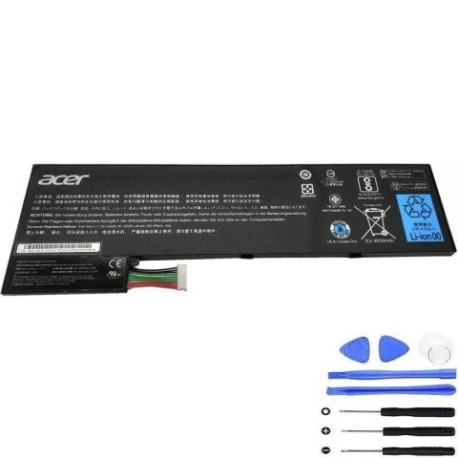
Battery models & part numbers
| Reference / P/N |
|---|
| Acer AP12A |
| Acer AP12A3i |
| Acer AP12A4i |
| Acer BT.00303.028 |
| Acer BT.00304.011 |
| Acer BT00304011 |
| Acer KT.00303.002 |
| Acer KT.00304.006 |
Compatible models
| Model |
|---|
| Acer Aspire M3-481 |
| Acer Aspire M3-481G |
| Acer Aspire M3-581G |
| Acer Aspire M3-581PT |
| Acer Aspire M3-581T |
| Acer Aspire M3-581TG |
| Acer Aspire M5-481 |
| Acer Aspire M5-481G |
| Acer Aspire M5-481PT |
| Acer Aspire M5-481T |
| Acer Aspire M5-481TG |
| Acer Aspire M5-581G |
| Acer Aspire M5-581T |
| Acer Aspire M5-581TG |
| Acer Aspire Timeline Ultra M5-481PTG |
| Acer Aspire TimelineU M3-481G |
| Acer Aspire TimelineU M3-581PT |
| Acer Aspire TimelineU M3-581PTG |
| Acer Aspire TimelineU M3-581T |
| Acer Aspire TimelineU M3-581TG |
| Acer Aspire TimelineU M5-581TG |
| Acer Iconia W700 |
| Acer Iconia W700-323b4G06as |
| Acer Iconia W700P |
| Acer TravelMate P645-M |
| Acer TravelMate P645-MG |
| Acer TravelMate P645-S |
| Acer TravelMate P645-SG |
| Acer TravelMate P645-VG |
| Acer TravelMate P645-VG-9821 |
| Acer TravelMate P648-G2-M |
| Acer TravelMate P648-G2-MG |
| Acer TravelMate P648-G3-M |
| Acer TravelMate P648-M |
| Acer TravelMate P648-MG |
| Acer TravelMate P658-G2-M |
| Acer TravelMate P658-G2-MG |
| Acer TravelMate P658-G3-M |
| Acer TravelMate P658-M |
| Acer TravelMate P658-MG |
Introduction
As your Acer laptop ages, battery performance naturally declines. The AP12A3i 54Wh battery serves numerous Acer models across the Aspire, TravelMate, and Iconia series. Understanding when to replace and how to choose the right battery saves you money and extends your laptop’s life. For AU/NZ customers, proper battery disposal and authorised replacements are particularly important due to our strict environmental regulations.
Common signs you need a replacement
| Symptom | Cause | Verification | Recommendation |
|---|---|---|---|
| Rapid discharge (less than 1 hour) | Battery cell degradation | Check battery health in Windows Power Report | Immediate replacement needed |
| Laptop won’t power on without charger | Complete battery failure | Remove charger – device shuts down | Urgent replacement required |
| Battery percentage jumps erratically | Faulty battery circuitry | Monitor percentage changes during use | Replace within 2-4 weeks |
| Battery swelling or bulging | Gas buildup from cell damage | Visual inspection of battery compartment | Stop using immediately – safety hazard |
| Overheating during charging | Internal short circuits | Feel battery temperature while charging | Replace battery to prevent damage |
How to check compatibility
Finding your exact Acer model is crucial for battery compatibility. Check the bottom label of your laptop for the complete model number including suffixes like -M, -G, or -TG. For Aspire M3/M5 series, the specific variant matters as some have different battery connectors. Use Acer’s official support website by entering your serial number to verify compatible parts. Many Australian retailers also offer compatibility checkers where you can input your model number. Remember that part numbers like BT.00304.011 and KT.00304.006 are interchangeable with AP12A3i for these specific models.
When to replace
Most Acer batteries last 2-3 years with regular use. Consider replacement when your battery capacity drops below 60% of original, or after approximately 500 charge cycles. For business users with TravelMate models, proactive replacement at 18-24 months ensures uninterrupted productivity. Students using Aspire models should monitor battery health before important study periods. The AP12A3i typically shows noticeable degradation after 18 months of daily use in our Australian climate conditions.
Installation guide
Replacing your Acer battery is straightforward with proper preparation. First, power down completely and disconnect the charger. For most compatible models, you’ll find the battery secured by one or two sliding latches. Gently push the latches outward while lifting the battery. Clean the battery compartment with isopropyl alcohol before inserting the new AP12A3i. Ensure the connectors align properly – you should hear a click when securely seated. Many Aspire M3/M5 models have tool-less battery removal, while some TravelMate variants may require a small Phillips screwdriver. Always handle the new battery by its edges to avoid damaging the cells.
Usage & care tips
Maximise your new AP12A3i battery’s lifespan with proper care. Avoid frequent full discharges – lithium-ion batteries prefer partial cycles. Ideal storage temperature is 15-25°C, avoiding extreme heat common in Australiansummers. Calibrate your new battery by charging to 100%, then using until it shuts down, then charging uninterrupted overnight. For TravelMate business laptops, enable Acer Power Management software to optimise charging patterns. Don’t leave your laptop plugged in constantly – occasional battery use maintains cell health. Store between 40-80% charge if not using for extended periods.
Safety & recycling in AU/NZ
Battery safety is regulated under Australian Consumer Law and NZ Consumer Guarantees Act. Never attempt to open or puncture batteries. If swelling occurs, place in a fire-proof container and contact your local recycling centre immediately. In Australia, use Battery Recycling services available at most Officeworks, Aldi, and Bunnings locations. New Zealand residents can utilise the Agrecovery programme for free battery disposal. Proper recycling prevents heavy metal contamination and recovers valuable materials. Always purchase from authorised sellers to ensure compliance with Australian/New Zealand safety standards.
FAQ
How long does the AP12A3i battery typically last?
With normal use, expect 2-3 years or 500-800 charge cycles. Heavy users may need replacement sooner.
Will this battery work with my Acer TravelMate P645-MG?
Yes, the AP12A3i is specifically compatible with the TravelMate P645-MG and all variants listed above.
Is installation difficult for beginners?
Most compatible models feature tool-less battery replacement requiring no technical skills. Simply follow our guide.
How do I verify my battery is genuine?
Check for proper Acer branding, correct voltage (11.1V), and purchase from reputable suppliers with Australian warranties.
What’s the warranty on replacement batteries?
Quality replacements typically offer 12-24 month warranties complying with Australian Consumer Law protections.
Can I use my laptop while charging the new battery?
Yes, modern Acer laptops support pass-through charging allowing simultaneous use and charging.
Where should I recycle my old Acer battery in New Zealand?
Most electronics retailers and transfer stations accept batteries through the e-waste recycling programme.