Acer AP12E3K 28Wh Battery Replacement: Complete Guide for Australian & New Zealand Users
If your Acer Aspire S7-191 is struggling to hold charge or showing battery warning signs, you’ve come to the right place. This comprehensive guide covers everything Australian and New Zealand consumers need to know about replacing their laptop battery with the genuine Acer AP12E3K 28Wh model.
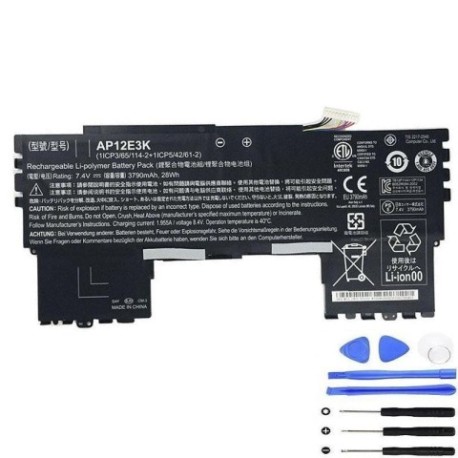
Battery models & part numbers
| Reference / P/N |
|---|
| Acer-AP12E3K-28Wh |
| KT.00403.008 |
| KT00403008 |
Compatible models
| Model |
|---|
| Acer Aspire S7-191 |
Introduction
The Acer Aspire S7-191 is a premium ultrabook known for its sleek design and portability, but like all laptops, its battery will eventually need replacement. The AP12E3K 28Wh battery is the official replacement that ensures your device maintains optimal performance and safety standards. For Australian and New Zealand users, choosing the correct battery replacement is crucial for maintaining your laptop’s warranty compliance and ensuring compatibility with local power standards.
Common signs you need a replacement
| Symptom | Cause | Verification | Recommendation |
|---|---|---|---|
| Battery drains quickly (under 1 hour) | Reduced battery capacity from age/cycles | Check battery health in Windows Power Report | Replace if capacity below 60% of original |
| Laptop shuts down unexpectedly | Battery can’t maintain voltage under load | Monitor battery percentage during use | Immediate replacement recommended |
| Battery won’t charge past 80-90% | Battery management system failure | Check charging status in Acer Care Center | Replace to restore full charging capability |
| Battery swelling or bulging | Internal chemical degradation | Visual inspection of battery compartment | Stop using immediately and replace |
| Overheating during charging | Inefficient charging circuits | Monitor temperature with hardware tools | Replace to prevent damage to laptop |
How to check compatibility
Before purchasing any battery replacement for your Acer Aspire S7-191, it’s essential to verify compatibility. Start by checking the original battery’s part number – you’ll find this printed on the battery itself when removed from the laptop. For Acer devices, you can also use the Acer Support website by entering your serial number or using the automatic detection tool. The Aspire S7-191 specifically requires the AP12E3K 28Wh battery, which may also be listed under part numbers KT.00403.008 or KT00403008. Always cross-reference with multiple sources including the original purchase documentation and Acer’s official parts database.
For Australian and New Zealand consumers, it’s particularly important to ensure the replacement battery meets local safety standards. Look for the RCM mark (Regulatory Compliance Mark) which indicates compliance with Australian communications and media authority requirements. The battery should also carry the CE mark for European conformity, though Australian standards are generally aligned with international safety requirements for lithium-ion batteries.
When to replace
Most laptop batteries, including the Acer AP12E3K 28Wh, are designed for approximately 300-500 full charge cycles before significant capacity degradation occurs. For typical users, this translates to 2-3 years of regular use. However, several factors specific to Australian and New Zealand conditions can affect battery lifespan. High ambient temperatures common in Australian summers can accelerate battery degradation, as lithium-ion batteries perform best between 15°C and 25°C. Similarly, frequent power cycling between battery and mains power in areas with unreliable electricity can shorten battery life.
Monitor your battery’s health through Windows Battery Report (run powercfg /batteryreport in Command Prompt) or Acer’s built-in diagnostic tools. When your battery capacity drops below 60% of its original specification or you notice significant performance issues, replacement is recommended. Don’t wait until complete failure – a degraded battery can cause system instability and potentially damage other components.
Installation guide
Replacing the battery in your Acer Aspire S7-191 requires careful attention to detail but is manageable for most users with basic technical skills. Begin by completely shutting down your laptop and disconnecting all peripherals. Place the laptop on a clean, static-free surface. You’ll need a small Phillips screwdriver and a plastic spudger or guitar pick for this procedure.
Turn the laptop over and locate the battery compartment. The Aspire S7-191 typically has several small screws securing the bottom cover. Remove these carefully and set them aside in a secure container. Use the plastic tool to gently pry open the bottom casing, working your way around the edges. Be patient – these ultrabooks have precise fittings that require careful handling.
Once inside, locate the battery connector. It’s crucial to disconnect the battery before proceeding with any internal work. Gently pull the connector straight out – avoid twisting or using excessive force. Remove any screws securing the battery in place, then carefully lift the battery out. Take this opportunity to clean any dust from the interior using compressed air.
Position your new AP12E3K 28Wh battery in place, secure it with the appropriate screws, and reconnect the battery connector. Ensure all connections are firm but not forced. Replace the bottom cover, securing it with all original screws. Power on your laptop and allow it to recognise the new battery. It’s recommended to perform a full charge cycle (charge to 100%, then discharge to near empty) to calibrate the battery monitoring system.
Usage & care tips
Proper battery maintenance can significantly extend the lifespan of your new AP12E3K 28Wh battery. Avoid exposing your laptop to extreme temperatures – never leave it in a hot car during Australian summers, as temperatures can exceed 60°C and cause permanent battery damage. Similarly, avoid using your laptop in direct sunlight for extended periods.
For optimal battery health, maintain charge levels between 20% and 80% for daily use. While modern batteries don’t suffer from the “memory effect” of older technologies, frequent full discharges can stress the battery. If you primarily use your laptop plugged in, consider setting a charge limit through Acer’s power management software to preserve battery health.
Australian power conditions can vary significantly between regions. Use a quality surge protector to protect your laptop and battery from power spikes. When travelling between Australia and New Zealand, ensure your charger is compatible with local voltage standards (both countries use 230V, 50Hz).
Safety & recycling in AU/NZ
Lithium-ion batteries require careful handling and proper disposal. In Australia, batteries should never be disposed of in household waste due to fire risk and environmental concerns. Most states have battery recycling programs through organisations like Battery World or council recycling centres. In New Zealand, the Ministry for the Environment recommends taking used batteries to designated recycling facilities.
If your old battery shows signs of swelling, damage, or leakage, handle it with extreme care. Place it in a non-flammable container and take it to a professional recycling facility immediately. Many electronics retailers in both countries offer battery recycling services.
When storing batteries long-term, maintain a charge level of around 40-50% and store in a cool, dry place away from metal objects. Never attempt to disassemble or puncture a lithium-ion battery, as this can cause thermal runaway and fire.
FAQ
How long does the AP12E3K 28Wh battery typically last?
The original battery should provide 5-7 hours of typical use, though this varies based on screen brightness, applications running, and wireless connectivity usage. Replacement batteries from reputable suppliers should meet or exceed original specifications.
Will replacing my battery void my Acer warranty?
In Australia and New Zealand, consumer law protects your right to have devices serviced by qualified technicians. However, damage caused by improper installation may not be covered. Using genuine Acer parts is always recommended to maintain compatibility and safety.
How can I verify I’m purchasing a genuine Acer battery?
Look for official packaging, proper labelling with all part numbers, and purchase from authorised resellers. Genuine batteries will have proper safety certifications and typically come with a warranty.
My new battery isn’t charging – what should I do?
First, ensure all connections are secure. Try resetting the battery by shutting down, disconnecting AC power, holding the power button for 30 seconds, then reconnecting and powering on. If issues persist, contact the supplier.
Can I use a higher capacity battery in my Aspire S7-191?
No, the laptop’s power management system is calibrated for the specific 28Wh capacity. Using incompatible batteries can cause system instability and potential safety issues.
How should I dispose of my old battery in Australia?
Take it to a designated battery recycling point at most electronics retailers or council waste facilities. Many offer free recycling services for household batteries.
What’s the typical cost for professional installation?
In AU/NZ, expect to pay $50-100 for professional battery replacement service, plus the cost of the battery itself. Many users find the DIY approach straightforward with proper guidance.