Acer AP13G3N 25Wh Battery Replacement for Iconia W3-810 Tablets
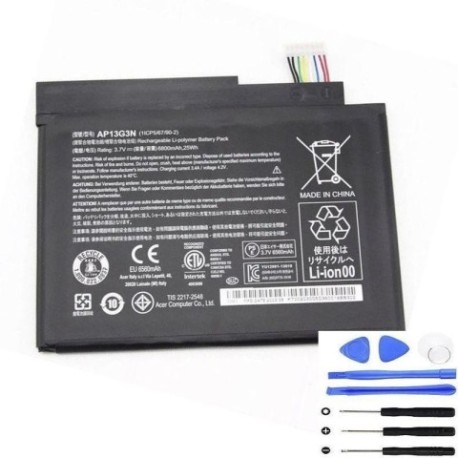
If your Acer Iconia W3-810 tablet is struggling to hold a charge or showing battery-related issues, you’ve come to the right place. This comprehensive guide covers everything Australian and New Zealand users need to know about replacing their tablet battery with the genuine Acer AP13G3N 25Wh replacement.
Battery models & part numbers
| Reference / P/N |
|---|
| Acer-AP13G3N-25Wh |
| KT00203005 |
Compatible models
| Model |
|---|
| Acer Iconia W3-810 |
| Acer Iconia W3-810 8s Tablet |
| Acer Iconia W3-810P |
Introduction
The Acer Iconia W3-810 series represents some of Acer’s most popular 8-inch Windows tablets, known for their portability and versatility. However, like all lithium-ion batteries, they degrade over time. Understanding when and how to replace your battery can extend your tablet’s lifespan significantly.
Common signs you need a replacement
| Symptoms | Causes | Verification | Recommendation |
|---|---|---|---|
| Rapid battery drain | Reduced capacity from age/cycles | Check battery health in Windows | Consider replacement if under 70% capacity |
| Tablet shutting down unexpectedly | Voltage drops under load | Monitor shutdown percentages | Replace immediately for reliable use |
| Battery not charging to 100% | Cell degradation | Observe charging patterns | Replace if stuck below 80% regularly |
| Tablet swelling or bulging | Gas buildup from damaged cells | Visual inspection | Replace immediately – safety hazard |
| Overheating during charging | Internal resistance increase | Touch temperature check | Replace if uncomfortably hot |
How to check compatibility
For Acer Iconia W3-810 tablet owners, compatibility checking is straightforward. First, locate your tablet’s model number on the back cover or in system information. All W3-810 variants (including the 8s Tablet and W3-810P) use the same AP13G3N battery. You can verify this through Acer’s official support website by entering your serial number or using their compatibility checker tool. Many Australian computer repair centres also offer free compatibility checks if you’re uncertain.
When to replace
Most Acer Iconia W3-810 batteries last 2-3 years with regular use. Consider replacement when your battery health drops below 70% capacity, you experience sudden shutdowns above 20% charge, or charging takes significantly longer than when new. Australian climate conditions can accelerate battery degradation, so monitor performance closely during summer months.
Installation guide
Replacing the battery in your Acer Iconia W3-810 requires careful handling. Begin by powering off the tablet completely. Use a plastic opening tool to carefully separate the back cover starting from the edges. The battery is secured with adhesive strips – gently heat the area with a hairdryer on low heat to soften the adhesive. Disconnect the battery connector from the motherboard before removing. Install the new AP13G3N battery, reconnect, and test before resealing the case. Many Australian users find local repair centres convenient for this procedure.
Usage & care tips
To maximise your new battery’s lifespan: avoid frequent full discharges, keep the tablet between 15-35°C during use, and store with 40-80% charge if not used for extended periods. Australian summers can be harsh on batteries – never leave your tablet in direct sunlight or hot vehicles. Use only Acer-authorised chargers to prevent damage.
Safety & recycling in AU/NZ
In Australia and New Zealand, lithium-ion batteries must be recycled properly. Never dispose of old batteries in household waste. Most electronics retailers offer free battery recycling services. If your old battery shows any swelling, handle with care and take it to a designated recycling centre immediately. Many local councils provide battery recycling options – check your council’s website for locations.
FAQ
How long does the AP13G3N battery typically last?
With normal use, expect 3-5 hours of continuous use depending on screen brightness and applications running.
Can I use third-party batteries with my Iconia W3-810?
While possible, we recommend genuine Acer batteries for optimal performance and safety compliance with Australian standards.
How do I check my current battery health?
In Windows, open Command Prompt as administrator and type “powercfg /batteryreport” to generate a detailed battery health report.
Will replacing the battery void my warranty?
If your tablet is still under manufacturer warranty, have the replacement performed by an Acer-authorised service centre in Australia.
How long does shipping take to AU/NZ addresses?
Most suppliers deliver within 5-10 business days to major Australian and New Zealand cities.
What tools do I need for installation?
Basic tools include plastic spudgers, Phillips screwdrivers, and optionally a heat gun or hairdryer for adhesive removal.
Can I replace the battery myself if I’m not technically skilled?
While the process is moderately difficult, many Australian users successfully complete it by following detailed video tutorials. Consider professional installation if unsure.