Asus A31N1319 33Wh Laptop Battery Replacement Guide
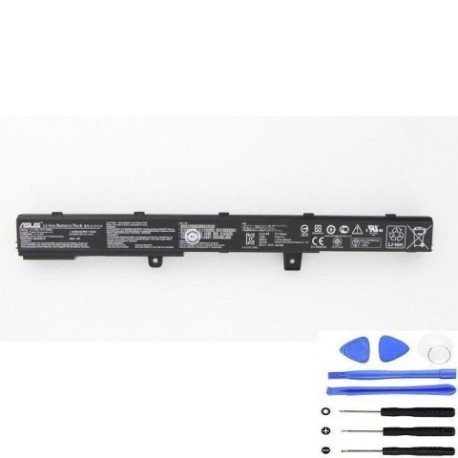
Introduction
If your Asus laptop is showing signs of battery fatigue, you’ve come to the right place. The Asus A31N1319 33Wh battery replacement is a common need for many Asus laptop owners across Australia and New Zealand. This comprehensive guide covers everything from compatibility checking to installation, specifically tailored for our AU/NZ audience with local safety standards and recycling information.
Battery models & part numbers
| Reference / P/N |
|---|
| Asus-A31N1319-33Wh |
Compatible models
| Model |
|---|
| Asus 0B110-00250000 |
| Asus 0B110-00250100 |
| Asus 0B110-00250200 |
| Asus 0B110-00250600 |
| Asus 0B110-00250700 |
| Asus 0B110-00250800 |
| Asus A41N1308 |
| Asus F551M |
| Asus F551MAV |
| Asus F551MAV-DB02-B |
| Asus F551MAV-SX |
| Asus R411MA |
| Asus X451CA |
| Asus X451CA-1A |
| Asus X451CA-1G |
| Asus X451CA-2A |
| Asus X451CA-3G |
| Asus X451M |
| Asus X451MA |
| Asus X451MA-1A |
| Asus X451MA-1G |
| Asus X451MA-2A |
| Asus X451MA-3G |
| Asus X45Li91 |
| Asus X45Li9C |
| Asus X551CA-1A |
| Asus X551CA-3G |
| Asus X551MA |
| Asus X551MA-1A |
| Asus X551MA-3G |
Common signs you need a replacement
| Symptom | Cause | Verification | Recommendation |
|---|---|---|---|
| Battery drains quickly (less than 1 hour) | Reduced capacity from age/cycles | Check battery health in Windows | Replace if capacity below 60% |
| Laptop shuts down unexpectedly | Voltage drops under load | Monitor battery percentage drops | Immediate replacement needed |
| Battery won’t charge past certain percentage | Battery management system failure | Observe charging behaviour | Replace battery unit |
| Battery swelling or bulging | Internal gas buildup | Visual inspection | Stop using immediately and replace |
| Overheating during charging | Internal resistance increase | Touch test during charge | Replace to prevent damage |
How to check compatibility
Finding your exact Asus model number is crucial for battery compatibility. For Asus laptops in the compatible list above, locate the model number typically found on a sticker on the bottom case, under the battery compartment, or in the system information (press Windows key + R, type “msinfo32”, and check System Model). The A31N1319 battery fits multiple Asus series including X451, X551, F551, and R411 models. Always cross-reference with our compatibility table above and consider using Asus’s official support website with your serial number for verification.
When to replace
Most laptop batteries last 2-4 years with regular use. Replace your Asus battery when you notice significant performance degradation, typically when runtime drops below 60% of original capacity or when Windows reports “Consider replacing your battery”. For business users in AU/NZ, proactive replacement at 2-3 years can prevent productivity loss.
Installation guide
Replacing your Asus A31N1319 battery is straightforward. First, power off your laptop and disconnect the AC adapter. Flip the laptop over and locate the battery release latches – most compatible models have external battery compartments. Slide the latches to release the battery, then gently lift it out. Insert the new A31N1319 battery, ensuring proper alignment of connectors. Press firmly until it clicks into place. Power on your laptop and allow the system to recognise the new battery. Charge fully before first use for optimal performance.
Usage & care tips
To maximise your new Asus battery’s lifespan in Australia’s varying climate conditions: avoid extreme temperatures (ideal range 15-25°C), don’t leave your laptop plugged in constantly at 100%, perform occasional full discharge cycles, and store in cool, dry conditions when not in use. For NZ users, be mindful of humidity levels which can affect battery performance.
Safety & recycling in AU/NZ
In Australia and New Zealand, laptop batteries must be disposed of properly through authorised recycling centres. Never dispose of lithium-ion batteries in household waste due to fire risk. Many electronics retailers offer free battery recycling services. Check with your local council for specific disposal guidelines in your area.
FAQ
How long does the A31N1319 battery typically last?
With normal use, expect 2-4 years or 300-500 charge cycles before noticeable capacity loss.
Will this battery work with my Asus laptop if it’s not exactly listed?
Strictly use only with compatible models listed. Using incompatible batteries can damage your device.
Do I need to calibrate the new battery?
Yes, perform a full charge-discharge cycle after installation for accurate battery reporting.
Is this battery genuine Asus or compatible?
This is a high-quality compatible battery meeting original specifications and safety standards.
What warranty comes with the battery?
Typically 12 months warranty from reputable suppliers, covering manufacturing defects.
Can I use my laptop while charging the new battery?
Yes, modern laptops are designed for simultaneous use and charging without harming the battery.
How do I dispose of my old Asus battery in Australia?
Take it to any Battery World, Officeworks, or similar electronics retailer offering free battery recycling.