Asus A32-F80-48Wh Battery Replacement Guide for Australian & New Zealand Users
Is your Asus laptop struggling to hold a charge? The A32-F80-48Wh replacement battery brings new life to compatible Asus models across Australia and New Zealand. This comprehensive guide covers everything from compatibility checking to installation and proper battery care.
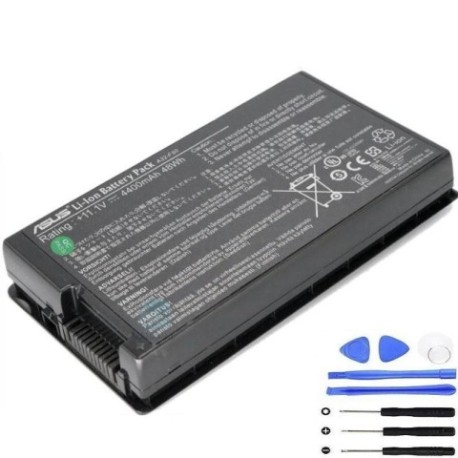
Battery models & part numbers
| Reference / P/N |
|---|
| Asus-A32-F80-48Wh |
Compatible models
| Model |
|---|
| Asus 07G016501875 |
| Asus 07G016Y01865 |
| Asus 07G016Y0186A |
| Asus 07G016Y2186A |
| Asus 0B20-00880ASM |
| Asus 70-NM81B1200Z |
| Asus 70-NRH1B1000PZ |
| Asus A32-F80A |
| Asus A32-F80H |
| Asus AS-F80L-2A |
| Asus AS-F80S-2A |
| Asus AS-N81A-1A |
| Asus F50GX |
| Asus F50Q |
| Asus F50SF |
| Asus F50SL |
| Asus F50SV |
| Asus F50Z |
| Asus F80 |
| Asus F80A |
| Asus F80CR |
| Asus F80H |
| Asus F80L |
| Asus F80Q |
| Asus F80S |
| Asus F81 |
| Asus F81SE |
| Asus F83 |
| Asus F83SE |
| Asus F83T |
| Asus F83VD |
| Asus F83VF |
| Asus N81A |
| Asus Pro61S |
| Asus Pro61SL |
| Asus Pro80 |
| Asus Pro80E |
| Asus Pro80F |
| Asus Pro80Fm |
| Asus Pro80H |
| Asus Pro80Hm |
| Asus Pro80Jc |
| Asus Pro80Jn |
| Asus Pro80Jr |
| Asus Pro80Js |
| Asus Pro80Jt |
| Asus X61G |
| Asus X61Q |
| Asus X61S |
| Asus X61SF |
| Asus X61SL |
| Asus X61SV |
| Asus X61Z |
Common signs you need a replacement
| Symptom | Cause | Verification | Recommendation |
|---|---|---|---|
| Battery drains quickly (less than 1 hour) | Ageing lithium-ion cells losing capacity | Check Windows battery report or Asus Power4Gear | Replace if capacity below 50% of original |
| Laptop shuts down unexpectedly | Voltage drops under load, battery can’t sustain power | Monitor during intensive tasks like video streaming | Immediate replacement recommended |
| Battery won’t charge past certain percentage | Battery management system limiting charge to prevent damage | Observe charging behaviour over multiple cycles | Replace if stuck below 80% consistently |
| Battery swelling or physical deformation | Gas buildup from internal chemical reactions | Visual inspection, check if laptop doesn’t sit flat | Remove immediately and replace – safety hazard |
| Overheating during charging | Increased internal resistance in ageing cells | Touch test (be careful), monitor temperature | Replace to prevent damage to laptop components |
How to check compatibility
Finding your exact Asus model number is crucial for battery compatibility. For F-series and Pro-series laptops compatible with the A32-F80-48Wh battery, check these locations:
Physical Labels: Turn your laptop over and look for the model number sticker. It’s usually near the battery compartment or on the bottom case. Common formats include “F80A”, “F83SE”, or “Pro80Jc”.
System Information: Press Windows Key + R, type “msinfo32” and look for “System Model”. This shows the exact model Asus recognises.
Asus Support Website: Visit the official Asus support centre and use their compatibility checker tool. Enter your serial number or model for verified parts compatibility.
Battery Compartment: Remove the current battery (if removable) and check the part number printed on it. The A32-F80-48Wh directly replaces batteries with matching specifications.
When to replace your Asus battery
Most Asus laptop batteries last 2-3 years with regular use. Consider replacement when:
- Battery runtime drops below 60% of original capacity
- Your laptop is 2+ years old and you rely on portability
- You experience any of the warning signs mentioned above
- The battery shows physical damage or swelling
- You’re preparing for important travel or work projects
For Australian and New Zealand users, consider our climate conditions. Higher temperatures in northern Australia can accelerate battery degradation, so you might need replacement sooner than the typical lifespan.
Installation guide for Asus A32-F80-48Wh battery
Replacing your Asus battery is straightforward with these steps:
- Power down completely – Shut down your laptop and disconnect the AC adapter
- Ground yourself – Touch a metal surface to discharge static electricity
- Access battery compartment – For most F-series models, flip the laptop over and locate the battery release latches
- Remove old battery – Slide the release latches outward and lift the battery out carefully
- Install new battery – Align the new A32-F80-48Wh battery with the connectors and press firmly until it clicks into place
- Initial charge – Connect the AC adapter and charge fully before first use (about 4-6 hours)
- Calibration
Note for specific models: Some Pro series and F83 models may have internal batteries requiring professional installation. If unsure, consult Asus service centres in Australia or New Zealand.
Usage & care tips for longer battery life
Maximise your new A32-F80-48Wh battery’s lifespan with these practices:
- Avoid extreme temperatures – Keep between 15°C and 25°C for optimal performance
- Partial discharges are better – Unlike older batteries, lithium-ion prefers shallow discharges between 20-80%
- Monthly calibration – Occasionally discharge to 10% then charge fully to keep battery meter accurate
- Storage preparation – If storing long-term, charge to 50% and store in cool, dry conditions
- Use genuine chargers – Only use Asus-authorised AC adapters to ensure proper charging voltage
Safety & recycling in AU/NZ
Safety First: Never puncture, crush, or expose lithium-ion batteries to fire or water. If your battery swells, stop using immediately and contact professional disposal services.
Australian Recycling: Use Battery Recycling services available at most Officeworks, Aldi, or Bunnings stores. Many council waste transfer stations also accept laptop batteries free of charge.
New Zealand Recycling: Drop off old batteries at participating Mitre 10, Noel Leeming, or PlaceMakers stores through the eDay recycling programme. Most local council transfer stations also accept e-waste.
FAQ
How long does the A32-F80-48Wh battery typically last?
With normal use, expect 2-3 years or 500-800 charge cycles before capacity noticeably declines. Proper care can extend this to 4 years.
Will this battery work with my Asus F83SE in New Zealand?
Yes, the F83SE is specifically listed in our compatibility table and uses the same A32-F80-48Wh battery specification.
How do I know if my battery is genuine?
Genuine A32-F80-48Wh batteries have proper Asus branding, precise model numbering, and come from authorised suppliers with warranty.
Can I replace the battery myself or should I go to a service centre?
Most compatible models have user-replaceable batteries. However, if your laptop requires disassembly or you’re uncomfortable, visit an Asus-authorised service centre in Australia or NZ.
What’s the warranty on this replacement battery?
Typically 12-24 months from reputable suppliers, covering manufacturing defects and premature capacity loss.
How long does shipping take to regional Australia?
Most suppliers offer 3-7 business days to regional areas, with express options available for metropolitan centres.
Is the 48Wh capacity sufficient for my Asus Pro80 model?
Yes, 48Wh was the original specification for most Pro80 variants and provides 3-5 hours of typical usage depending on power settings.
Ready to restore your Asus laptop’s mobility? Click below to get your genuine A32-F80-48Wh replacement battery delivered across Australia and New Zealand.