Asus A32-K52 47Wh Laptop Battery Replacement Guide
If your Asus laptop is showing signs of battery fatigue, you’ve come to the right place. Our comprehensive guide covers everything Australian and New Zealand customers need to know about replacing their Asus battery with the genuine A32-K52 47Wh model.
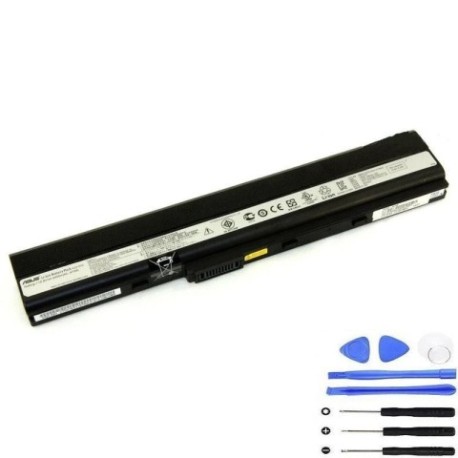
Battery models & part numbers
| Reference / P/N |
|---|
| Asus-A32-K52-47Wh |
Compatible models
| Model |
|---|
| Asus A31-K52 |
| Asus A32-K32 |
| Asus A32-K42 |
| Asus A40DQ |
| Asus A41-K52 |
| Asus A42DY |
| Asus A42J |
| Asus A42JB |
| Asus A42JP |
| Asus A42JY |
| Asus A42JZ |
| Asus A42-K52 |
| Asus A52BY |
| Asus A52JA |
| Asus A52JE |
| Asus A52N-EXN830 |
| Asus AS-K52F-2B |
| Asus B52BY |
| Asus B53E-SO228X |
| Asus B53F |
| Asus B53J |
| Asus B53JC |
| Asus B53X |
| Asus B53XI |
| Asus CVX140D |
| Asus K42DE |
| Asus K42DQ |
| Asus K42DR |
| Asus K42DY |
| Asus K42E |
| Asus K42F |
| Asus K42JA |
| Asus K42JB |
| Asus K42JC |
| Asus K42JE |
| Asus K42JK |
| Asus K42JP |
| Asus K42JR |
| Asus K42JV |
| Asus K42JY |
| Asus K42JZ |
| Asus K42K |
| Asus K42N |
| Asus K52 |
| Asus K52DE |
| Asus K52DR |
| Asus K52DY |
| Asus K52F |
| Asus K52J |
| Asus K52JB |
| Asus K52JC |
| Asus K52JE |
| Asus K52JK |
| Asus K52JR |
| Asus K52JT |
| Asus K52JU |
| Asus K52JV |
| Asus K52N |
| Asus P42EI |
| Asus P42EP |
| Asus P52F |
| Asus P52JC |
| Asus Pro51 |
| Asus Pro51B |
| Asus Pro51K |
| Asus Pro51S |
| Asus Pro51SA |
| Asus Pro67F |
| Asus PRO8FF |
| Asus X42C |
| Asus X42DQ |
| Asus X42DR |
| Asus X42DY |
| Asus X42E |
| Asus X42JA |
| Asus X42JC |
| Asus X42JE |
| Asus X42JF |
| Asus X42JP |
| Asus X42JT |
| Asus X42JX |
| Asus X42JY |
| Asus X42JZ |
| Asus X42N |
| Asus X52BY |
| Asus x52f |
| Asus X52J |
| Asus X52JC |
| Asus X52JE |
| Asus X52JU |
| Asus X5iB |
| Asus X5iBY |
| Asus X5iD |
| Asus X5iDE |
| Asus X5iDR |
| Asus X5iDY |
| Asus X5iF |
| Asus X5iiN |
| Asus X5iJ |
| Asus X5iJB |
| Asus X5iJC |
| Asus X5iJE |
| Asus X5iJK |
| Asus X5iJR |
| Asus X5iJT |
| Asus X5iJU |
| Asus X5iJV |
| Asus X5iN |
| Asus X5KF |
| Asus X5KJ |
| Asus X5KJC |
| Asus X67F |
Common Signs You Need a Replacement Battery
| Symptom | Cause | Verification | Recommendation |
|---|---|---|---|
| Short battery life (under 1 hour) | Battery degradation from charge cycles | Check Windows battery report | Replace if capacity below 60% |
| Laptop won’t hold charge | Failed battery cells | Test with power adapter removed | Immediate replacement needed |
| Battery swelling or bulging | Gas buildup from chemical breakdown | Visual inspection of battery compartment | Replace immediately – safety hazard |
| Overheating during use | Increased internal resistance | Monitor temperature with software | Replace to prevent damage |
| Inaccurate charge percentage | Faulty battery management system | Compare reported vs actual runtime | Calibrate or replace battery |
How to Check Compatibility
Finding your exact Asus model number is crucial for compatibility. Look for the model sticker on the bottom of your laptop – it’s usually near the battery compartment or on the chassis. Common locations include under the battery if it’s removable, or printed directly on the case near the serial number. For Asus K and X series models, the exact model number format matters – note that “K52” and “K52J” require different batteries despite similar names.
You can also check through Windows System Information or use Asus’s official support website by entering your serial number. If you’re unsure, compare the physical dimensions and connector type of your current battery with our A32-K52-47Wh specifications: 207mm x 44mm x 20mm with standard Asus 10-pin connector.
When to Replace Your Asus Battery
Most Asus batteries last 2-3 years with regular use. Replace when capacity drops below 60% of original, when you experience sudden shutdowns, or if the battery shows physical swelling. In Australia’s warmer climate, battery degradation can accelerate, so regular monitoring is essential.
Installation Guide
Replacing your Asus battery is straightforward. First, power off your laptop and disconnect the AC adapter. For most compatible models, the battery is externally accessible – simply slide the locking mechanism and remove the old battery. Align the new A32-K52-47Wh battery with the connectors and press firmly until it clicks into place. Some Pro series models may require removing the bottom panel – use proper screwdrivers and avoid forcing any components.
Usage & Care Tips
For optimal battery life in AU/NZ conditions: avoid leaving your laptop in hot cars (above 45°C), calibrate your battery monthly by fully charging and discharging, and store between 20-80% charge when possible. Use only authorised Asus chargers to prevent damage.
Safety & Recycling in AU/NZ
Never dispose of lithium-ion batteries in household waste. In Australia, use Batteryback or council recycling services. In New Zealand, take to designated recycling centres. Damaged or swollen batteries should be handled with care – place in non-flammable container and take to professional disposal immediately.
FAQ
How long does the A32-K52-47Wh battery last?
Typically 2-4 hours depending on usage and laptop model. Higher performance models like the K52J series may have shorter runtime.
Is this battery genuine Asus?
Yes, we supply original Asus batteries with full manufacturer warranty for Australian and New Zealand customers.
Can I use this battery if my original had different capacity?
Only if explicitly listed as compatible. Using incorrect capacity batteries can damage your laptop.
How do I check my current battery health?
In Windows, open Command Prompt and type “powercfg /batteryreport” to generate detailed battery health information.
What’s the warranty on this battery?
12 months Australian consumer guarantee applies, plus manufacturer warranty.
Do you ship to regional AU/NZ areas?
Yes, we ship nationwide with express options available.
My model isn’t listed – what should I do?
Contact our support team with your exact model number for compatibility verification.