ASUS A41N1611 48Wh Laptop Battery Replacement Guide
If your ASUS gaming or productivity laptop is struggling to hold charge, our comprehensive guide helps Australian and New Zealand users find the perfect battery replacement. The ASUS A41N1611 48Wh battery serves multiple ROG, TUF Gaming, and VivoBook Pro models with reliable power and extended runtime.
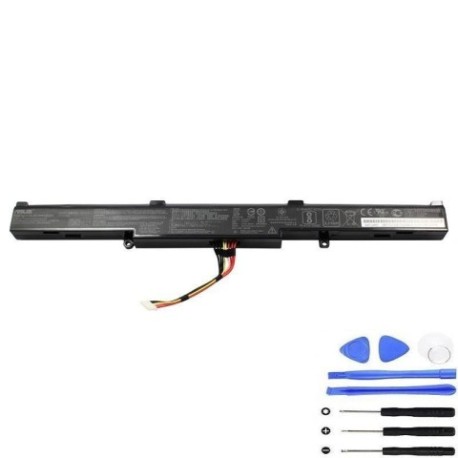
Battery models & part numbers
| Reference / P/N |
|---|
| 0B110-00470000 |
| 0B110-00470100 |
| A41Lk5H |
| Asus-A41N1611-48Wh |
| L41LK2H |
| L41LK9H |
Compatible models
| Model |
|---|
| Asus ROG GL742VL |
| Asus ROG GL742VW |
| Asus ROG GL742VW-T4127T |
| Asus ROG GL742VW-T4144T |
| Asus ROG GL742VW-T4247T |
| Asus ROG GL742VW-T4423T |
| Asus ROG GL742VW-TY134T |
| Asus ROG GL752VL |
| Asus ROG GL752VL-GC057T |
| Asus ROG GL752VW |
| Asus ROG GL752VW-T4003T |
| Asus ROG GL752VW-T4004T |
| Asus ROG GL752VW-T4005T |
| Asus ROG GL752VW-T4016T |
| Asus ROG GL752VW-T4032T |
| Asus ROG GL752VW-T4077T |
| Asus ROG GL752VW-T4079T |
| Asus ROG GL752VW-T4091T |
| Asus ROG GL752VW-T4105 |
| Asus ROG GL752VW-T4108D |
| Asus ROG GL752VW-T4116T |
| Asus ROG GL752VW-T4122T |
| Asus ROG GL752VW-T4130T |
| Asus ROG GL752VW-T4137T |
| Asus ROG GL752VW-T4138T |
| Asus ROG GL752VW-T4179T |
| Asus ROG GL752VW-T4180T |
| Asus ROG GL752VW-T4188T |
| Asus ROG GL752VW-T4189T |
| Asus ROG GL752VW-T4243T |
| Asus ROG Strix GL553VD |
| Asus ROG Strix GL553VD-FY010T |
| Asus ROG Strix GL553VD-FY072T |
| Asus ROG Strix GL553VD-FY073T |
| Asus ROG Strix GL553VD-FY074T |
| Asus ROG Strix GL553VD-FY075T |
| Asus ROG Strix GL553VD-FY076T |
| Asus ROG Strix GL553VD-FY077T |
| Asus ROG Strix GL553VE |
| Asus ROG Strix GL553VE-FY003T |
| Asus ROG Strix GL553VE-FY016T |
| Asus ROG Strix GL553VE-FY096 |
| Asus ROG Strix GL553VE-FY242T |
| Asus ROG Strix GL553VE-FY244T |
| Asus ROG Strix GL553VE-FY247T |
| Asus ROG Strix GL553VW |
| Asus ROG Strix GL553VW-DH71 |
| Asus ROG Strix GL553VW-DM005T |
| Asus ROG Strix GL553VW-FY032T |
| Asus ROG Strix GL553VW-FY089T |
| Asus ROG Strix GL753VD |
| Asus ROG Strix GL753VD-GC009 |
| Asus ROG Strix GL753VD-GC011T |
| Asus ROG Strix GL753VD-GC014T |
| Asus ROG Strix GL753VD-GC032T |
| Asus ROG Strix GL753VD-GC041T |
| Asus ROG Strix GL753VD-GC042 |
| Asus ROG Strix GL753VD-GC043T |
| Asus ROG Strix GL753VD-GC044T |
| Asus ROG Strix GL753VD-GC045T |
| Asus ROG Strix GL753VD-GC061T |
| Asus ROG Strix GL753VD-GC133T |
| Asus ROG Strix GL753VD-GC337T |
| Asus ROG Strix GL753VE |
| Asus ROG Strix GL753VE-DS74 |
| Asus ROG Strix GL753VE-GC004T |
| Asus ROG Strix GL753VE-GC133T |
| Asus ROG Strix GL753VE-GC150T |
| Asus ROG Strix GL753VE-GC151T |
| Asus TUF FX553VD |
| Asus TUF FX553VD-DM234 |
| Asus TUF FX553VD-DM234T |
| Asus TUF FX553VD-DM235T |
| Asus TUF FX553VD-DM236T |
| Asus TUF FX553VD-DM248T |
| Asus TUF FX553VD-DM249T |
| Asus TUF FX553VD-DM603 |
| Asus TUF FX553VD-DM917T |
| Asus TUF FX553VD-DM973T |
| Asus TUF FX553VE |
| Asus TUF FX553VE-DM079T |
| Asus TUF FX553VE-DM131T |
| Asus TUF FX553VE-DM289T |
| Asus TUF FX553VE-DM406 |
| Asus TUF FX553VE-DM486T |
| Asus TUF FX553VE-DM494T |
| Asus TUF FX553VE-DM506 |
| Asus TUF FX753VD |
| Asus TUF FX753VD-GC193T |
| Asus TUF FX753VD-GC206T |
| Asus TUF FX753VD-GC490T |
| Asus TUF FX753VE |
| Asus TUF FX753VE-GC028T |
| Asus TUF FX753VE-GC092T |
| Asus TUF FX753VE-GC108T |
| Asus TUF FX753VE-GC155T |
| Asus TUF FX753VE-GC218 |
| Asus TUF FX753VE-GC224 |
| Asus VivoBook Pro N552VW |
| Asus VivoBook Pro N552VW-FI040T |
| Asus VivoBook Pro N552VW-FI056T |
| Asus VivoBook Pro N552VW-FW026T |
| Asus VivoBook Pro N552VW-FY083T |
| Asus VivoBook Pro N552VW-FY217T |
| Asus VivoBook Pro N552VX |
| Asus VivoBook Pro N552VX-FI018T |
| Asus VivoBook Pro N552VX-FY012T |
| Asus VivoBook Pro N552VX-FY017T |
| Asus VivoBook Pro N552VX-FY026T |
| Asus VivoBook Pro N552VX-FY071T |
| Asus VivoBook Pro N552VX-FY103T |
| Asus VivoBook Pro N552VX-FY104T |
| Asus VivoBook Pro N552VX-FY105T |
| Asus VivoBook Pro N552VX-FY137T |
| Asus VivoBook Pro N552VX-FY200T |
| Asus VivoBook Pro N552VX-FY291T |
| Asus VivoBook Pro N552VX-FY295T |
| Asus VivoBook Pro N552VX-FY382T |
| Asus VivoBook Pro N752VX |
| Asus VivoBook Pro N752VX-GC049T |
| Asus VivoBook Pro N752VX-GC087T |
| Asus VivoBook Pro N752VX-GC089T |
| Asus VivoBook Pro N752VX-GC094T |
| Asus VivoBook Pro N752VX-GC116T |
| Asus VivoBook Pro N752VX-GC131T |
| Asus VivoBook Pro N752VX-GC138T |
| Asus VivoBook Pro N752VX-GC139T |
| Asus VivoBook Pro N752VX-GC189T |
| Asus VivoBook Pro N752VX-GC234T |
Common signs you need a replacement
| Symptom | Cause | Verification | Recommendation |
|---|---|---|---|
| Rapid power drain | Reduced battery capacity | Check battery health in Windows | Replace if capacity below 60% |
| Laptop won’t charge | Battery protection circuit failure | Try different power adapter | Replace battery immediately |
| Swollen battery case | Gas buildup from degradation | Visual inspection of battery | Replace urgently for safety |
| Random shutdowns | Voltage drops under load | Monitor during gaming/work | Replace to restore stability |
How to check compatibility
Finding your exact ASUS model is crucial for battery compatibility. Check the bottom label of your laptop for the complete model number including suffixes. For ROG and TUF Gaming models, the label is typically near the battery compartment. You can also find your model in Windows System Information. Cross-reference your model with our comprehensive compatibility table above. The A41N1611 battery fits multiple series including ROG GL742/GL752, Strix GL553/GL753, TUF FX553/FX753, and VivoBook Pro N552/N752 variants.
When to replace your battery
Most ASUS batteries last 2-3 years with daily use. Gaming laptops like ROG models may require replacement sooner due to higher power demands. Replace when battery health drops below 70% capacity or if you notice significant runtime reduction. Swollen batteries should be replaced immediately for safety reasons.
Installation guide
Replacing your ASUS battery is straightforward. Power down completely and disconnect the charger. Remove the bottom panel screws (note: some models require removing the entire bottom cover). Locate the battery connector and gently disconnect it. Remove the mounting screws securing the battery. Install your new A41N1611 battery in reverse order, ensuring all connections are secure. First boot may take longer as the system recognises the new battery.
Usage & care tips
Optimise your battery lifespan by avoiding extreme temperatures. Ideal operating range is 15-25°C. For gaming sessions, consider using performance mode while plugged in. Calibrate your battery monthly by fully charging then discharging to 10%. Store in cool, dry conditions if not using for extended periods.
Safety & recycling in AU/NZ
Never dispose of lithium-ion batteries in household waste. In Australia, use Battery Recycling services at Officeworks, Aldi, or B-cycle collection points. In New Zealand, take to designated recycling centres. Damaged or swollen batteries require special handling – contact your local council for advice.
FAQ
How long does shipping take to AU/NZ?
Typically 7-14 business days with express options available.
Is this battery genuine ASUS?
Our batteries meet or exceed original specifications with full compatibility.
What warranty do you offer?
12-month warranty covering defects and performance issues.
Can I use this battery for gaming?
Yes, the 48Wh capacity supports intensive gaming sessions.
How do I check battery health?
Use Windows Battery Report or ASUS Battery Health Charging software.
Do you provide installation service?
We provide detailed guides; professional installation recommended for complex models.
What if my model isn’t listed?
Contact our support team with your exact model number for verification.