Complete Guide to ASUS G750 Battery Replacement for Australian & New Zealand Users
If you’re experiencing battery issues with your ASUS G750 gaming laptop, you’ve come to the right place. This comprehensive guide covers everything Australian and New Zealand users need to know about replacing their laptop battery, including compatible models, installation steps, and local safety considerations.
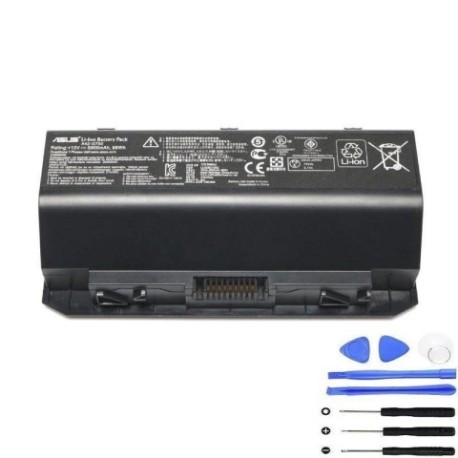
Battery models & part numbers
| Reference / P/N |
|---|
| 0B110-00200000 |
| Asus-A42-G750-88Wh |
Compatible models
| Model |
|---|
| Asus G750JH |
| Asus G750JH-1A |
| Asus G750JM |
| Asus G750JM-1A |
| Asus G750JS |
| Asus G750JS-1A |
| Asus G750JW |
| Asus G750JW-1A |
| Asus G750JX-1A |
| Asus G750JY |
| Asus G750JY-1A |
| Asus G750JZ |
| Asus G750JZ-1A |
| Asus G75LM2H |
Introduction
The ASUS G750 series represents some of the most powerful gaming laptops ever released, but like all portable devices, their batteries degrade over time. For Australian and New Zealand gamers and professionals who rely on their ASUS G750 laptops, understanding battery replacement is crucial for maintaining peak performance. This guide provides comprehensive information specifically tailored for our region, covering everything from compatibility checks to proper disposal methods that comply with local regulations.
Common signs you need a replacement
| Symptom | Cause | Verification | Recommendation |
|---|---|---|---|
| Battery drains quickly during gaming | Reduced capacity from age/cycles | Check battery health in Windows | Consider replacement if under 60% capacity |
| Laptop shuts down unexpectedly | Battery can’t maintain voltage under load | Monitor during intensive tasks | Replace immediately for data safety |
| Battery won’t charge past certain percentage | Cell imbalance or BMS issues | Try different charger first | Replace if charging issues persist |
| Battery swelling or physical damage | Internal short circuit or age | Visual inspection | Replace immediately – safety hazard |
| Overheating during charging | Internal resistance increase | Monitor temperature | Replace if consistently hot |
How to check compatibility
For ASUS G750 owners in Australia and New Zealand, verifying battery compatibility is straightforward. Start by locating your laptop’s model number, which is typically found on a sticker on the bottom case or under the battery compartment. The G750 series uses a standardised battery design across most variants, but it’s essential to confirm your specific model matches our compatibility list. You can also check your current battery’s part number – if it matches either Asus-A42-G750-88Wh or 0B110-00200000, you’re good to go. For additional verification, ASUS provides official support tools on their Australian website where you can enter your serial number to confirm compatible accessories.
When to replace
Most ASUS G750 batteries last 2-3 years with regular use, or approximately 500 charge cycles. For gaming laptops used extensively in Australia’s warmer climate, you might notice reduced performance sooner due to heat accelerating battery degradation. Consider replacement when your battery health drops below 70% of original capacity, when you experience sudden shutdowns during gaming sessions, or if the battery shows any physical swelling. Many Australian users find they need replacement around the 18-24 month mark if they’re heavy gamers, while casual users might get 3+ years from their original battery.
Installation guide
Replacing the battery in your ASUS G750 is a straightforward process that most Australian users can complete in 10-15 minutes. First, ensure your laptop is completely powered off and disconnected from any power source. Flip the laptop over and locate the battery release latch – this is typically a sliding switch near the battery compartment. Slide the latch to unlock position, then gently lift the battery out. Align your new Asus-A42-G750-88Wh battery with the connectors, ensuring the orientation matches the original. Press firmly until you hear a click, then slide the locking latch back into place. Power on your laptop and allow it to recognise the new battery. It’s recommended to perform a full charge cycle (0-100%) before regular use to calibrate the battery monitoring system.
Usage & care tips
To maximise your new battery’s lifespan in Australian conditions, avoid exposing your laptop to extreme temperatures – don’t leave it in hot cars or direct sunlight for extended periods. For optimal battery health, try to keep charge levels between 20-80% for daily use rather than constantly charging to 100%. If you primarily use your G750 as a desktop replacement, consider removing the battery when connected to power for long periods. Calibrate your battery monthly by allowing it to discharge fully then charging to 100% uninterrupted. During gaming sessions, ensure proper ventilation to prevent excessive heat buildup, which is particularly important during Australian summers.
Safety & recycling in AU/NZ
Battery safety and proper disposal are regulated in both Australia and New Zealand. Never attempt to open or modify lithium-ion batteries, and avoid puncturing or crushing them. If your battery shows signs of swelling, stop using it immediately and dispose of it properly. In Australia, you can recycle old laptop batteries through Batteryback.org.au programs available at most office supply stores and electronics retailers. In New Zealand, the Recycle-more.co.nz program provides similar services. Many council waste facilities in both countries accept e-waste including laptop batteries. Never dispose of lithium batteries in household rubbish due to fire risk.
FAQ
How long does shipping take to Australia and New Zealand?
Most replacement batteries ship within 1-2 business days and typically arrive within 5-10 business days to major Australian cities and 7-14 days to New Zealand, depending on your location.
Will this battery work with my G750 purchased overseas?
Yes, the Asus-A42-G750-88Wh battery is compatible with all regional variants of the G750 series, regardless of where the laptop was originally purchased.
What warranty comes with the replacement battery?
Quality replacement batteries typically come with 12-month warranties that cover manufacturing defects and premature capacity loss.
Can I use my laptop while the new battery is charging?
Yes, you can use your ASUS G750 normally while the new battery charges. The charging circuit is designed to handle simultaneous use and charging.
How do I check my current battery’s health in Windows?
Open Command Prompt as administrator and type “powercfg /batteryreport” to generate a detailed battery health report showing current capacity versus design capacity.
Is it safe to leave my G750 plugged in all the time?
While modern laptops have protection circuits, for optimal battery health it’s better to occasionally use battery power and avoid keeping it at 100% charge constantly.
What should I do with my old battery?
Never throw lithium batteries in household waste. Use authorised recycling programs available at Officeworks, JB Hi-Fi, or similar retailers in AU/NZ.