Complete Guide to ASUS G75 Series Battery Replacement in Australia & New Zealand
If your ASUS G75 gaming laptop is struggling with battery life, sudden shutdowns, or won’t hold a charge, you’ve come to the right place. This comprehensive guide covers everything Australian and New Zealand users need to know about replacing their ASUS G75 battery safely and effectively.
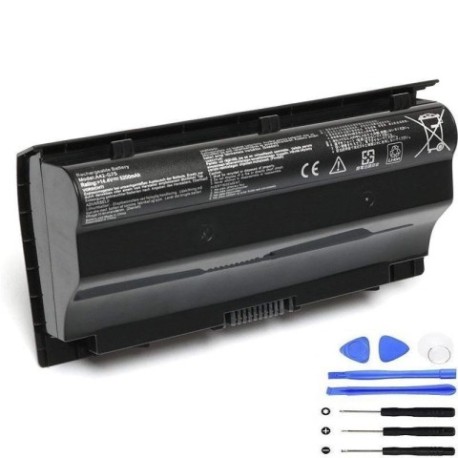
Battery models & part numbers
| Reference / P/N |
|---|
| 0B110-00070000 |
| Asus-A42-G75-75Wh |
Compatible models
| Model |
|---|
| Asus G75V |
| Asus Gaming G75 |
| Asus Gaming G75VX |
| G75V |
| G75VM 3Ds |
| G75VMs |
| G75VW Gamings |
| G75VX |
Introduction
The ASUS G75 series represents some of the most powerful gaming laptops ever released, but like all portable devices, their batteries have a finite lifespan. In Australia and New Zealand’s climate conditions, laptop batteries typically last 2-4 years with regular use. Understanding when and how to replace your battery can save you from unexpected shutdowns during crucial gaming sessions or work tasks.
Common signs you need a replacement
| Symptoms | Causes | Verification | Recommendation |
|---|---|---|---|
| Battery drains rapidly (less than 1 hour) | Ageing cells, reduced capacity | Check Windows battery report | Replace if capacity below 60% |
| Laptop shuts down unexpectedly | Voltage drops under load | Monitor during gaming sessions | Immediate replacement needed |
| Battery won’t charge past certain percentage | Battery controller limiting charge | Observe charging behaviour | Replace to restore full capacity |
| Battery swelling or physical damage | Internal chemical breakdown | Visual inspection | Replace immediately – safety risk |
| Overheating during charging | Inefficient charging circuit | Temperature monitoring | Replace to prevent damage |
How to check compatibility
Finding your exact ASUS G75 model is crucial for battery compatibility. Here’s how Australian and New Zealand users can identify their specific model:
Locate Your Model Number: Turn your laptop over and look for the white sticker on the bottom casing. For ASUS G75 models, you’ll typically find the model number near the serial number and regulatory information. Common locations include near the battery compartment or along the bottom edge.
Check System Information: Press Windows Key + R, type “msinfo32” and press Enter. Look for “System Model” in the system summary. This will display your exact laptop model that matches our compatibility list.
ASUS Official Tools: Visit the ASUS Australia support website and use their product identification tool. Enter your serial number (found on the bottom sticker) to get precise model information.
Physical Verification: Remove your current battery (if possible) and check for part numbers printed on it. The ASUS-A42-G75-75Wh or 0B110-00070000 should be clearly marked.
When to replace
Timing your battery replacement correctly can save you from inconvenient shutdowns and potential data loss. Consider replacement when:
- Your battery lasts less than 60 minutes during normal use
- The battery indicator shows inconsistent charge levels
- Your laptop is 3+ years old with original battery
- You notice physical swelling or deformation
- Frequent unexpected shutdowns occur at 20-30% charge
- Battery health software shows capacity below 70% of original
For gaming laptops like the ASUS G75 series, batteries tend to degrade faster due to high power demands during gaming sessions. Australian summers can accelerate this degradation, so monitor your battery health regularly.
Installation guide
Replacing your ASUS G75 battery is straightforward with the right approach. Follow these steps for a safe installation:
Preparation: Power down your laptop completely and disconnect the AC adapter. Work on a clean, static-free surface. Gather a small Phillips head screwdriver and an anti-static wrist strap if available.
Battery Removal: Turn the laptop upside down. Locate the battery release latches – most G75 models have two sliding locks on either side of the battery. Slide both latches to the unlock position simultaneously. The battery should lift out easily. If it’s stuck, don’t force it – check for additional screws holding it in place.
New Battery Installation: Align the new ASUS-A42-G75-75Wh battery with the compartment, ensuring the connectors match up. Gently press the battery into place until you hear a click from both locking mechanisms. Don’t force it – if it doesn’t seat properly, realign and try again.
Initial Charge: Connect your AC adapter and charge the new battery completely before first use. This helps calibrate the battery controller for optimal performance.
Common Installation Issues: Some users report the new battery not being recognised initially. If this occurs, try resetting the EC (Embedded Controller) by holding the power button for 40 seconds with both battery and AC adapter removed.
Usage & care tips
Maximise your new battery’s lifespan with these Australia/NZ specific care practices:
- Avoid Extreme Temperatures: Don’t leave your laptop in hot cars during Australian summers – temperatures can exceed 60°C inside vehicles, permanently damaging battery cells
- Optimal Charging: For lithium-ion batteries, keep charge between 20-80% for daily use. Avoid frequent full discharges
- Gaming Sessions: When gaming intensively, use AC power to reduce battery cycle count
- Storage: If storing long-term, charge to 50% and store in cool, dry conditions (15-25°C ideal)
- Cleaning: Keep battery contacts clean using isopropyl alcohol and cotton swabs every 6 months
- Performance Monitoring: Use ASUS Battery Health Charging software to optimise charging patterns based on your usage
Safety & recycling in AU/NZ
Battery safety and proper disposal are regulated in Australia and New Zealand. Follow these guidelines:
Safety Precautions:
- Never attempt to open or puncture lithium-ion batteries
- Discontinue use immediately if you notice swelling, leaking, or overheating
- Only use authorised replacement batteries from reputable suppliers
- Keep batteries away from water and extreme heat sources
Australian Recycling: Old laptop batteries can be recycled through Batteryback.org.au drop-off points available at most Officeworks, Bunnings, and Aldi stores. Many local councils also offer battery recycling services.
New Zealand Recycling: Use the Recycle.co.nz directory to find battery recycling centres. Most Noel Leeming, Harvey Norman, and PB Tech stores accept old batteries for recycling.
Transport Regulations: When shipping batteries within Australia/NZ, ensure they’re properly packaged and declared according to dangerous goods regulations.
FAQ
How long does the ASUS A42 G75 75Wh battery typically last?
With normal use, expect 2-4 years of service. Gaming laptops like the G75 series may see shorter lifespan due to higher power demands. Australian climate conditions can also affect longevity.
Will this battery work with my G75VW purchased in New Zealand?
Yes, the ASUS-A42-G75-75Wh is compatible with all G75VW models regardless of purchase region. The battery specifications are standardised globally for these models.
How do I know if my battery swelling is dangerous?
Any visible swelling requires immediate replacement and careful handling. Don’t use the laptop and recycle the battery properly. Swollen batteries can rupture and pose fire risks.
Can I use a higher capacity battery than 75Wh?
No, using batteries with different specifications can damage your laptop and void warranties. Stick with the authorised 75Wh capacity designed for G75 series.
My new battery isn’t charging to 100% – is this normal?
Modern batteries often stop at 95-98% to prolong lifespan. If it’s stopping below 90%, try calibrating by draining to 10% then charging fully overnight.
How long does shipping take to regional Australia?
Most suppliers deliver within 3-7 business days to metropolitan areas and 7-14 days to regional locations. Express options are usually available.
Does replacing the battery void my ASUS warranty?
In Australia and New Zealand, replacing the battery yourself doesn’t automatically void your laptop warranty, but any damage caused during installation might not be covered. Check your specific warranty terms.
Remember that proper battery maintenance not only extends your laptop’s mobile usability but also ensures safe operation. Whether you’re gaming in Sydney or working remotely in Queenstown, a reliable battery is essential for maximising your ASUS G75’s performance.