ASUS A42N1713 71Wh Laptop Battery Replacement Guide
If you’re experiencing battery issues with your ASUS ROG gaming laptop, you’ve come to the right place. This comprehensive guide covers everything Australian and New Zealand users need to know about the A42N1713 71Wh replacement battery, including compatible models, installation tips, and local safety information.
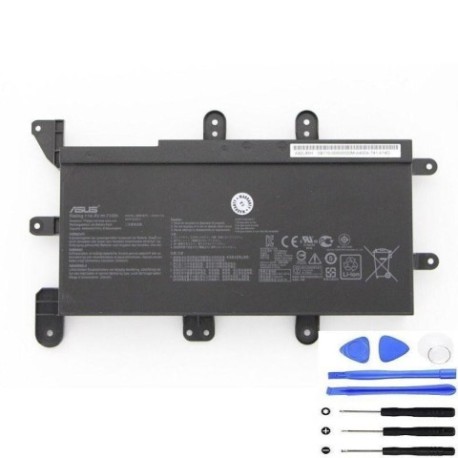
Battery models & part numbers
| Reference / P/N |
|---|
| 0B110-00500000 |
| A42L85H |
| Asus-A42N1713-71Wh |
Compatible models
| Model |
|---|
| Asus G703GI |
| Asus G703GS |
| Asus G703VI |
| Asus G753 |
| Asus GX703 |
| Asus GX703VI |
| Asus ROG Chimera G703VI |
| Asus ROG G703GI |
| Asus ROG G703GS |
| Asus ROG G703VI |
| Asus ROG G7A |
| Asus ROG G7AI7700 |
| Asus ROG G7AI7820 |
| Asus ROG G7BI |
| Asus ROG GX703VI |
Introduction
Gaming laptops like the ASUS ROG series are powerful machines, but their high-performance components can be demanding on batteries. The A42N1713 71Wh battery is specifically designed for these gaming workhorses, providing reliable power for extended gaming sessions and productivity work. As an authorised replacement part, it ensures your laptop maintains optimal performance without compromising safety.
Common signs you need a replacement
| Symptom | Cause | Verification | Recommendation |
|---|---|---|---|
| Rapid power drain during gaming | Battery capacity degradation | Check battery health in Windows Power Centre | Consider replacement if capacity below 60% |
| Laptop won’t hold charge overnight | High self-discharge rate | Charge to 100%, unplug and check after 8 hours | Replace if losing more than 20% charge idle |
| Battery swelling or bulging | Internal chemical breakdown | Visual inspection of battery compartment | Immediate replacement required for safety |
| Random shutdowns at 20-30% charge | Voltage regulation failure | Monitor shutdown patterns | Replace to prevent data loss |
| Overheating during charging | Internal resistance increase | Check temperature with monitoring software | Replace if exceeding 45°C during charge |
How to check compatibility
Before purchasing any replacement battery, proper compatibility verification is essential. For ASUS ROG laptops, start by locating your model number on the bottom casing or under the battery compartment. The label typically includes both the marketing name (like “ROG G703GI”) and internal model codes. You can also check through Windows System Information or ASUS’s official MyASUS app, which provides detailed hardware specifications.
For Australian and New Zealand users, ASUS provides local support through their authorised service centres. You can visit the ASUS Australia or ASUS New Zealand website and use their compatibility checker tools. Alternatively, contact their customer support with your serial number for precise part verification. Remember that using non-compatible batteries can void warranties and pose safety risks.
When to replace
Gaming laptop batteries typically last 2-3 years with regular use, but intensive gaming sessions can accelerate degradation. Consider replacement when your battery health drops below 70% of original capacity, or if you notice any physical swelling. For ROG models used primarily for gaming, it’s common to replace batteries around the 18-month mark to maintain peak performance during competitive gaming sessions.
Installation guide
Replacing the battery in your ASUS ROG laptop requires careful attention to detail. First, ensure the laptop is completely powered off and disconnected from all power sources. For most G703 and G753 models, you’ll need to remove the bottom panel using a Phillips #00 screwdriver. Take note of screw lengths as they may vary. Once the panel is removed, locate the battery connector – it’s typically a multi-pin connector near the centre of the battery.
Gently disconnect the battery cable by pulling the connector straight out, not by pulling on the wires. Remove any screws securing the battery to the chassis, then lift the battery out carefully. When installing the new A42N1713 battery, ensure it sits flush in the compartment and all connectors align properly. Reconnect the battery cable firmly, replace the bottom panel, and power on the laptop. The first charge cycle should be uninterrupted to allow proper battery calibration.
Usage & care tips
To maximise your new battery’s lifespan, avoid consistently charging to 100% for extended periods. For gaming laptops used primarily while plugged in, consider setting a charge limit to 80% using ASUS Battery Health Charging in the MyASUS app. Keep your laptop in cool, well-ventilated environments during use, as temperatures above 35°C can accelerate battery degradation. If storing your laptop for extended periods, charge the battery to 50-60% and store in a cool, dry place.
For Australian conditions, avoid leaving your laptop in hot cars or direct sunlight. The high ambient temperatures common in many parts of Australia can significantly reduce battery life. Similarly, in New Zealand’s variable climate, avoid rapid temperature changes that can cause condensation inside the battery compartment.
Safety & recycling in AU/NZ
Battery safety is paramount, especially with high-capacity lithium-ion batteries used in gaming laptops. Never attempt to open or modify the battery casing, and avoid exposing batteries to extreme temperatures or physical damage. In Australia, damaged or swollen batteries should be taken to authorised collection points like Battery World, Officeworks, or council recycling centres. Most electronics retailers accept old batteries for proper disposal.
In New Zealand, the Ministry for the Environment recommends using accredited e-waste recyclers. Many council transfer stations have dedicated battery recycling bins, and retailers like Noel Leeming and Harvey Norman often provide take-back services. Never dispose of lithium batteries in household rubbish due to fire risks in waste facilities.
FAQ
How long does the A42N1713 battery typically last?
The A42N1713 71Wh battery provides 3-5 hours of general use or 1-2 hours of intensive gaming on compatible ROG models. Actual runtime depends on screen brightness, performance settings, and applications running.
Will replacing my battery void my ASUS warranty?
In Australia and New Zealand, using authorised replacement parts from reputable suppliers generally doesn’t void your warranty. However, damage caused during installation might not be covered. For peace of mind, consider having installation done at an authorised service centre.
Can I use this battery with my ASUS laptop that has a different part number?
Only if your laptop model is listed in the compatibility table. Using incompatible batteries can damage your laptop and pose safety hazards. Always verify compatibility before purchase.
How do I properly dispose of my old ASUS battery in Australia?
Take it to any Battery World store, Officeworks, or your local council’s e-waste collection point. Many computer repair shops also accept old batteries for recycling.
What’s the difference between the A42N1713 and other ASUS battery models?
The A42N1713 is specifically designed for high-performance ROG models with its 71Wh capacity and specific voltage requirements. Using incorrect batteries can lead to performance issues or safety concerns.
How can I maximise my new battery’s lifespan?
Avoid extreme temperatures, don’t consistently charge to 100%, use the ASUS Battery Health Charging feature, and perform regular calibration cycles by fully discharging and charging every 2-3 months.
Is overnight charging safe for my ASUS ROG laptop?
Modern ASUS laptops include overcharge protection, making overnight charging generally safe. However, for optimal battery health, use the Battery Health Charging feature to limit maximum charge to 80% or 60% when primarily using AC power.