ASUS A42N1830 96Wh Laptop Battery Replacement Guide
If you’re experiencing battery issues with your ASUS ROG G703 series laptop, you’ve come to the right place. This comprehensive guide covers everything Australian and New Zealand users need to know about replacing their laptop battery with the genuine ASUS A42N1830 96Wh model.
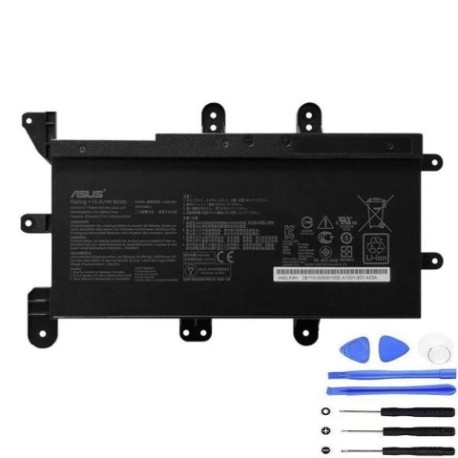
Battery models & part numbers
| Reference / P/N |
|---|
| 0B110-00500200 |
| 4INAR19/66-2 |
| A42LK4H |
| Asus-A42N1830-96Wh |
Compatible models
| Model |
|---|
| Asus ROG G703GX |
| Asus ROG G703GX-E5001T |
| Asus ROG G703GX-XB96K |
| Asus ROG G703GXR |
| Asus ROG G703GXR-E5006T |
| Asus ROG G703GXR-EV003T |
| Asus ROG G703GXR-EV040T |
Introduction
The ASUS ROG G703 series represents some of the most powerful gaming laptops available in the Australian and New Zealand markets. These high-performance machines demand reliable power sources, and the A42N1830 96Wh battery is specifically designed to meet these requirements. Whether you’re gaming, working, or studying, having a properly functioning battery is essential for maximising your laptop’s potential.
Common signs you need a replacement
| Symptom | Cause | Verification | Recommendation |
|---|---|---|---|
| Battery drains quickly (under 1 hour) | Ageing cells, reduced capacity | Check battery health in Windows Power Report | Replace if capacity below 60% |
| Laptop shuts down unexpectedly | Battery cannot maintain voltage | Monitor battery percentage drops | Immediate replacement needed |
| Battery won’t charge past certain percentage | Charging circuit failure | Try different power adapter | Replace battery if issue persists |
| Battery swelling or physical damage | Internal short circuit, overheating | Visual inspection, laptop not sitting flat | Replace immediately – safety hazard |
| Overheating during charging | Inefficient charging, internal resistance | Monitor temperature with software | Replace to prevent damage |
How to check compatibility
Before purchasing any replacement battery for your ASUS ROG G703, it’s crucial to verify compatibility. Start by locating your laptop’s model number, typically found on the bottom case near the serial number sticker. For ASUS laptops, you can also check through the MyASUS app or by pressing F2 during boot to access the BIOS, where system information is displayed. The A42N1830 96Wh battery is specifically designed for the G703 series and compatible with all variants listed above. Always cross-reference your current battery’s part number with our compatibility list to ensure perfect fit and performance.
When to replace
Most laptop batteries, including the A42N1830, have a typical lifespan of 2-3 years with regular use. However, gaming laptops like the ROG G703 series may experience faster degradation due to higher power demands and heat generation. Consider replacement when your battery health drops below 70% of its original capacity, when you notice significant runtime reduction, or if the battery shows any physical signs of damage. For Australian and New Zealand users, it’s also wise to replace before the 2-year manufacturer’s warranty expires if you’re experiencing issues.
Installation guide
Replacing the battery in your ASUS ROG G703 requires careful attention to detail. First, ensure you have the correct tools: a Phillips #00 screwdriver, plastic spudger, and anti-static wrist strap. Power down the laptop completely and disconnect all cables. Flip the laptop over and locate the battery compartment screws – typically 8-10 screws securing the bottom panel. Remove these carefully, then gently pry open the bottom case using the plastic spudger. Locate the battery connector near the centre of the motherboard and carefully disconnect it. Remove the 4 screws securing the battery, lift it out, and replace with your new A42N1830 96Wh battery. Reverse the process for reassembly.
Usage & care tips
To maximise the lifespan of your new A42N1830 battery, follow these best practices: Avoid frequent full discharges – lithium-ion batteries prefer partial discharges between 20-80%. Keep your laptop in cool environments, ideally between 15-25°C, as heat is the primary enemy of battery health. If using your laptop primarily plugged in, consider setting a charge limit to 60% in the MyASUS app to reduce stress on the battery. Calibrate your battery monthly by allowing it to discharge to 10% then charging to 100% uninterrupted. For Australian conditions, avoid leaving your laptop in hot cars or direct sunlight for extended periods.
Safety & recycling in AU/NZ
Battery safety is paramount, especially with high-capacity batteries like the 96Wh A42N1830. Never attempt to open or modify the battery casing, as this can cause short circuits or thermal runaway. If you notice any swelling, leaking, or unusual heating, discontinue use immediately and contact professional disposal services. In Australia, you can recycle old laptop batteries through Batteryback.org.au or at designated collection points at Officeworks, Bunnings, and Aldi stores. In New Zealand, use the Recycle.co.nz locator to find your nearest battery recycling facility. Proper disposal helps protect our environment and prevents hazardous materials from entering landfill.
FAQ
How long does the A42N1830 96Wh battery typically last?
Under normal usage conditions, you can expect 2-4 hours of gaming or 4-6 hours of general use. The actual runtime depends on your power settings, screen brightness, and applications running.
Is this battery genuine ASUS or compatible?
The A42N1830 is the original ASUS part number, and we supply genuine replacement batteries that meet or exceed OEM specifications for perfect compatibility.
Will replacing the battery void my laptop warranty?
In Australia and New Zealand, replacing the battery yourself typically doesn’t void the overall laptop warranty, but any damage caused during installation may not be covered. For laptops still under warranty, consider using authorised service centres.
How do I check my current battery’s health?
Open Command Prompt as administrator and type “powercfg /batteryreport” to generate a detailed battery health report showing design capacity versus current capacity.
Can I use a higher capacity battery?
No, the A42N1830 96Wh is specifically designed for the G703 chassis. Using incompatible batteries can cause damage and void warranties.
How long does shipping take to AU/NZ?
Most orders reach major Australian cities within 3-5 business days and New Zealand within 5-7 business days via express shipping.
What if the battery doesn’t fit my laptop?
We offer a 30-day return policy for incompatible items. Double-check your model number before ordering, and contact our support team if you have any doubts about compatibility.
Investing in a genuine ASUS A42N1830 96Wh battery ensures your ROG G703 continues to deliver the peak performance you expect. With proper installation and care, your new battery will provide reliable power for your gaming and computing needs across Australia and New Zealand.