ASUS B31N1345 48Wh Battery Replacement Guide for Australian & New Zealand Users
If your ASUS Transformer Book Flip TP500 series laptop is struggling with battery life, you’ve come to the right place. This comprehensive guide covers everything Australian and New Zealand consumers need to know about replacing their ASUS B31N1345 48Wh battery.
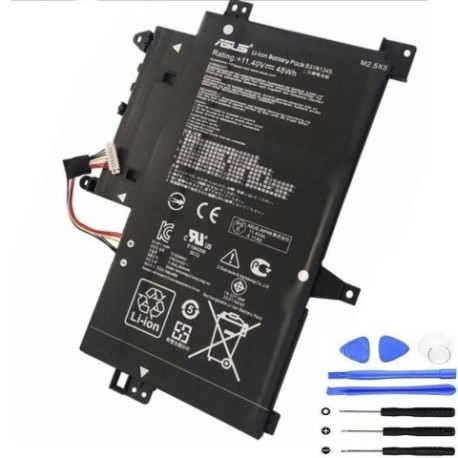
Battery models & part numbers
| Reference / P/N |
|---|
| 0B200-00990000 |
| 0B200-00990100 |
| Asus-B31N1345-48Wh |
| B31Bn9h |
| B31N1345 |
Compatible models
| Model |
|---|
| Asus Transformer Book Flip TP500L |
| Asus Transformer Book Flip TP500LA |
| Asus Transformer Book Flip TP500LB |
| Asus Transformer Book Flip TP500LN |
Introduction
The ASUS Transformer Book Flip TP500 series represents some of the most innovative 2-in-1 laptops available in the Australian and New Zealand markets. These versatile devices combine laptop productivity with tablet convenience, but like all portable electronics, their batteries degrade over time. The B31N1345 48Wh battery is the heart of these machines, and understanding when and how to replace it can extend your device’s lifespan significantly.
Many TP500 series owners report excellent performance for 2-3 years before noticing battery degradation. The good news is that replacing the battery is often more cost-effective than purchasing a new laptop, especially given the robust build quality of these ASUS models.
Common signs you need a replacement
| Symptom | Cause | Verification | Recommendation |
|---|---|---|---|
| Battery drains quickly (less than 2 hours) | Reduced capacity from charge cycles | Check battery health in Windows | Consider replacement if below 60% capacity |
| Laptop shuts down unexpectedly | Voltage drops under load | Monitor battery percentage drops | Replace immediately to prevent data loss |
| Battery won’t charge past 80% | Battery protection circuit activated | Try different charger first | Battery replacement needed |
| Laptop feels hot near battery area | Internal resistance increased | Check temperature with software | Replace for safety reasons |
| Battery percentage jumps erratically | Faulty battery management system | Observe percentage changes | Replace to restore accurate monitoring |
How to check compatibility
Before purchasing any replacement battery for your ASUS Transformer Book Flip, it’s crucial to verify compatibility. Here’s how Australian and New Zealand consumers can ensure they’re getting the right battery:
Finding Your Model Information: The easiest way to identify your exact model is to check the label on the bottom of your laptop. For TP500 series devices, you’ll typically find this near the hinge area or on the central portion of the base. Look for text that reads “ASUS Transformer Book Flip TP500” followed by a letter designation (L, LA, LB, or LN).
Using ASUS Official Tools: ASUS provides excellent support resources for Australian and New Zealand customers. You can visit the official ASUS support website and enter your serial number to get precise component information. The serial number is usually located near the model information on the bottom label or can be found in Windows by typing “System Information” in the search bar.
Cross-Reference Part Numbers: The B31N1345 battery is compatible with multiple part numbers as shown in our table above. If you’re replacing an existing battery, match the part number printed on your current battery. Common compatible numbers include 0B200-00990000 and 0B200-00990100.
Physical Compatibility Check: The TP500 series uses a specific battery shape and connector type. The B31N1345 measures approximately 205mm x 70mm x 5mm and features a standard 3-pin connector. If you’re unsure, compare the physical dimensions and connector with your existing battery.
When to replace
Timing your battery replacement correctly can save you both money and frustration. Here are the key indicators that it’s time to replace your ASUS B31N1345 battery:
Capacity Degradation: When your battery holds less than 60% of its original capacity, replacement becomes cost-effective. You can check this in Windows by generating a battery report (open Command Prompt as administrator and type: powercfg /batteryreport).
Age Considerations: Most lithium-ion batteries, including the B31N1345, have a functional lifespan of 2-4 years with regular use. If your TP500 series laptop is approaching this age range and you’re noticing reduced performance, it’s likely time for replacement.
Performance Impact: When battery issues start affecting your productivity – such as needing to stay near power outlets or experiencing unexpected shutdowns during important work – the inconvenience justifies replacement.
Safety Concerns: Any signs of physical damage, swelling, or excessive heat should prompt immediate replacement. Continuing to use a compromised battery risks damage to your laptop and potential safety hazards.
Installation guide
Replacing the battery in your ASUS Transformer Book Flip TP500 series is a straightforward process that most technically inclined users can accomplish. Here’s a step-by-step guide:
Preparation: Before beginning, ensure you have the right tools. You’ll need a Phillips #00 screwdriver, a plastic spudger or guitar pick, an anti-static wrist strap (recommended), and a clean, well-lit workspace. Power off your laptop completely and disconnect all cables.
Accessing the Battery: Turn your laptop upside down on a soft surface. Remove the 11 screws securing the bottom cover. These screws are standard Phillips head and should come out easily. Use your plastic spudger to gently pry the bottom cover starting from the rear edge near the hinge. Work your way around the perimeter until the cover lifts off.
Battery Removal: Locate the battery near the centre of the chassis. You’ll see it’s connected via a single cable to the motherboard. Carefully disconnect this cable by pulling the connector straight up. Remove the 4 screws securing the battery to the chassis. These may require a bit more force than the case screws. Lift the battery out carefully.
Installation: Place your new B31N1345 battery in position and secure it with the 4 screws. Reconnect the battery cable to the motherboard, ensuring it clicks into place. Before replacing the bottom cover, you may want to test the installation by connecting power and turning on the laptop briefly.
Reassembly: Replace the bottom cover, ensuring all clips engage properly. Reinstall the 11 screws, being careful not to overtighten. Power on your laptop and check that it recognises the new battery.
Important Notes: Always handle lithium-ion batteries with care. Avoid puncturing or bending the battery. If you encounter resistance during any step, stop and reassess rather than forcing components. If you’re uncomfortable with any part of this process, consider seeking professional assistance from an authorised ASUS service centre.
Usage & care tips
Proper battery maintenance can significantly extend the life of your new B31N1345 battery. Here are essential care tips for Australian and New Zealand conditions:
Charging Practices: Unlike older battery technologies, lithium-ion batteries don’t require full discharge cycles. In fact, it’s better to keep your battery between 20% and 80% charge for daily use. Avoid leaving your laptop plugged in constantly at 100% charge, as this can stress the battery over time.
Temperature Management: Australian summers and New Zealand’s varying climates can affect battery performance. Avoid exposing your laptop to temperatures above 35°C or below 5°C for extended periods. Never leave your laptop in a parked car during hot weather, as interior temperatures can quickly reach damaging levels.
Storage Guidelines: If you won’t be using your laptop for an extended period, store it with the battery at around 50% charge in a cool, dry place. Ideal storage temperature is between 15°C and 25°C.
Power Management: Use Windows power management features to optimise battery life. The “Balanced” power plan typically offers the best compromise between performance and battery longevity. Adjust screen brightness and close unnecessary applications to extend battery runtime.
Update Management: Keep your ASUS BIOS and drivers updated. ASUS frequently releases updates that improve battery management and efficiency. Check for updates monthly through the MyASUS application or the ASUS support website.
Safety & recycling in AU/NZ
Proper handling and disposal of laptop batteries is crucial for environmental protection and personal safety. Here’s what Australian and New Zealand consumers need to know:
Safety Precautions: Never attempt to open or modify a lithium-ion battery. If your battery becomes damaged, swollen, or excessively hot, stop using it immediately and seek professional disposal. In case of battery leakage, avoid contact with skin and ventilate the area.
Australian Recycling Options: In Australia, most electronics retailers offer free battery recycling services. Officeworks, JB Hi-Fi, and Battery World locations accept used laptop batteries for proper recycling. You can also check with your local council for household chemical collection events.
New Zealand Recycling: In New Zealand, the TechCollect NZ programme provides free recycling for e-waste including laptop batteries. Many Noel Leeming and Harvey Norman stores participate in this programme. Some councils also offer specific e-waste collection services.
Transport Regulations: When shipping old batteries for recycling, ensure they’re properly packaged to prevent short circuits. Tape the battery terminals and place the battery in arigid container. Both Australia and New Zealand have strict regulations regarding battery transportation.
Environmental Responsibility: Proper battery recycling prevents hazardous materials from entering landfills and allows valuable materials to be recovered and reused. A typical laptop battery contains lithium, cobalt, and other materials that can be repurposed for new batteries or other products.
FAQ
How long does the B31N1345 48Wh battery typically last?
With normal use, you can expect 2-4 years of good performance from your ASUS battery. The actual lifespan depends on usage patterns, charging habits, and environmental conditions. Heavy users might notice degradation after 18-24 months, while light users might get 3-4 years before replacement becomes necessary.
Can I use a higher capacity battery in my TP500 series laptop?
No, you should only use the specified 48Wh B31N1345 battery or its direct equivalents. Using batteries with different specifications can cause compatibility issues, potential damage to your laptop, and safety hazards. The laptop’s power management system is calibrated for the 48Wh capacity.
How do I know if my replacement battery is genuine?
Genuine ASUS batteries feature precise labelling with clear, sharp printing. They should have the correct part numbers (B31N1345, 0B200-00990000, etc.) and safety certifications. Purchase from authorised retailers or reputable suppliers who provide warranties. Be wary of significantly discounted batteries, as they may be counterfeit.
Will replacing the battery void my ASUS warranty?
If your laptop is still under manufacturer warranty, having the battery replaced by an unauthorised service provider may void the remaining warranty. For in-warranty devices, contact ASUS support directly. For out-of-warranty devices, self-replacement is typically acceptable, though professional installation is recommended if you’re unsure.
How long should the new battery last on a single charge?
The B31N1345 48Wh battery should provide 4-7 hours of typical use, depending on your settings and activities. Higher screen brightness, demanding applications, and wireless connectivity will reduce runtime. For optimal battery life, reduce screen brightness and close unnecessary applications when working on battery power.
What should I do with my old battery?
Never dispose of laptop batteries in household waste. Use the recycling options mentioned in the Safety & Recycling section above. Many retailers offer take-back programmes, and local councils often provide e-waste collection services. Proper recycling is free and environmentally responsible.
Why does my new battery not charge to 100% immediately?
This is normal behaviour for lithium-ion batteries. The battery management system may limit charging to preserve battery health, especially during the first few cycles. After several charge-discharge cycles, the battery should reach its full capacity. If the issue persists after a week of use, contact your supplier.
Replacing the battery in your ASUS Transformer Book Flip TP500 series can breathe new life into your trusted device. With the genuine B31N1345 48Wh battery, proper installation, and good maintenance practices, you can enjoy years of reliable mobile computing. Remember to recycle your old battery responsibly and enjoy the restored performance of your ASUS laptop.