Complete Guide to Asus B31N1503 48Wh Battery Replacement
If you’re experiencing battery issues with your Asus E202SA or L202SA laptop, you’ve come to the right place. This comprehensive guide covers everything Australian and New Zealand users need to know about replacing their laptop battery with the genuine Asus B31N1503 48Wh model.
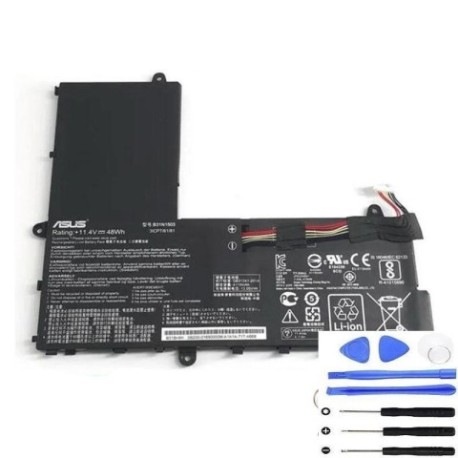
Battery models & part numbers
| Reference / P/N |
|---|
| 0B200-01690000 |
| Asus-B31N1503-48Wh |
| B31NnC3 |
Compatible models
| Model |
|---|
| Asus E202SA |
| Asus L202SA |
Introduction
Welcome to your complete resource for Asus B31N1503 48Wh battery replacement. As an Australian or New Zealand user of Asus E202SA or L202SA laptops, you’ll find everything you need to make an informed decision about battery replacement. These reliable education and business laptops deserve quality power solutions that match their original performance standards.
Common signs you need a replacement
| Symptoms | Causes | Verification | Recommendation |
|---|---|---|---|
| Battery drains in under 1 hour | Cell degradation after 2+ years | Check Windows battery report | Immediate replacement needed |
| Laptop shuts down unexpectedly | Voltage drops under load | Monitor battery percentage drops | Replace to prevent data loss |
| Battery won’t charge past 80% | Battery protection mode activated | Check charging indicator behaviour | Replace to restore full capacity |
| Laptop feels hot near battery area | Internal resistance increasing | Use temperature monitoring software | Safety replacement recommended |
| Battery percentage jumps erratically | Failing battery management system | Observe percentage changes | Replace for accurate monitoring |
How to check compatibility
Finding your exact Asus model information is crucial for battery compatibility. For E202SA and L202SA owners, look for the model sticker on the bottom casing of your laptop. The text should clearly state “E202SA” or “L202SA” along with other identification numbers. You can also check through Windows System Information by pressing Windows Key + R, typing “msinfo32”, and looking under System Model. Asus Australia’s official support website provides compatibility checking tools where you can enter your serial number to verify battery requirements. Remember that the B31N1503 battery also works with part numbers 0B200-01690000 and B31NnC3, making it a versatile replacement solution.
When to replace
Most Asus laptop batteries last 2-3 years with regular use before showing significant capacity loss. If your battery health shows below 60% in diagnostic tools, or if you’re experiencing any of the symptoms listed above, it’s time to consider replacement. Australian climate conditions can accelerate battery degradation, especially in warmer regions where temperatures regularly exceed 30°C. For optimal performance and safety, replace your battery before it completely fails to avoid potential damage to your laptop’s power management system.
Installation guide
Replacing the battery in your Asus E202SA or L202SA is straightforward with the right approach. First, ensure your laptop is completely powered off and disconnected from any power sources. Flip the laptop over and locate the battery compartment – these models typically have an easily accessible battery bay. You’ll need a small Phillips head screwdriver to remove the securing screws. Gently disconnect the battery connector from the motherboard, being careful not to damage the delicate pins. Insert your new B31N1503 battery, reconnect the connector securely, and replace the screws. The entire process should take 10-15 minutes and requires no specialised tools beyond basic screwdrivers.
Usage & care tips
To maximise your new battery’s lifespan in Australian conditions, avoid exposing your laptop to extreme temperatures. Don’t leave it in direct sunlight or in hot cars where temperatures can exceed 45°C. For optimal battery health, maintain charge levels between 20-80% when possible, rather than constantly charging to 100%. If you’re using your laptop primarily on AC power, consider removing the battery once it reaches 50-60% charge to reduce stress on the cells. Calibrate your battery monthly by allowing it to discharge completely then charging to full capacity uninterrupted.
Safety & recycling in AU/NZ
Battery safety is paramount in Australia and New Zealand. Never attempt to open or modify your laptop battery, as this can cause dangerous chemical reactions or fires. If you notice any swelling, leaking, or unusual odours from your battery, discontinue use immediately and contact professional disposal services. In Australia, you can recycle old laptop batteries through Battery World stores, Officeworks, or council e-waste collection points. In New Zealand, most computer retailers and council transfer stations accept battery recycling. Proper disposal helps protect our unique environment from hazardous materials.
FAQ
How long does the B31N1503 battery typically last?
With normal use, expect 2-3 years of reliable performance, though heavy usage or exposure to high temperatures may shorten this timeframe.
Will this battery work with my Asus laptop if it’s not an E202SA or L202SA?
Only if your laptop uses one of the compatible part numbers: 0B200-01690000 or B31NnC3. Always verify compatibility before purchase.
How do I know if my battery is genuine Asus?
Genuine Asus batteries feature proper branding, correct model numbering, and come from authorised retailers with appropriate certification.
Can I replace the battery myself without voiding warranty?
For laptops out of warranty, self-replacement is fine. For in-warranty devices, check Asus Australia/New Zealand’s policy or use authorised service centres.
What should I do with my old battery?
Never dispose of laptop batteries in household waste. Use approved recycling centres available throughout Australia and New Zealand.
How long does shipping take to AU/NZ addresses?
Most retailers offer 5-10 business day delivery to major Australian cities and 7-14 days to regional areas and New Zealand.
Is the 48Wh capacity sufficient for all-day use?
For typical office and education use, 48Wh provides 4-6 hours of runtime. For extended use, consider carrying your charger or a power bank.