Asus B31N1705 42Wh Battery Replacement Guide for Australian & New Zealand Users
If you’re experiencing battery issues with your Asus VivoBook Flip 14 or ZenBook Flip 14, you’ve come to the right place. This comprehensive guide covers everything Australian and New Zealand users need to know about replacing their laptop battery with the genuine Asus B31N1705 42Wh model.
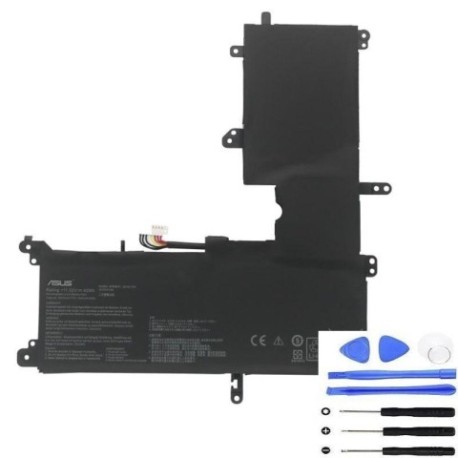
Battery models & part numbers
| Reference / P/N |
|---|
| Asus 0B200-02660000 |
| Asus 0B200-02660100 |
| Asus B31Bm9H |
| Asus B31N1705-1 |
Compatible models
| Model |
|---|
| Asus VivoBook Flip 14 TP410UAs |
| Asus VivoBook Flip 14 TP410UFs |
| Asus VivoBook Flip 14 TP410URs |
| Asus ZenBook Flip 14 UX460UAs |
Introduction
Welcome to your complete guide for Asus B31N1705 42Wh battery replacement in Australia and New Zealand. As an authorised laptop battery specialist, we understand the frustration when your trusted Asus convertible starts showing battery problems. This guide provides comprehensive information specifically tailored for AU/NZ consumers, covering compatibility, installation, safety standards, and local recycling options.
Common signs you need a replacement
| Symptom | Cause | Verification | Recommendation |
|---|---|---|---|
| Battery drains quickly (less than 1 hour) | Ageing battery cells, reduced capacity | Check battery health in Windows Power Report | Replace if capacity below 60% of original |
| Laptop shuts down unexpectedly | Voltage drops under load, faulty cells | Monitor battery percentage during use | Immediate replacement recommended |
| Battery won’t charge past certain percentage | Battery management system failure | Try different power adapter first | Replace battery if issue persists |
| Battery swelling or bulging | Gas buildup from chemical degradation | Visual inspection, check for trackpad lifting | Stop using immediately and replace |
| Overheating during charging | Internal resistance increase, poor heat dissipation | Monitor temperature with HWMonitor | Replace if consistently over 45°C |
How to check compatibility
Before purchasing any replacement battery for your Asus convertible, proper compatibility verification is crucial. For Australian and New Zealand users, here’s how to ensure you’re getting the right battery:
Finding Your Model Information: Locate the model number sticker on the bottom casing of your laptop. For VivoBook Flip 14 and ZenBook Flip 14 models, this is typically found near the hinge area or on the central portion of the base. The model number should match exactly with our compatibility list above.
Using Asus Official Tools: Visit the Asus support website and enter your serial number or model number. The official compatibility checker will confirm which battery part numbers are authorised for your specific device. This is particularly important for Australian consumers as local warranty conditions may vary.
Physical Verification: Remove your current battery (if comfortable doing so) and compare the part number printed on it with our listed compatible numbers. The B31N1705 series batteries have specific dimensions of 207.7mm x 138.5mm x 4.8mm – ensure these match your existing battery’s measurements.
When to replace
Understanding the optimal replacement timing can save you from unexpected downtime and potential data loss. For Asus convertible users in Australia and New Zealand, consider replacement when:
Performance Threshold: When your battery capacity drops below 70% of its original specification. You can check this in Windows by generating a battery report (powercfg /batteryreport). Most Asus B31N1705 batteries should provide 3-4 hours of typical usage when new – if you’re getting less than 2 hours, replacement is advisable.
Age Consideration: Lithium-ion batteries naturally degrade over time. Even with minimal use, consider replacement after 2-3 years for optimal performance. The humid climate in many Australian and New Zealand regions can accelerate battery degradation.
Safety Indicators: Any physical swelling, unusual heating, or erratic charging behaviour warrants immediate replacement. Don’t wait for complete failure, as damaged batteries can pose fire risks.
Installation guide
Replacing the battery in your Asus VivoBook Flip 14 or ZenBook Flip 14 requires careful attention to detail. Here’s a step-by-step guide tailored for Australian DIY enthusiasts:
Preparation: Power down your laptop completely and disconnect the AC adapter. Work on a clean, static-free surface. Gather necessary tools: Phillips #00 screwdriver, plastic spudger, and anti-static wrist strap (recommended).
Accessing the Battery: For most compatible models, you’ll need to remove the bottom cover. Locate and remove all visible screws (typically 10-12). Use a plastic spudger to carefully separate the bottom cover from the chassis, starting from the rear vents.
Battery Removal: Once inside, locate the battery connector near the centre of the motherboard. Gently disconnect the battery cable by pulling the connector straight up. Remove the 4-6 screws securing the battery to the chassis. Lift the battery out carefully, noting any adhesive strips that may require gentle heating with a hairdryer for easier removal.
Installation: Place the new B31N1705 battery in position, ensuring all screw holes align. Reinstall the mounting screws, then connect the battery cable to the motherboard. Before replacing the bottom cover, test the installation by connecting the AC adapter and powering on the device.
Usage & care tips
Maximise the lifespan of your new Asus B31N1705 battery with these expert tips for Australian conditions:
Optimal Charging Practices: Avoid frequently draining your battery to 0%. Instead, maintain between 20-80% for daily use. Complete full charge cycles (0-100%) only once monthly to recalibrate the battery meter.
Temperature Management: Australian summers can be harsh on electronics. Never leave your laptop in a hot car or direct sunlight. Ideal operating temperature is 10-35°C. If using your convertible outdoors, ensure adequate ventilation.
Storage Advice: If storing your laptop for extended periods, charge the battery to 50-60% and power down completely. Store in a cool, dry place away from direct sunlight.
Power Settings Optimisation: Use Asus Battery Health Charging software (available through MyASUS app) to set charging limits that suit your usage patterns. This can significantly extend battery lifespan.
Safety & recycling in AU/NZ
Proper battery handling and disposal are regulated in Australia and New Zealand. Here’s what you need to know:
Australian Safety Standards: All replacement batteries sold in Australia must comply with Australian Standard AS/NZS 60335.2.29. Our B31N1705 batteries meet these requirements and include overcharge protection, short-circuit protection, and temperature control.
New Zealand Regulations: Under the Waste Minimisation Act, batteries are classified as hazardous waste. Never dispose of lithium-ion batteries in household rubbish.
Recycling Options: Both countries have extensive battery recycling programmes. In Australia, use B-cycle collection points available at most office supply stores and electronics retailers. In New Zealand, take old batteries to designated recycling centres or participating retailers.
Transportation Notes: When shipping old batteries for recycling, ensure they’re individually packaged to prevent short circuits. Tape the terminals and place in separate plastic bags.
FAQ
How long does the Asus B31N1705 42Wh battery typically last?
With normal usage, expect 3-4 years of service life. Heavy users might see reduced lifespan to 2-3 years. The 42Wh capacity provides approximately 4-6 hours of mixed usage depending on screen brightness and applications running.
Will replacing the battery void my Asus warranty in Australia?
If your laptop is still under manufacturer warranty, we recommend checking with Asus Australia first. Generally, self-replacement may void warranty, but many users find the cost savings worthwhile after warranty expiration.
How can I verify this battery is genuine and not counterfeit?
Genuine Asus batteries feature precise branding, proper weight (approximately 240g), and specific serial number formatting. Purchase from authorised resellers and check for Australian compliance markings.
My laptop shows “plugged in, not charging” after installation – what should I do?
This usually indicates a connection issue ora need for battery calibration. First, ensure the battery connector is firmly seated. If the issue persists, try a full power reset: shut down, disconnect AC power, hold power button for 60 seconds, then reconnect and power on. Allow the battery to charge uninterrupted for 4-5 hours to complete calibration.
Is overnight charging harmful to the new battery?
Modern Asus laptops with the B31N1705 battery include smart charging circuits that stop charging at 100%. However, for optimal battery health, it’s better to unplug once fully charged, especially in warmer Australian climates where excess heat can accelerate degradation.
Can I use this battery for my Asus VivoBook Flip 14 TP410UA (without the ‘s’)?
No. Compatibility is precise. The ‘s’ suffix or other minor model variations often indicate different hardware configurations or regional versions. Only use batteries confirmed for your exact model number as listed in our compatibility table.
Where can I get professional installation help in New Zealand?
Many computer repair shops throughout New Zealand offer battery replacement services. Look for businesses that are experienced with Asus laptops specifically. Always provide them with the exact part number (B31N1705 or its equivalents) to ensure they source the correct battery.