ASUS B31N1842 42Wh Battery Replacement Guide for Australian & New Zealand Users
If your ASUS laptop is struggling to hold charge or showing battery warning signs, our comprehensive guide helps you identify compatibility, understand replacement needs, and make an informed purchase decision. This ASUS B31N1842 42Wh battery replacement solution restores your laptop’s mobility and performance.
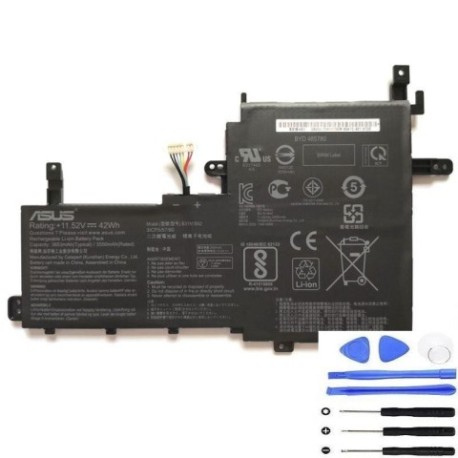
Battery models & part numbers
| Reference / P/N |
|---|
| 0B200-03440000 |
| 0B200-03440100 |
| 0B200-03440200 |
| Asus-B31N1842-42Wh.jpg |
| B31BmE1 |
Compatible models
| Model |
|---|
| Asus Expert Book P1 P1511CEA |
| Asus VivoBook 15 K513EA |
| Asus VivoBook 15 S513EA |
| Asus VivoBook 15 S513IA |
| Asus VivoBook 15 X513EA |
| Asus VivoBook 15 X513EP |
| Asus VivoBook 15 X513EQ |
| Asus VivoBook 15 X513UA |
| Asus VivoBook 15 X515EP |
| Asus VivoBook S15 S531FA |
| Asus VivoBook S15 S531FL |
| Asus VivoBook S15 S533EP |
| Asus VivoBook S15 S533UA |
| Asus X513IA |
Introduction
Laptop batteries naturally degrade over time, and when your ASUS laptop starts showing battery issues, it can significantly impact your productivity and mobility. The ASUS B31N1842 42Wh battery serves as a reliable replacement solution for multiple ASUS laptop models commonly used across Australia and New Zealand. Understanding when to replace your battery and ensuring compatibility is crucial for maintaining your laptop’s performance and extending its lifespan.
Many users experience frustration when their laptop suddenly shuts down during important work or won’t hold charge long enough for mobile use. This comprehensive guide addresses these concerns by providing clear information about compatible models, replacement indicators, and installation guidance specifically tailored for AU/NZ consumers.
Common signs you need a replacement
| Symptom | Cause | Verification | Recommendation |
|---|---|---|---|
| Rapid battery drain | Battery capacity degradation | Check battery health in Windows | Consider replacement if below 60% capacity |
| Laptop won’t charge fully | Battery cell failure | Monitor charging percentage | Replace if stuck below 80% charge |
| Battery swelling | Chemical breakdown | Visual inspection | Immediate replacement required |
| Overheating during use | Internal resistance increase | Temperature monitoring | Replace if consistently hot |
| Random shutdowns | Voltage instability | Battery diagnostic tools | Replace to prevent data loss |
How to check compatibility
Ensuring compatibility is essential when replacing your ASUS laptop battery. Start by locating your laptop’s model number, which is typically found on the bottom case, under the battery compartment, or in the system information. For ASUS laptops, you can check compatibility through multiple methods:
Physical Identification: Remove the current battery and note the part number printed on it. Compare this with the B31N1842 and related part numbers listed above. Many ASUS VivoBook and ExpertBook models share compatible battery designs across similar generations.
Software Verification: Use ASUS’s official support website by entering your laptop’s serial number or model. The ASUS Battery Health Charging software available through MyASUS can also provide detailed battery information and compatibility guidance.
Cross-Reference Checking: If your laptop model appears in our compatible models list above, the B31N1842 battery should fit perfectly. Pay attention to physical dimensions – the B31N1842 measures approximately 207mm x 138mm x 5mm and uses a standard 3-pin connector common across compatible ASUS models.
For Australian and New Zealand users, it’s particularly important to verify that replacement batteries meet local safety standards. The B31N1842 replacement batteries we offer comply with Australian Communications and Media Authority (ACMA) requirements and New Zealand’s electrical safety standards.
When to replace
Timing your battery replacement correctly can save you from unexpected downtime and potential data loss. Most lithium-ion batteries, including the ASUS B31N1842, typically last 2-3 years with regular use before showing significant degradation. However, several factors specific to Australian and New Zealand conditions can affect battery lifespan:
Climate Considerations: High temperatures common in Australian summers can accelerate battery degradation. If you frequently use your laptop in temperatures above 35°C, expect reduced battery lifespan. Similarly, coastal areas in New Zealand with high humidity can affect battery performance over time.
Usage Patterns: Heavy users who frequently cycle between battery and AC power may experience faster degradation. If your laptop is primarily used on battery power with daily full discharge cycles, consider replacement around the 18-24 month mark.
Performance Indicators: When your battery health drops below 60% of original capacity or you notice runtime has decreased to less than half of the original specification, replacement becomes economically sensible. For the 42Wh B31N1842 battery, this typically means runtime dropping below 2-3 hours for standard usage.
Safety Considerations: Immediate replacement is necessary if you notice any physical swelling, leaking, or excessive heat during charging. These indicate potential safety hazards that shouldn’t be ignored.
Installation guide
Replacing your ASUS laptop battery is generally straightforward, but following proper procedures ensures safety and optimal performance. Before beginning, ensure you have a clean, static-free workspace and the necessary tools – typically a small Phillips head screwdriver.
Preparation Steps:
- Shut down your laptop completely and disconnect the AC adapter
- Ground yourself to prevent static discharge
- Have your new B31N1842 battery ready and ensure it’s charged to at least 30%
Removal Process:
- Turn the laptop upside down on a soft surface
- Locate the battery release latches – most compatible ASUS models have sliding locks
- Slide the release latch to unlock position and gently lift the battery out
- For models with screwed batteries, remove the screws carefully noting their positions
Installation Process:
- Align the new B31N1842 battery with the connector, ensuring proper orientation
- Gently press into place until you hear a click or feel it seated properly
- If applicable, replace any screws removed during disassembly
- Close any battery compartment covers
Initial Setup:
- Connect the AC adapter and power on your laptop
- Allow the system to recognise the new battery – this may take a few minutes
- Check device manager to confirm battery detection
- Perform an initial full charge cycle for optimal calibration
For Australian and New Zealand users, it’s worth noting that many local computer repair shops offer professional installation services if you’re uncomfortable performing the replacement yourself. Typical installation costs range from $30-$60 AUD in major cities.
Usage & care tips
Proper battery maintenance extends the lifespan of your new ASUS B31N1842 battery and ensures consistent performance. Follow these evidence-based practices tailored for Australian and New Zealand conditions:
Charging Best Practices:
- Avoid frequent full discharges – lithium-ion batteries prefer partial discharges between 20-80%
- Don’t leave your laptop plugged in continuously at 100% charge for extended periods
- Use ASUS Battery Health Charging software to set maximum charge limits to 80-90% for extended battery life
- Charge at room temperature (15-25°C) for optimal battery health
Temperature Management:
- Avoid exposing your laptop to direct sunlight, particularly during Australian summers
- Never use your laptop on soft surfaces like beds or couches that block ventilation ports
If your laptop feels hot during use, take breaks to allow cooling
Store your laptop in climate-controlled environments when not in use
Storage Guidelines:
- If storing your laptop for extended periods, charge battery to 40-60%
Store in cool, dry place away from direct sunlight
Recharge every 3-6 months to maintain battery health
Performance Optimisation:
- Adjust power settings to balanced or power saver modes when on battery
Reduce screen brightness – this significantly impacts battery life
Close unnecessary applications and browser tabs
Disconnect peripherals when not in use
Safety & recycling in AU/NZ
Battery safety and proper disposal are crucial environmental responsibilities. In Australia and New Zealand, specific regulations govern battery handling and recycling:
Safety Precautions:
- Never attempt to open or puncture the battery casing
Avoid exposing batteries to temperatures above 60°C or below -20°C
Only use authorised ASUS chargers or compatible power adapters
If battery swelling occurs, discontinue use immediately and dispose of properly
Keep batteries away from water and other liquids
Australian Recycling Options:
- Drop off old laptop batteries at any Officeworks store nationwide
Many council waste transfer stations accept e-waste including batteries
Battery World stores participate in battery recycling programs
Check RecyclingNearYou.com.au for local options
New Zealand Recycling Options:
- Participate in the eDay events organised in various regions
Drop off at specialised e-waste recycling centres in major cities
Many computer retailers offer take-back programs
Check with your local council for e-waste collection services
Both countries have product stewardship schemes encouraging proper battery disposal. Never dispose of lithium-ion batteries in household rubbish as they pose fire risks in landfill and waste valuable resources that can be recovered through recycling.
FAQ
How long does the ASUS B31N1842 battery typically last?
The B31N1842 42Wh battery typically provides 2-4 hours of runtime depending on usage intensity, screen brightness, and applications running. With normal use, expect 300-500 charge cycles before significant capacity degradation occurs.
Will replacing my battery void my ASUS warranty?
In Australia and New Zealand, replacing the battery yourself generally doesn’t void the overall laptop warranty, but any damage caused during installation may not be covered. For warranty preservation, consider using an authorised service centre.
How can I verify my new battery is genuine?
Genuine ASUS B31N1842 batteries feature precise labelling, proper packaging with safety certifications, and consistent performance. Purchase from reputable suppliers and check for Australian compliance marks.
Why does my new battery not charge to 100% immediately?
New batteries often require several charge cycles to calibrate properly. The battery management system needs time to learn capacity characteristics. Complete 2-3 full charge cycles for accurate percentage reporting.
Can I use a higher capacity battery with my ASUS laptop?
No, you should only use batteries with the specified capacity and voltage. Using incompatible batteries can cause damage to your laptop’s charging circuit and potentially create safety hazards.
How do I dispose of my old ASUS battery safely?
In Australia, use Batteryback.org.au to find drop-off locations. In New Zealand, check with your local council for e-waste disposal options. Never dispose of lithium batteries in household waste.
What should I do if my new battery isn’t recognised by my laptop?
Ensure proper connection and try resetting the EC (Embedded Controller) by holding the power button for 40 seconds with the battery and AC adapter disconnected. If issues persist, contact the supplier for assistance.
Replacing your ASUS laptop battery with the genuine B31N1842 42Wh model restores the portability and reliability you originally enjoyed. With proper installation, care, and eventual recycling, you’ll maximise both performance and environmental responsibility. For Australian and New Zealand users facing battery issues, this compatible replacement solution offers a cost-effective way to extend your laptop’s useful life without compromising on quality or safety standards.