ASUS C21N1509 38Wh Battery Replacement Guide for Australian & New Zealand Users
If your ASUS VivoBook is struggling to hold a charge or showing battery warning signs, you’ve come to the right place. This comprehensive guide covers everything Australian and New Zealand users need to know about replacing their laptop battery with the genuine ASUS C21N1509 38Wh model.
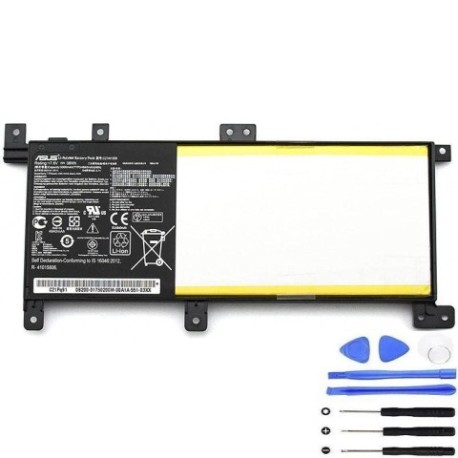
Battery models & part numbers
| Reference / P/N |
|---|
| 0B200-01750000 |
| 0B200-01750200 |
| 0B200-01750300 |
| 0B200-01750400 |
| 0B200-01750500 |
| 0B200-01750600 |
| 0B200-01750700 |
| Asus-C21N1509-38Wh |
| C21Pq91 |
| C21Pq9H |
| C21PqCH |
Compatible models
| Model |
|---|
| Asus VivoBook F556UQ |
| Asus VivoBook F556UR |
| Asus VivoBook X556UA |
| Asus VivoBook X556UB |
| Asus VivoBook X556UF |
| Asus VivoBook X556UJ |
| Asus VivoBook X556UQ |
| Asus VivoBook X556UR |
| Asus VivoBook X556UV |
Introduction
Your ASUS VivoBook is designed to be your reliable companion for work, study, and entertainment across Australia and New Zealand. However, like all lithium-ion batteries, its power source has a limited lifespan. The ASUS C21N1509 38Wh battery replacement ensures you can continue enjoying your laptop’s full potential without being tethered to a power outlet.
This guide is specifically tailored for AU/NZ consumers, addressing local considerations like climate conditions, authorised service centres, and proper disposal methods. Whether you’re in Sydney, Melbourne, Auckland, or Wellington, understanding your battery replacement options empowers you to make informed decisions about your device’s maintenance.
Common signs you need a replacement
| Symptom | Cause | Verification | Recommendation |
|---|---|---|---|
| Rapid battery drain | Reduced capacity from age/cycles | Check battery health in Windows | Consider replacement if below 60% |
| Laptop shuts down unexpectedly | Voltage drops under load | Monitor during intensive tasks | Replace to prevent data loss |
| Battery won’t charge fully | Charging circuit protection | Check charging percentage | Replace for full mobility |
| Physical swelling/bulging | Gas buildup from degradation | Visual inspection | Immediate replacement required |
| Overheating during use | Increased internal resistance | Temperature monitoring | Replace for safety & performance |
Many AU/NZ users notice these symptoms after 2-3 years of regular use, particularly in warmer climates where battery degradation accelerates. Don’t ignore these warning signs – they’re your laptop’s way of telling you it needs attention.
How to check compatibility
Before purchasing any replacement battery, verifying compatibility is crucial. For ASUS VivoBook owners in Australia and New Zealand, here’s how to confirm your device needs the C21N1509 38Wh model:
Finding Your Model Information: Turn your laptop over and locate the white sticker containing model details. For VivoBook F556 and X556 series, this is typically found on the bottom case. You can also check through Windows by pressing Windows Key + R, typing “msinfo32”, and looking under “System Model”.
Cross-Reference with Official Sources: Visit the ASUS Australia or New Zealand support website and enter your serial number or model name. The official compatibility checker will confirm whether your device uses the C21N1509 battery. Many authorised service centres across major cities like Sydney, Melbourne, Brisbane, Auckland, and Wellington can also verify compatibility.
Physical Inspection: If you’re technically inclined, you can carefully remove your current battery (after proper shutdown) and check for part numbers printed on the battery itself. The C21N1509 measures approximately 205mm x 60mm x 4mm and features a specific connector type compatible with your VivoBook’s motherboard.
Remember that using incompatible batteries can void your warranty and potentially damage your device. Always opt for genuine or high-quality compatible replacements from reputable suppliers.
When to replace
Timing your battery replacement correctly ensures you never face unexpected downtime. For ASUS VivoBook users in Australia and New Zealand, consider replacement when:
Battery Health Drops Below 60%: Windows Battery Report (generated via Command Prompt) shows design capacity versus full charge capacity. When your battery can’t hold more than 60% of its original charge, replacement becomes cost-effective.
After 500 Complete Charge Cycles: Most lithium-ion batteries, including the C21N1509, maintain optimal performance for 300-500 complete cycles. If you’ve owned your VivoBook for 2+ years with regular use, you’re likely approaching this threshold.
Seasonal Considerations: Australian summers and New Zealand’s varying climates can accelerate battery degradation. Consider preemptive replacement before extreme weather seasons if your battery is already showing age.
Before Important Projects: If you have critical work, studies, or travel planned, replacing an aging battery proactively prevents interruptions. The peace of mind knowing your device has reliable power is invaluable.
Many users wait until their battery fails completely, but proactive replacement saves frustration and potential data loss. The C21N1509 38Wh typically provides 4-6 hours of mixed usage, so if you’re consistently getting less than 2 hours, replacement should be strongly considered.
Installation guide
Replacing your ASUS VivoBook battery is straightforward with proper preparation. Follow this step-by-step guide tailored for Australian and New Zealand DIY enthusiasts:
Preparation: Power down your laptop completely and unplug the AC adapter. Work on a clean, static-free surface with good lighting. Gather necessary tools: Phillips #00 screwdriver, plastic spudger or guitar pick, and an anti-static wrist strap (recommended).
Safety First: Ensure you’re working in a well-ventilated area. Remove any jewellery that might cause shorts. Have a small container for screws to prevent loss.
Removal Process: Turn the laptop upside down. Locate and remove the screws securing the bottom cover – typically 10-12 screws of varying lengths. Use your plastic tool to carefully pry the bottom case starting from the corners. Once inside, locate the battery connector (usually near the centre or toward the front). Gently disconnect the battery cable from the motherboard. Remove the screws securing the battery (usually 4-6) and lift the battery out.
Installation: Place your new C21N1509 38Wh battery in position. Secure with the screws you removed earlier. Reconnect the battery cable to the motherboard, ensuring it’s firmly seated. Replace the bottom cover and secure all screws.
Initial Setup: Connect your AC adapter and power on the laptop. Allow the system to recognise the new battery. For optimal performance, complete a full charge cycle: charge to 100%, use until about 10%, then recharge fully.
If you encounter resistance during any step or feel unsure, consider visiting an authorised ASUS service centre. Major Australian cities have multiple service options, and many computer repair shops throughout New Zealand can assist with installation.
Usage & care tips
Maximising your new C21N1509 battery’s lifespan requires proper care habits. These tips are particularly relevant for Australian and New Zealand climates:
Optimal Charging Practices: Avoid frequently draining your battery to 0%. Instead, try to keep it between 20-80% for daily use. Complete full cycles (0-100%) only once monthly to recalibrate the battery meter. Unplug the charger once fully charged rather than leaving it connected constantly.
Temperature Management: Australian summers can be harsh on electronics. Never leave your laptop in a hot car or direct sunlight. Ideal operating temperature is 10-35°C. During heatwaves, consider using your laptop in air-conditioned spaces or with additional cooling.
Storage Considerations: If storing your laptop unused for extended periods, charge the battery to about 50-60% and power down completely. Store in a cool, dry place away from direct sunlight. For New Zealand’s humid coastal areas, consider using silica gel packets in storage areas.
Power Settings Optimisation: Configure Windows power plans to balance performance and battery life. Use battery saver mode when unplugged for extended periods. Reduce screen brightness and close unnecessary applications to extend usage time.
Regular Maintenance: Update your BIOS and battery drivers regularly through ASUS official channels. Run battery calibration every 2-3 months by fully charging, then discharging to about 5%, then recharging completely.
Following these practices can extend your battery’s effective lifespan to 3-4 years, providing excellent value from your replacement investment.
Safety & recycling in AU/NZ
Proper battery handling and disposal are crucial for environmental protection and personal safety. In Australia and New Zealand, specific regulations govern battery recycling:
Safety Precautions: Never attempt to open, puncture, or modify your laptop battery. If you notice swelling, leaking, or unusual heating, discontinue use immediately and contact a professional. Store spare batteries in cool, dry places away from metal objects that could cause short circuits.
Australian Recycling Options: Through the B-cycle program, Australians can drop off used laptop batteries at over 2,000 collection points nationwide. Major retailers like Officeworks, JB Hi-Fi, and Battery World participate in battery recycling programs. Many local councils also offer e-waste collection services for batteries.
New Zealand Recycling Services: The Ministry for the Environment supports battery recycling through various programmes. Places like Computer Recycling, RemarkIT Solutions, and many council transfer stations accept laptop batteries. Some retailers like Noel Leeming and Harvey Norman offer take-back services for electronic waste.
Transportation Guidelines: When transporting used batteries for recycling, tape the terminals to prevent short circuits. Never place loose batteries in regular rubbish bins as they pose fire risks in waste facilities.
Environmental Benefits: Proper recycling recovers valuable materials like lithium, cobalt, and copper while preventing hazardous substances from entering landfills. Both Australia and New Zealand are working toward circular economy models for battery materials.
FAQ
How long does the C21N1509 38Wh battery typically last?
With normal usage, expect 4-6 hours depending on your power settings and applications. High-performance tasks like gaming or video editing will reduce this to 2-3 hours, while basic web browsing and document work can extend usage to 6+ hours.
Is this battery compatible with my VivoBook purchased in Australia/NZ?
Yes, the C21N1509 is the genuine replacement for VivoBook F556 and X556 series sold in both countries. Regional variations in power adapters don’t affect battery compatibility.
How can I verify my battery is genuine?
Genuine ASUS batteries feature precise branding, proper serial numbers, and come in official packaging. Purchase from authorised resellers and check the holographic security labels. Counterfeit batteries often have poor printing quality and incorrect weight.
Will replacing my battery void my ASUS warranty?
In Australia, consumer law protects your right to have devices serviced by third parties without voiding warranty, provided the service is performed competently. In New Zealand, the Consumer Guarantees Act offers similar protections. However, damage caused by improper installation may not be covered.
How should I dispose of my old battery in Melbourne/Sydney/Auckland?
Major cities have multiple e-waste drop-off locations. In Melbourne, check with Sustainability Victoria for local options. Sydney residents can use the Planet Ark recycling directory. Aucklanders can visit the Auckland Council website for transfer station locations accepting batteries.
What’s the difference between 38Wh and higher capacity batteries?
The 38Wh rating indicates energy storage capacity. Higher Wh batteries provide longer runtime but must be specifically designed for your model. Using incompatible higher-capacity batteries can damage your VivoBook’s charging system.
Can I use my laptop while charging the new battery?
Yes, modern laptops including ASUS VivoBooks are designed for simultaneous use and charging. The system automatically manages power flow to protect both the battery and your device.
Replacing your ASUS VivoBook’s battery restores the freedom and mobility you originally enjoyed. With the genuine C21N1509 38Wh battery, proper installation, and good maintenance habits, you can expect years of reliable performance. Whether you’re studying at a Melbourne café, working from a Sydney co-working space, or travelling across New Zealand, a healthy battery ensures your laptop remains your trusted companion.