Asus C21N1808 38Wh Battery Replacement: Complete Guide for Australian & New Zealand Users
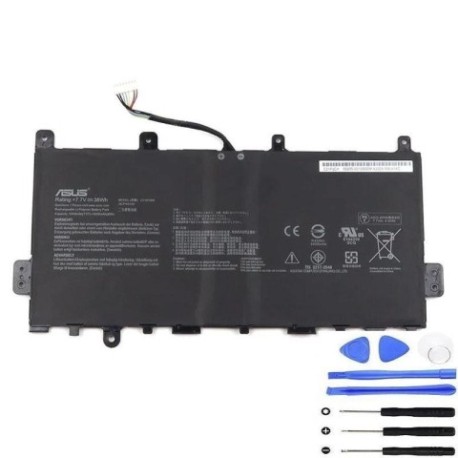
If you’re experiencing battery issues with your Asus Chromebook or laptop in Australia or New Zealand, you’ve come to the right place. This comprehensive guide covers everything from compatibility checking to installation and maintenance for your Asus C21N1808 38Wh battery replacement.
Battery models & part numbers
| Reference / P/N |
|---|
| 0B200-03130000 |
| Asus-C21N1808-38Wh-B-1 |
| C21N1808 |
| C21PqCH |
Compatible models
| Model |
|---|
| Asus Chromebook C423NA |
| Asus MJ401TA |
Introduction
As a laptop user in Australia or New Zealand, dealing with battery issues can be frustrating, especially when you rely on your device for work, study, or entertainment. The Asus C21N1808 38Wh battery is a critical component for several popular Asus models, and understanding when and how to replace it can save you time, money, and unnecessary stress.
This battery is specifically designed for Asus Chromebooks and laptops, offering reliable performance and compatibility with multiple device models. Whether you’re in Sydney, Melbourne, Auckland, or Wellington, having access to accurate information about battery replacement is essential for maintaining your device’s optimal performance.
Common signs you need a replacement
| Symptom | Cause | Verification | Recommendation |
|---|---|---|---|
| Rapid battery drain | Ageing battery cells losing capacity | Check battery health in system settings | Consider replacement if capacity below 60% |
| Laptop won’t hold charge | Failed battery cells or circuitry | Test with different power adapter | Immediate replacement recommended |
| Battery swelling | Chemical breakdown or overheating | Visual inspection of battery compartment | Replace immediately for safety |
| Inconsistent charging | Battery management system failure | Monitor charging patterns over several days | Replace if pattern persists |
| Overheating during use | Inefficient battery operation | Check temperature during normal operation | Replace if temperatures exceed 45°C |
How to check compatibility
Before purchasing a replacement battery for your Asus device in Australia or New Zealand, it’s crucial to verify compatibility to ensure optimal performance and safety.
Finding your model information
For Asus Chromebook C423NA and MJ401TA users, locating your model information is straightforward. Check the bottom casing of your device for a sticker containing the model number, serial number, and regulatory information. Alternatively, you can access system information through your device’s settings menu:
- On Chrome OS: Go to Settings > About Chrome OS > Additional details
- Look for model number and serial number information
- Compare with the compatible models listed above
Using official Asus tools
Asus provides several resources for Australian and New Zealand customers to verify compatibility:
- Visit the official Asus support website and enter your serial number
- Use the Asus product identification tool available online
- Contact Asus authorised service centres in major cities like Sydney, Melbourne, Brisbane, Auckland, or Wellington
Cross-referencing part numbers
When checking compatibility, always cross-reference multiple part numbers. The Asus C21N1808 battery may be listed under different reference numbers depending on the retailer or region. Ensure any replacement battery matches at least one of the part numbers provided in our compatibility table.
When to replace
Understanding the right time to replace your Asus battery can save you from unexpected downtime and potential data loss. Here are key indicators that it’s time for a replacement:
Battery health metrics
Modern laptops, including Asus Chromebooks, provide battery health information through system diagnostics. When your battery health drops below 70-80% of its original capacity, consider replacement planning. Most Asus batteries are designed for approximately 500-800 charge cycles before significant degradation occurs.
Performance impact
If you notice your device performance suffering when running on battery power, or if system throttling occurs more frequently, your battery may no longer be providing adequate power delivery. This is particularly noticeable during processor-intensive tasks.
Age considerations
Even with minimal use, lithium-ion batteries degrade over time. If your Asus device is more than 2-3 years old and you’re experiencing any battery-related issues, replacement is likely necessary regardless of usage patterns.
Installation guide
Replacing the battery in your Asus Chromebook or laptop requires careful attention to detail and proper tools. Follow this step-by-step guide for a successful installation.
Preparation and safety
Before beginning any repair work on your Asus device:
- Power down the device completely and disconnect from any power source
- Work on a clean, static-free surface with adequate lighting
- Use proper tools including precision screwdrivers and plastic opening tools
- Ground yourself to prevent electrostatic discharge damage
- Keep organised notes or take photos during disassembly for reference
Step-by-step replacement process
For Asus Chromebook C423NA and MJ401TA models:
- Remove the bottom case screws using the appropriate screwdriver
- Carefully pry open the bottom case starting from the corners
- Locate the battery connector on the motherboard and gently disconnect it
- Remove any screws securing the battery to the chassis
- Lift the old battery out carefully, noting its orientation
- Place the new C21N1808 battery in position
- Secure with screws and reconnect the battery connector
- Replace the bottom case and secure all screws
Post-installation testing
After installing your new battery:
- Connect the power adapter and allow the battery to charge for at least 2 hours
- Power on the device and check for any error messages
- Verify battery detection in system settings
- Run the device on battery power to ensure proper operation
- Calibrate the battery by performing a full charge-discharge cycle
Usage & care tips
Proper battery maintenance can significantly extend the lifespan of your Asus C21N1808 replacement battery. Follow these best practices for optimal performance in Australian and New Zealand conditions.
Charging practices
Modern lithium-ion batteries perform best with partial rather than full discharge cycles. Avoid letting your battery drain completely before recharging. Instead, aim to keep the charge level between 20% and 80% for daily use. Only perform full calibration cycles once every 1-2 months.
Temperature management
Australian summers and New Zealand’s varying climates can affect battery performance. Avoid exposing your device to extreme temperatures:
- Never leave your laptop in a hot car or direct sunlight
- Avoid using your device in ambient temperatures above 35°C
- Store devices in climate-controlled environments when not in use
- Allow devices to cool before charging if they’ve been in hot conditions
Storage recommendations
If you need to store your Asus device for extended periods:
- Charge the battery to approximately 50-60% before storage
- Store in a cool, dry place with temperatures between 15-25°C
- Power down the device completely before storage
- Recharge the battery every 3-6 months if storing long-term
Safety & recycling in AU/NZ
Battery safety and proper disposal are critical considerations for Australian and New Zealand consumers. Follow these guidelines to ensure safe usage and environmentally responsible disposal.
Safety precautions
When using and handling your Asus battery:
- Only use authorised chargers and accessories
- Never attempt to disassemble or modify the battery
- Avoid physical damage to the battery casing
- Stop using immediately if you notice swelling, leakage, or unusual odours
- Keep batteries away from children and pets
Australian recycling programs
In Australia, battery recycling is managed through several programmes:
- B-cycle: The official battery stewardship scheme
- Drop-off locations at major retailers including Officeworks, Bunnings, and Aldi
- Council recycling centres in most metropolitan areas
- Business recycling services for larger quantities
New Zealand recycling options
New Zealand residents can recycle batteries through:
- eDay events organised by local councils
- Retailer take-back programmes at stores like Noel Leeming and Harvey Norman
- Community recycling centres in major urban areas
- specialised e-waste recycling facilities
Legal requirements
Both Australia and New Zealand have regulations governing battery disposal. It’s illegal to dispose of lithium-ion batteries in regular household waste due to fire risks and environmental concerns. Always use approved recycling channels.
FAQ
How long does the Asus C21N1808 38Wh battery typically last?
The Asus C21N1808 38Wh battery is designed to provide approximately 4-8 hours of typical usage depending on your device model and usage patterns. With proper care, the battery should maintain good performance for 2-3 years before significant capacity loss occurs.
Can I use this battery with other Asus models not listed?
No, we strongly recommend only using the C21N1808 battery with the compatible models listed in our compatibility table. Using incompatible batteries can cause damage to your device and void warranties. Always verify compatibility before purchase.
Is installation difficult for someone without technicalexperience?
While battery replacement requires some technical skill, many users with basic DIY experience can successfully replace their Asus battery by following our detailed guide. However, if you’re uncomfortable with electronics repair, we recommend seeking assistance from an authorised Asus service centre in Australia or New Zealand.
How can I verify my replacement battery is genuine?
Genuine Asus batteries should have proper branding, correct model numbers, and come in official packaging. Purchase from reputable suppliers, check for authentication seals, and verify the battery performance matches specifications. Our recommended supplier provides genuine compatible batteries with full documentation.
What warranty comes with this battery?
Replacement batteries typically come with a 12-month warranty from reputable suppliers. Always check the specific warranty terms before purchase and retain your proof of purchase for any potential claims. The warranty usually covers manufacturing defects but not damage from improper use or installation.
My device still has issues after battery replacement. What should I do?
If problems persist after installing a new battery, several factors could be involved. Check your power adapter, charging port, and motherboard connections. If issues continue, consult an authorised technician as the problem may be with other components rather than the battery itself.
Are there any special considerations for Australian power standards?
Australian and New Zealand power standards (230V, 50Hz) are compatible with Asus charging systems. However, ensure you’re using an approved power adapter designed for AU/NZ markets. Using incompatible chargers can affect battery performance and potentially cause damage.
Replacing your Asus C21N1808 battery doesn’t have to be a daunting task. With the right information, tools, and genuine replacement parts, you can restore your device’s mobility and performance. Remember to always prioritise safety, verify compatibility, and use proper recycling channels for your old battery. Whether you’re in Brisbane, Perth, Christchurch, or anywhere across Australia and New Zealand, this guide provides everything you need for a successful battery replacement experience.