ASUS C31N1610 54Wh Battery Replacement Guide for Australian & New Zealand Users
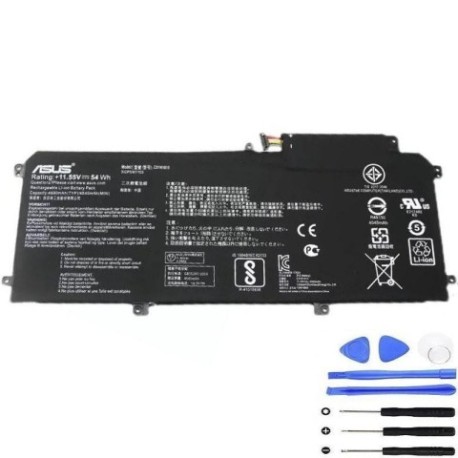
Battery models & part numbers
| Reference / P/N |
|---|
| 0B200-02090100 |
| Asus-C31N1610-54Wh |
| C31Pp21 |
Compatible models
| Model |
|---|
| Asus ZenBook UX330CA-FC009T |
| Asus ZenBook UX330CA-FC020T |
| Asus ZenBook UX330CA-FC030T |
| Asus ZenBook UX330CA-FC031T |
Introduction
If you’re an ASUS ZenBook UX330CA user in Australia or New Zealand experiencing battery issues, you’re not alone. Laptop batteries naturally degrade over time, and finding the right replacement can be confusing with multiple part numbers and model variations. This comprehensive guide covers everything you need to know about the ASUS C31N1610 54Wh battery replacement, from compatibility verification to installation and proper care.
Common signs you need a replacement
| Symptom | Cause | Verification | Recommendation |
|---|---|---|---|
| Battery won’t hold charge | Cell degradation after 2-3 years | Check battery health in Windows | Replace if capacity below 60% |
| Laptop shuts down unexpectedly | Voltage drops under load | Monitor during intensive tasks | Immediate replacement needed |
| Battery swelling | Gas buildup from chemical reactions | Visual inspection, trackpad lifting | Stop using immediately |
| Overheating during charging | Internal resistance increase | Touch test, thermal monitoring | Replace to prevent damage |
| Charging indicator issues | Battery management system failure | LED behaviour observation | Professional diagnosis |
How to check compatibility
Before purchasing any replacement battery for your ASUS ZenBook UX330CA, proper compatibility verification is essential. Start by locating your laptop’s exact model number, which is typically found on the bottom casing sticker or in the system information (press Windows Key + R, type “msinfo32”, and check System Model). For ASUS devices specifically, you can also use the MyASUS app, which provides detailed hardware information and official compatibility checks.
The ASUS C31N1610 54Wh battery is designed specifically for the ZenBook UX330CA series and compatible with multiple part numbers including 0B200-02090100 and C31Pp21. Always cross-reference your current battery’s part number with the replacement, and ensure the physical dimensions match (typically around 210mm x 70mm x 20mm for this model). Australian consumers should verify that the replacement battery meets Australian safety standards and carries proper certification.
When to replace
Most laptop batteries, including the ASUS C31N1610 54Wh, have a typical lifespan of 2-3 years with regular use. However, several factors specific to Australian and New Zealand conditions can affect this timeline. High ambient temperatures common in Australian summers can accelerate battery degradation, while frequent charging cycles from mobile use patterns common among Kiwi professionals can shorten battery life.
Monitor your battery health through Windows Battery Report (run “powercfg /batteryreport” in Command Prompt) and consider replacement when capacity drops below 70% of original. For ASUS ZenBook UX330CA users, noticeable performance drops during unplugged use or the battery not charging to 100% are clear indicators. If your laptop is over two years old and you’re experiencing reduced battery life, it’s likely time for a replacement.
Installation guide
Replacing the battery in your ASUS ZenBook UX330CA requires careful attention to detail but is manageable for most users. Begin by powering down the laptop completely and disconnecting all cables. You’ll need a Phillips #00 screwdriver and a plastic spudger or guitar pick for this procedure.
Turn the laptop upside down and remove the 10 screws securing the bottom cover (note that some screws may be different lengths, so keep them organised). Carefully pry the bottom cover starting from the rear edge near the hinge area. Once inside, locate the battery connector near the centre of the motherboard and gently disconnect it by pulling the connector straight up. Remove the four screws securing the battery, then lift the battery out at a 45-degree angle.
Install the new ASUS C31N1610 54Wh battery by reversing this process, ensuring all connections are secure before replacing the bottom cover. After installation, charge the battery completely before first use to calibrate the battery management system.
Usage & care tips
Proper battery maintenance can significantly extend the life of your new ASUS C31N1610 54Wh battery. Avoid exposing your laptop to extreme temperatures – don’t leave it in hot cars during Australian summers or in direct sunlight. Ideal operating temperatures are between 10°C and 35°C. For optimal battery health, try to keep the charge level between 20% and 80% for daily use, with occasional full cycles to recalibrate the battery meter.
If you primarily use your laptop plugged in, consider enabling ASUS Battery Health Charging in the MyASUS app, which limits maximum charge to 60-80% to reduce wear. For New Zealand users who frequently move between locations, allow the battery to cool before charging if the laptop has been in use. Store your laptop with around 50% charge if not using for extended periods.
Safety & recycling in AU/NZ
Battery safety is paramount, especially with lithium-ion batteries like the ASUS C31N1610 54Wh. Never attempt to disassemble or puncture the battery, and avoid exposing it to water or moisture. If you notice any swelling, overheating, or unusual odours, discontinue use immediately and contact professional disposal services.
In Australia, used laptop batteries must be recycled through authorised collection points. Major retailers like Officeworks and JB Hi-Fi offer free battery recycling services. In New Zealand, check with your local council for e-waste collection days or use dedicated recycling centres. Never dispose of lithium-ion batteries in household rubbish due to fire risks and environmental concerns.
FAQ
How long does the ASUS C31N1610 54Wh battery typically last?
With normal use, expect 3-5 hours of typical productivity use. Heavy tasks may reduce this to 2-3 hours, while light web browsing can extend to 6-7 hours.
Is this battery compatible with other ZenBook models?
No, the C31N1610 is specifically designed for the UX330CA series. Using it in incompatible models may cause damage and void warranties.
How do I know if my replacement battery is genuine?
Genuine ASUS batteries feature proper branding, correct part numbers, and come in official packaging. Purchase from authorised retailers to ensure authenticity.
Can I replace the battery myself without voiding warranty?
For laptops out of warranty, self-replacement is acceptable. For in-warranty devices, check ASUS policy or use authorised service centres.
What should I do with my old battery?
Recycle it properly through authorised e-waste facilities. Many Australian states and New Zealand regions have dedicated battery recycling programs.
How long does shipping take to AU/NZ addresses?
Most reputable suppliers offer 5-10 business day delivery to major Australian and New Zealand cities, with express options available.
Does temperature affect battery performance in AU/NZ climates?
Yes, extreme heat in Australian summers can reduce battery life, while cold New Zealand winters may temporarily decrease performance until the battery warms up.