ASUS C31N1721 56Wh Laptop Battery Replacement Guide
If your ASUS laptop is struggling to hold a charge or shutting down unexpectedly, you likely need a battery replacement. Our comprehensive guide covers everything Australian and New Zealand consumers need to know about the ASUS C31N1721 56Wh battery, including compatible models, installation tips, and local recycling options.
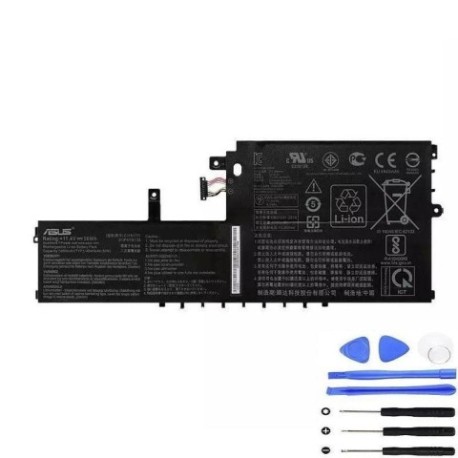
Battery models & part numbers
| Reference / P/N |
|---|
| 0B200-02830000 |
| 0B200-02830100 |
| 0B200-02830200 |
| 0B200-02830300 |
| 3759D4 |
| Asus-C31N1721-56Wh |
| C31Pp95 |
| ICP4059134 |
Compatible models
| Model |
|---|
| E406MA |
| E406SA |
| L406MA |
| L406MA-BV157TS |
| L406MA-EK077TS |
| L406MA-EK158TS |
| L406MA-EK342TS |
| L406MA-EK954TS |
| R420MA |
| R420MA-BV164TS |
| VivoBook E406MA |
| VivoBook E406MA-EB155T |
| VivoBook E406MA-EK065RA |
| VivoBook E406MA-EK072TS |
| VivoBook E406SA |
| VivoBook E406SA-BV013T |
| VivoBook E406SA-BV072TS |
Introduction
Laptop batteries are consumable components that naturally degrade over time. The ASUS C31N1721 56Wh battery is designed for various ASUS VivoBook and other laptop models commonly used across Australia and New Zealand. Understanding when and how to replace your battery can save you from unexpected shutdowns and extend your laptop’s usable life.
Common signs you need a replacement
| Symptom | Cause | Verification | Recommendation |
|---|---|---|---|
| Reduced battery life | Natural cell degradation | Check Windows battery report | Replace if below 50% capacity |
| Laptop shuts down unexpectedly | Voltage drops under load | Monitor during intensive tasks | Immediate replacement needed |
| Battery not charging fully | Charging circuit issues | Check charging indicator | Test with different charger |
| Physical swelling | Gas buildup from cell failure | Visual inspection | Replace immediately – safety risk |
| Overheating during use | Internal resistance increase | Temperature monitoring | Replace to prevent damage |
How to check compatibility
Before purchasing a replacement battery, verify compatibility with your specific ASUS model. For VivoBook E406MA, E406SA, L406MA, and R420MA series laptops, check the model number on the bottom casing or under the battery compartment. You can also use ASUS’s official support website by entering your serial number or model name. The battery compartment typically displays the compatible part numbers, including C31N1721, 0B200 series, or other listed references. Always cross-reference with multiple identifiers to ensure perfect fit and electrical compatibility.
When to replace
Most laptop batteries last 2-4 years with regular use. Consider replacement when your battery holds less than 60% of its original capacity, requires frequent charging, or shows physical damage. In Australia’s warmer climates, battery degradation can accelerate, so monitor performance regularly. If your laptop struggles to maintain charge during important work or study sessions, it’s time for a replacement to restore reliability.
Installation guide
Replacing the battery in compatible ASUS models is generally straightforward. First, power down the laptop and disconnect all cables. Place the laptop on a clean, static-free surface. For most VivoBook models, you’ll need to remove the bottom panel using a Phillips screwdriver. Locate the battery connector and gently disconnect it. Remove the screws securing the battery, then lift it out. Install the new C31N1721 battery, reconnect the connector, and reassemble. Always handle lithium-ion batteries carefully and avoid puncturing or bending them during installation.
Usage & care tips
To maximise your new battery’s lifespan, avoid frequent full discharges and instead perform partial discharges. Keep your laptop in cool environments (15-25°C ideal) and avoid leaving it in hot cars or direct sunlight. For Australian conditions, consider using power-saving modes during summer months. Calibrate your battery monthly by allowing it to discharge to about 20% then charging fully. Store batteries at 40-60% charge if not using for extended periods.
Safety & recycling in AU/NZ
In Australia and New Zealand, lithium-ion batteries must be disposed of properly through authorised recycling centres. Never dispose of batteries in household waste due to fire risks. Many electronics retailers offer free battery recycling services. In case of battery swelling, stop using immediately and contact professional disposal services. Always purchase from reputable suppliers to ensure compliance with Australian safety standards.
FAQ
How long does the ASUS C31N1721 battery last on a full charge?
Depending on usage and laptop model, expect 4-8 hours of typical use. Power-intensive tasks will reduce this time significantly.
Is this battery compatible with all ASUS VivoBook models?
No, it’s specifically designed for the E406MA, E406SA, L406MA, and R420MA series and their variants as listed in our compatibility table.
Can I replace the battery myself or should I seek professional help?
Most users with basic technical skills can replace it following our guide. If uncomfortable, authorised ASUS service centres in major Australian cities can assist.
How do I know if my battery is genuine ASUS?
Genuine batteries have proper branding, serial numbers, and come in official packaging. Purchase from authorised retailers to avoid counterfeits.
What’s the warranty on replacement batteries?
Typically 12 months from reputable suppliers, covering manufacturing defects but not normal wear and tear.
Can I use my laptop while plugged in with the new battery?
Yes, modern laptops have charging circuits that protect the battery from overcharging when connected to power.
How should I dispose of my old ASUS battery in New Zealand?
Use the Recycle-more programme or drop at designated e-waste collection points available at most council transfer stations.