ASUS C31N1824 48Wh Battery Replacement Guide for Australian & New Zealand Users
If your ASUS Chromebook Flip C434TA is struggling with battery life, you’ve come to the right place. This comprehensive guide covers everything Australian and New Zealand users need to know about replacing their laptop battery with the genuine ASUS C31N1824 48Wh model.
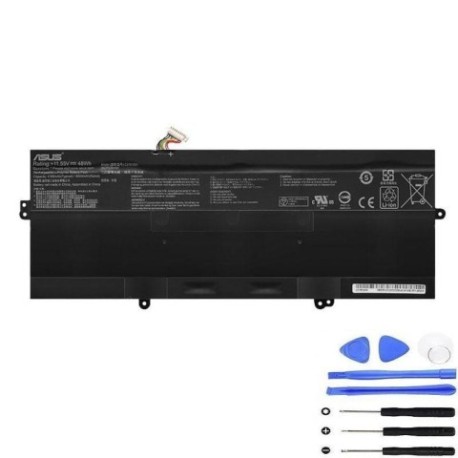
Battery models & part numbers
| Reference / P/N |
|---|
| 0B200-03290000 |
| 0B200-03290100 |
| 289191 |
| Asus-C31N1824-48Wh |
| C31PnC1 |
Compatible models
| Model |
|---|
| Asus Chromebook Flip C434TA |
| Asus Chromebook Flip C434TA-AI0264 |
| Asus Chromebook Flip C434TA-DSM4T |
| Asus Chromebook Flip C434TA-E10013 |
Introduction
The ASUS Chromebook Flip C434TA is a popular choice among Australian and New Zealand users for its versatility and performance. However, like all lithium-ion batteries, its power source has a limited lifespan. The C31N1824 48Wh battery is the genuine replacement that ensures your device continues to perform at its best.
Common signs you need a replacement
| Symptoms | Causes | Verification | Recommendation |
|---|---|---|---|
| Battery drains quickly (less than 2 hours) | Ageing cells, frequent charging cycles | Check battery health in Chrome OS settings | Consider replacement if capacity below 60% |
| Laptop shuts down unexpectedly | Voltage drops under load | Monitor battery percentage during use | Replace battery to prevent data loss |
| Battery won’t charge fully | Charging circuit issues, cell degradation | Leave charging for 4+ hours, check percentage | Test with different charger first |
| Laptop bulging or uneven surface | Battery swelling – serious safety hazard | Visual inspection, place on flat surface | STOP USING IMMEDIATELY and replace |
| Overheating during charging | Internal resistance increase | Feel bottom case temperature | Replace to prevent damage to other components |
How to check compatibility
Before purchasing any replacement battery for your ASUS Chromebook, proper compatibility verification is essential. For ASUS devices, you can find your model number on the bottom case label, typically starting with “C434TA”. The original battery part number is usually printed on the battery itself, accessible by removing the bottom cover. You can also check compatibility through ASUS’s official support website by entering your serial number. Many Australian authorised service centres offer free compatibility checks if you’re uncertain. Remember that using incompatible batteries can void your warranty and potentially damage your device.
When to replace
Most ASUS Chromebook batteries last 2-3 years with regular use. Consider replacement when your battery health drops below 70% capacity, you experience sudden shutdowns at 20% or higher charge levels, or the device no longer holds charge for a full work session. In Australia’s climate, batteries may degrade faster due to heat exposure, so monitor performance closely during summer months.
Installation guide
Replacing the battery in your ASUS Chromebook Flip C434TA requires careful attention. First, power off the device completely and disconnect all cables. You’ll need a Phillips #00 screwdriver and a plastic spudger. Remove the 10 screws securing the bottom case – note that some may be different lengths, so keep them organised. Gently pry the bottom cover starting from the corners. Once inside, locate the battery connector and carefully disconnect it. Remove the screws securing the battery, then lift it out. Install the new C31N1824 battery, reconnect the connector, and reassemble. The entire process should take 15-20 minutes for most users.
Usage & care tips
To maximise your new battery’s lifespan, avoid frequent full discharges – try to keep charge between 20-80% for daily use. Don’t leave your Chromebook plugged in constantly once fully charged. Store the device in cool, dry conditions away from direct sunlight. Australian summers can be particularly harsh on batteries, so never leave your laptop in a hot car. Perform calibration by doing a full charge-discharge cycle once every 2-3 months. Use only ASUS-approved chargers to ensure proper charging voltage and current.
Safety & recycling in AU/NZ
Battery safety is paramount. Never attempt to open or modify the battery casing. If you notice swelling, overheating, or unusual odours, discontinue use immediately and contact an authorised service centre. In Australia, used laptop batteries can be recycled through programs like Batteryback or at designated e-waste collection points at most council waste transfer stations. In New Zealand, check with your local council for battery recycling options. Proper disposal helps protect our environment and prevents hazardous materials from entering landfills.
FAQ
How long does the C31N1824 battery typically last?
The ASUS C31N1824 48Wh battery typically provides 8-10 hours of normal use on a full charge when new. Actual runtime depends on screen brightness, applications running, and wireless connectivity usage.
Will replacing the battery void my warranty?
If your ASUS Chromebook is still under manufacturer warranty, having the battery replaced by an authorised service centre will not void your warranty. Self-installation may affect remaining warranty coverage, so check your terms first.
Can I use third-party batteries with my ASUS Chromebook?
While third-party options exist, we strongly recommend using genuine ASUS batteries. Non-genuine batteries may not meet safety standards, could damage your device, and often provide poorer performance and shorter lifespan.
How do I check my current battery’s health?
On your ASUS Chromebook, type “chrome://system” in the address bar and look for “battery_info”. You can also install battery health checking extensions from the Chrome Web Store for more user-friendly monitoring.
What’s the difference between all the compatible model numbers?
The different C434TA model suffixes (AI0264, DSM4T, E10013) typically indicate regional variations, storage configurations, or minor hardware revisions. All use the same C31N1824 battery, so compatibility is guaranteed across the range.
How should I store my Chromebook if not using it for extended periods?
For storage longer than a month, charge the battery to 50-60% and power off completely. Store in a cool, dry place with temperatures between 15-25°C. Avoid extreme temperatures common in Australian sheds or garages.
Are there any recalls on ASUS Chromebook batteries?
As of current information, there are no active recalls for ASUS C434TA batteries in Australia or New Zealand. Always check the Product Safety Australia website and ASUS’s official recall page for the latest safety information.
Replacing your ASUS Chromebook Flip C434TA’s battery with the genuine C31N1824 model will restore your device’s mobility and performance. With proper care and maintenance, your new battery should provide reliable service for years to come, keeping you productive wherever your day takes you across Australia or New Zealand.