| Reference / P/N |
|---|
| Asus-C41N1541-76Wh |
Compatible models
| Model |
|---|
| Asus 0B200-02070000 |
| Asus 0B200-02070200 |
| Asus 0B200-02070300 |
| Asus 0B200-02070400 |
| Asus C41Pp91 |
| Asus G702VM |
| Asus G702VMK |
| Asus G702VS |
| Asus G702VSK |
| Asus G702VT |
| Asus GL702 |
| Asus GL702V |
| Asus GL702VM |
| Asus GL702VM1A |
| Asus GL702VM-1A |
| Asus GL702VMK |
| Asus GL702VS |
| Asus GL702VS1A |
| Asus GL702VS-1A |
| Asus GL702VS1C |
| Asus GL702VS-1C |
| Asus GL702VSKR |
| Asus GL702VSK-R |
| Asus GL702VT |
| Asus GL702VT1A |
| Asus GL702VT-1A |
| Asus GL702ZC-R7 |
| Asus ROG GL703 |
| Asus ROG GL703G |
| Asus ROG GL703GE |
| Asus ROG GL703GM |
| Asus ROG GL703GS |
| Asus ROG S7V |
| Asus ROG S7VM6700 |
| Asus ROG S7VM7700 |
| Asus ROG S7VT6700 |
| Asus ROG Strix GL702VM |
| Asus ROG Strix GL702VM1A |
| Asus ROG Strix GL702VS |
| Asus ROG Strix GL702VT |
| Asus ROG Strix GL702ZC |
| Asus ROG Strix S7ZC |
| Asus ROG STRIX SCAR GL703 |
| Asus-C41N1541-76Wh |
Introduction
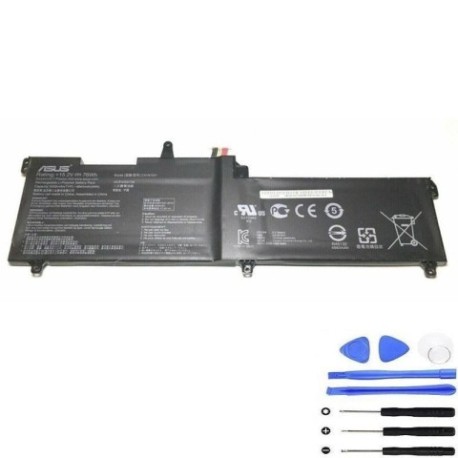
Keep your ASUS ROG gaming laptop performing at its peak with our genuine replacement battery. The C41N1541 76Wh battery is specifically designed for ASUS ROG Strix and GL series models, ensuring optimal performance and compatibility.
Common signs you need a replacement
| Symptoms | Causes | Verification | Recommendation |
|---|---|---|---|
| Battery drains quickly (under 1 hour) | Ageing cells, high gaming usage | Check battery health in Windows | Replace if capacity below 60% |
| Laptop shuts down unexpectedly | Voltage drops under load | Monitor during gaming sessions | Immediate replacement needed |
| Battery won’t charge fully | Charging circuit issues | Check charging indicator | Replace battery first |
| Battery swelling or overheating | Internal damage, safety risk | Visual inspection | Stop use immediately |
How to check compatibility
For ASUS ROG laptops, locate the model number on the bottom label or in System Information (type “msinfo32” in Windows search). Cross-reference with our compatibility list above. You can also use ASUS’s official support centre website with your serial number for verification.
When to replace
Replace your battery when runtime drops below 60 minutes, charging takes longer than 4 hours, or you notice physical swelling. For gaming laptops used heavily, consider replacement every 18-24 months.
Installation guide
Power off and unplug your laptop. Remove the bottom panel (usually 10-12 Phillips screws). Disconnect the battery connector carefully. Remove any securing screws and lift out the old battery. Install the new C41N1541 battery, reconnect, and reassemble. First charge: 8 hours for optimal calibration.
Usage & care tips
Avoid complete discharges; charge between 20-80% for longevity. Store at room temperature (15-25°C). Don’t leave plugged in constantly. For gaming, ensure proper ventilation to prevent overheating.
Safety & recycling in AU/NZ
Never puncture or disassemble batteries. Dispose at authorised e-waste centres (check local council websites). In Australia, use Batteryback or similar programs. In New Zealand, utilise Computer Recycling schemes.
FAQ
How long does shipping take in Australia?
Typically 3-7 business days nationwide.
Is this battery genuine ASUS?
Yes, original ASUS part with 12-month warranty.
Will this work with my GL702VM-1A?
Yes, fully compatible as listed.
What’s the battery life expectancy?
Approximately 500 charge cycles or 2-3 years with normal use.
Do you ship to New Zealand?
Yes, with 5-10 business day delivery.
Is installation difficult?
Moderate difficulty; basic technical skills recommended.
What if my model isn’t listed?
Contact our support team with your exact model number.