Battery models & part numbers
| Reference / P/N |
|---|
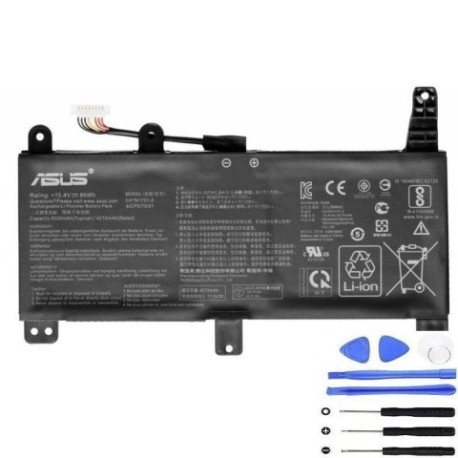
| Asus-C41N1731-C-66Wh |
Compatible models
| Model |
|---|
| Asus G532LWS |
| Asus G732LWS |
| Asus Rog STRIX G G731GU |
| Asus Rog STRIX G G731GV |
| Asus Rog STRIX G G731GW |
| Asus Rog STRIX G15 G512LV |
| Asus Rog STRIX G17 G712LW |
| Asus Rog STRIX G17 G712LWS |
| Asus ROG Strix G512LU |
| Asus ROG Strix G512LV |
| Asus ROG Strix G512LW |
| Asus ROG Strix G512LWS |
| Asus ROG Strix G531GU |
| Asus ROG Strix G531GV |
| Asus ROG Strix G531GW |
| Asus ROG Strix G532LV |
| Asus ROG Strix G532LW |
| Asus ROG Strix G532LWS |
| Asus ROG Strix G712LU |
| Asus ROG Strix G712LV |
| Asus ROG Strix G712LW |
| Asus ROG Strix G712LWS |
| Asus ROG Strix G731GU |
| Asus ROG Strix G731GV |
| Asus ROG Strix G731GW |
| Asus ROG Strix G732LV |
| Asus ROG Strix G732LW |
| Asus ROG Strix G732LWS |
| Asus ROG Strix G732LXS |
| Asus Rog STRIX SCAR 17 G732LWS |
| Asus Rog STRIX SCAR III G531GW |
Introduction
Keep your ASUS ROG gaming laptop performing at its peak with our genuine replacement battery. Designed specifically for ROG Strix and SCAR series models, this 66Wh battery ensures you get the gaming performance you expect without power interruptions.
Common signs you need a replacement
| Symptoms | Causes | Verification | Recommendation |
|---|---|---|---|
| Battery drains quickly during gaming | Ageing battery cells losing capacity | Check battery health in Windows Power Settings | Replace if capacity below 60% |
| Laptop shuts down unexpectedly | Battery can’t maintain stable voltage | Monitor battery percentage drops | Immediate replacement needed |
| Battery won’t charge to 100% | Charging circuit protection activated | Use ASUS Battery Health Charging software | Replace to restore full capacity |
| Laptop bulging or battery swelling | Gas buildup from degraded cells | Visual inspection of battery compartment | Stop using immediately and replace |
| Overheating during normal use | Inefficient battery generating excess heat | Check temperatures with HWMonitor | Replace to prevent damage to other components |
How to check compatibility
Finding your exact ASUS model number is crucial for battery compatibility. Check the bottom label of your laptop for the complete model designation. For ROG Strix models, look for labels starting with “G” followed by numbers (e.g., G532LWS). You can also find this information in Windows System Information or by using ASUS’s official support website with your serial number. Always cross-reference with our compatibility table above.
When to replace
Replace your ASUS battery when you notice significant performance degradation, typically after 2-3 years of regular gaming use. If your battery lasts less than an hour during light use or shows physical swelling, immediate replacement is essential for safety and performance.
Installation guide
Replacing your ASUS ROG battery requires careful handling. First, power off your laptop and disconnect all cables. Remove the bottom panel using a Phillips screwdriver – most ROG models have accessible battery compartments. Disconnect the battery connector from the motherboard, being gentle with the plastic clip. Install the new battery, ensuring the connector seats firmly. Reassemble and charge fully before first use.
Usage & care tips
For optimal battery life in your ASUS gaming laptop: avoid extreme temperatures (operate between 10-35°C), don’t leave your laptop plugged in constantly (use ASUS Battery Health Charging mode), and perform regular calibration by fully discharging and charging every 2-3 months. Store in cool, dry conditions when not in use.
Safety & recycling in AU/NZ
In Australia and New Zealand, lithium-ion batteries must be recycled properly. Never dispose of batteries in household waste. Use authorised battery recycling centres like Battery World, Officeworks, or council e-waste collection points. Damaged or swollen batteries should be handled with care – place in a fire-proof container and take to a recycling centre immediately.
FAQ
How long does shipping take within Australia?
Most orders ship within 1-2 business days with delivery in 3-7 days depending on your location.
Is this battery genuine ASUS?
Yes, this is an original ASUS C41N1731-C battery with full manufacturer specifications.
What warranty do you offer?
All our batteries come with a 12-month warranty covering manufacturing defects.
Will this battery work with my ASUS charger?
Yes, it’s fully compatible with your original ASUS power adapter and charging system.
How do I calibrate the new battery?
Charge to 100%, use until it shuts down, then charge uninterrupted to 100% again.
Can I install this battery myself?
Yes, most ASUS ROG models have user-replaceable batteries with standard screw types.
What’s the typical lifespan of this battery?
With proper care, expect 2-3 years of reliable gaming performance before noticeable degradation.