Battery models & part numbers
| Reference / P/N |
|---|
| 04YRJH |
| 06P6PN |
| 07XFJJ |
| 08NH55 |
| 09T48V |
| 0YXVK2 |
| 312-0233 |
| 312-0234 |
| 312-0235 |
| 312-0239 |
| 312-0240 |
| 312-1180 |
| 312-1197 |
| 312-1198 |
| 312-1200 |
| 312-1201 |
| 312-1202 |
| 312-1205 |
| 383CW |
| 451-11474 |
| 451-11475 |
| 451-11510 |
| 451-11579 |
| 451-11754 |
| 4T7JN |
| 4YRJH |
| 6P6PN |
| 6Q5AW |
| 7XFJJ |
| 8NH55 |
| 965Y7 |
| 9JR2H |
| 9T48V |
| 9TCXN |
| CN-04YRJH |
| Dell 9T48V |
| FMHC10 |
| GK2X6 |
| J1KND |
| J4XDH |
| JXFRP |
| W7H3N |
| WT2P4 |
| YXVK2 |
Compatible laptop models
| Model |
|---|
| Dell Inspiron 13R (N3010) |
| Dell Inspiron 13R (N3010D) |
| Dell Inspiron 13R (N3010R) |
| Dell Inspiron 14R (N4010) |
| Dell Inspiron 14R (N4010D) |
| Dell Inspiron 14R (N4010R) |
| Dell Inspiron 14R (N4110) |
| Dell Inspiron 15 (3520) |
| Dell Inspiron 15 (3520-0803) |
| Dell Inspiron 15 (3520-0810) |
| Dell Inspiron 15 (3520-0827) |
| Dell Inspiron 15R (5010) |
| Dell Inspiron 15R (5010-2372) |
| Dell Inspiron 15R (N5010) |
| Dell Inspiron 15R (N5010 P10F) |
| Dell Inspiron 15R (N5010D-258) |
| Dell Inspiron 15R (N5010R) |
| Dell Inspiron 15R (N5050) |
| Dell Inspiron 15R (N5110) |
| Dell Inspiron 17R (N7010) |
| Dell Inspiron 17R (N7010D) |
| Dell Inspiron 17R (N7010R) |
| Dell Inspiron 17R (N7110) |
| Dell Inspiron M4010 |
| Dell Inspiron M4010-127 |
| Dell Inspiron M4040 |
| Dell Inspiron M4110 |
| Dell Inspiron M5010 |
| Dell Inspiron M5010R |
| Dell Inspiron M5030 |
| Dell Inspiron M5040 |
| Dell Inspiron M5040-1602 |
| Dell Inspiron M5040-2111 |
| Dell Inspiron M5050 |
| Dell Inspiron M5110 |
| Dell Inspiron M5110 (5110-1108) |
| Dell Inspiron M5110 (5110-8074) |
| Dell Inspiron M5110 (5110-9987) |
| Dell Inspiron N301Z |
| Dell Inspiron N4010 |
| Dell Inspiron N4010D |
| Dell Inspiron N4010R |
| Dell Inspiron N4050 |
| Dell Inspiron N5030 |
| Dell Inspiron N5040 |
| Dell Inspiron N5050 |
| Dell Inspiron N5110 |
| Dell Vostro 1440 |
| Dell Vostro 1540 |
| Dell Vostro 1550 |
| Dell Vostro 2420 |
| Dell Vostro 2520 |
| Dell Vostro 2520-3971 |
| Dell Vostro 3450 |
| Dell Vostro 3550 |
| Dell Vostro 3550-2134 |
| Dell Vostro 3550-2721 |
| Dell Vostro 3550-6804 |
| Dell Vostro 3555 |
| Dell Vostro 3555-1397 |
| Dell Vostro 3750 |
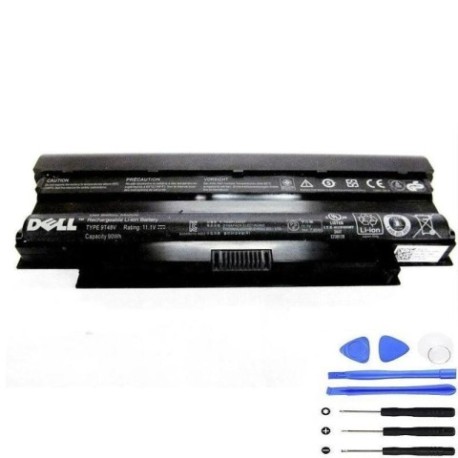
Introduction
Keep your Dell laptop running at peak performance with our genuine 9T48V 90Wh replacement battery. This high-capacity battery is compatible with dozens of Dell Inspiron and Vostro models, providing reliable power for work, study, or entertainment.
Common signs you need a replacement
| Symptom | Cause | Verification | Recommendation |
|---|---|---|---|
| Battery drains quickly | Reduced capacity from age/cycles | Check battery health in system settings | Consider replacement if under 50% capacity |
| Laptop won’t hold charge | Failed battery cells | Test with power adapter removed | Immediate replacement needed |
| Battery swelling | Internal chemical breakdown | Visual inspection of battery compartment | Replace immediately for safety |
| Overheating during use | Inefficient power delivery | Monitor temperature with software | Replace to prevent damage |
| Inconsistent charging | Faulty battery circuitry | Observe charging patterns | Replace for reliable performance |
How to check compatibility
Verify your laptop model matches our compatibility list above. You can also check your current battery’s part number (usually printed on the battery itself) against our reference numbers. For additional confirmation, consult your laptop’s service manual or Dell’s official support site.
When to replace
Replace your battery when you notice significant performance degradation, typically after 2-3 years of regular use. Most lithium-ion batteries maintain about 80% capacity after 300-500 charge cycles. If your laptop shuts down unexpectedly or won’t run without being plugged in, it’s time for a new battery.
Installation guide (overview)
1. Power down your laptop and disconnect the AC adapter. 2. Remove the battery compartment cover (if applicable). 3. Disconnect the old battery connector. 4. Remove any securing screws. 5. Insert the new battery and reconnect. 6. Replace cover and power on. Always refer to your specific model’s service manual for detailed instructions.
Usage & care tips
• Avoid extreme temperatures (ideal range 10-35°C)
• Don’t leave laptop plugged in constantly
• Perform occasional full discharge cycles
• Store at 40-60% charge if not using for extended periods
• Keep battery contacts clean and dry
Safety & recycling in AU/NZ
Never attempt to open or modify the battery. If damaged, dispose of properly at your local authorised battery recycling centre. In Australia, check with Batteryback or your council’s e-waste program. In New Zealand, use accredited e-waste recyclers. Never dispose of batteries in household waste.
FAQ
How long does shipping take to Australia/New Zealand?
Typically 7-14 business days depending on your location.
Is this battery genuine Dell?
This is a high-quality replacement battery compatible with Dell laptops.
What’s the warranty period?
Most replacement batteries come with 12 months warranty.
Can I use this battery with newer Dell models?
Only if specifically listed in our compatibility table above.
How do I maximise battery life?
Avoid full discharges, keep between 20-80% charge when possible, and store in cool conditions.
What if my model isn’t listed?
Check your current battery’s part number against our reference list.
Is installation difficult?
Most Dell batteries are user-replaceable with basic tools and careful following of instructions.