Battery models & part numbers
| Reference / P/N |
|---|
| 039DY5 |
| 0F62G0 |
| 0RPJC3 |
| 39DY5 |
| Dell-F62G0-38Wh |
| P83G001 |
| P87G |
| RPJC3 |
Compatible laptop models
| Model |
|---|
| Dell Inspiron 13 (5370) |
| Dell Inspiron 13 (5370-0576) |
| Dell Inspiron 13 (5370-0583) |
| Dell Inspiron 13 (5370-0590) |
| Dell Inspiron 13 (5370-1815) |
| Dell Inspiron 13 (5370-1822) |
| Dell Inspiron 13 (5370-2TTHR) |
| Dell Inspiron 13 (5370-61PN5) |
| Dell Inspiron 13 (5370-75K6D) |
| Dell Inspiron 13 (5370-7H5PM) |
| Dell Inspiron 13 (5370-9273) |
| Dell Inspiron 13 (5370-C9CJV) |
| Dell Inspiron 13 (5370-J8G8F) |
| Dell Inspiron 13 (5370-MCM45) |
| Dell Inspiron 13 (5370-MRFG2) |
| Dell Inspiron 13 (7370) |
| Dell Inspiron 13 (7370-1733) |
| Dell Inspiron 13 (7370-1740) |
| Dell Inspiron 13 (7370-7VF2T) |
| Dell Inspiron 13 (7370-8HK47) |
| Dell Inspiron 13 (7370-9665) |
| Dell Inspiron 13 (7370-9696) |
| Dell Inspiron 13 (7370-9702) |
| Dell Inspiron 13 (7370-DV18W) |
| Dell Inspiron 13 (7370-MKG04) |
| Dell Inspiron 13 (7370-MMFMH) |
| Dell Inspiron 13 (7373) |
| Dell Inspiron 13 (7373-0842) |
| Dell Inspiron 13 (7373-0859) |
| Dell Inspiron 13 (7373-0866) |
| Dell Inspiron 13 (7373-0873) |
| Dell Inspiron 13 (7373-4XJWT) |
| Dell Inspiron 13 (7373-75VK0) |
| Dell Inspiron 13 (7373-G3VVK) |
| Dell Inspiron 13 (7373-VFNYM) |
| Dell Inspiron 13 (7380) |
| Dell Inspiron 13 (7380-9F1P0) |
| Dell Inspiron 13 (7380-G5XKT) |
| Dell Inspiron 13 (7380-GT5GJ) |
| Dell Inspiron 13 (7386) |
| Dell Inspiron 13 (7386-2324) |
| Dell Inspiron 13 (7386-2331) |
| Dell Inspiron 13 (7386-2348) |
| Dell Inspiron 13 (7386-2713) |
| Dell Inspiron 13 (7386-3MVN4) |
| Dell Inspiron 13 (7386-44NRM) |
| Dell Inspiron 13 (7386-DTX1R) |
| Dell Inspiron 13 (7386-M06DY) |
| Dell Inspiron 13 (7386-YYNRM) |
| Dell Inspiron 13 2in1 (7373) |
| Dell Vostro (5370) |
| Dell Vostro 13 (5370) |
Introduction
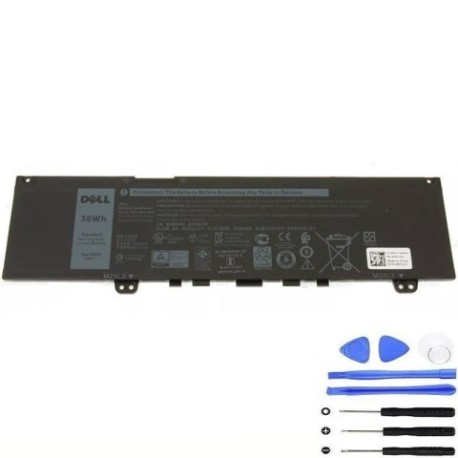
Keep your Dell laptop running smoothly with a genuine replacement battery. This guide helps you identify compatibility and make an informed purchase.
Common signs you need a replacement
| Symptom | Cause | Verification | Recommendation |
|---|---|---|---|
| Short battery life | Ageing cells | Check power settings | Replace if under 2 hours |
| Laptop shuts down unexpectedly | Voltage drops | Monitor battery health | Test with charger |
| Battery not charging | Faulty circuit | Inspect connections | Try different outlet |
| Swelling or overheating | Internal damage | Visual check | Replace immediately |
How to check compatibility
Refer to the tables above to match your laptop model or part number. Cross-check with your device’s label or system information.
When to replace
Consider replacement if your battery holds less than 50% charge, shows physical damage, or is over two years old with heavy use.
Installation guide (overview)
Power off the laptop, remove the old battery, align the new one, and secure it. Always follow manufacturer guidelines.
Usage & care tips
Avoid extreme temperatures; store between 15–25°C. Calibrate monthly by fully discharging and charging. Keep contacts clean.
Safety & recycling in AU/NZ
Dispose of old batteries at authorised collection centres. Never incinerate. Check local council guidelines for recycling.
FAQ
How long does delivery take? Typically 3–7 business days across Australia and New Zealand.
Is installation difficult? Most users can install it themselves; refer to online tutorials.
What is the warranty? Standard 12-month warranty applies.
Can I use this battery overseas? Yes, it supports universal voltage.
How do I recycle the old battery? Drop it at any Batteryback collection point.
Does it come charged? Partially charged; full charge recommended before first use.
What if my model isn’t listed? Contact support with your laptop’s service tag for confirmation.