Battery models & part numbers
| Reference / P/N |
|---|
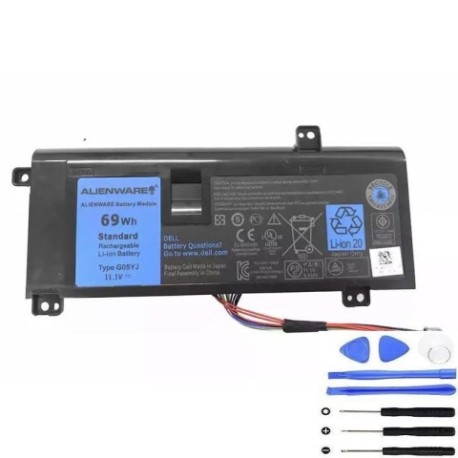
| Dell-G05YJ-69Wh |
Compatible laptop models
| Model |
|---|
| Dell 8X70T |
| Dell ALW14D-1728 |
| Dell ALW14D-1828 |
| Dell ALW14D-2728 |
| Dell ALW14D-4728 |
| Dell ALW14D-5528 |
| Dell ALW14D-5728 |
| Dell ALW14D-5828 |
| Dell Alienware 14 |
| Dell Y3PN0 |
Introduction
Keep your Dell Alienware 14 or compatible laptop running at peak performance with a genuine Dell G05YJ 69Wh replacement battery. Designed for Australian and New Zealand conditions, this battery ensures reliable power for gaming and productivity.
Common signs you need a replacement
| Symptom | Cause | How to check | Recommendation |
|---|---|---|---|
| Short battery life | Ageing cells, frequent cycles | Time usage on full charge | Replace if under 1 hour |
| Laptop shuts down unexpectedly | Voltage drops under load | Monitor during heavy use | Test with power meter |
| Battery won’t hold charge | Degraded capacity | Check in system settings | Compare to original specs |
| Swelling or overheating | Internal damage, safety risk | Visual inspection, feel for heat | Replace immediately |
How to check compatibility
Verify your laptop model matches the list above. Check the original battery part number or use Dell’s online support tool with your service tag for confirmation.
When to replace
Replace your battery when runtime drops below 50% of original, it shows physical damage, or causes system errors. In AU/NZ’s varying climates, consider replacement every 2–3 years for optimal performance.
Installation guide (overview)
Power off and unplug the laptop. Remove the bottom panel, disconnect the old battery, and secure the new one. Reassemble and charge fully before first use. Always refer to your device’s manual or seek professional help if unsure.
Usage & care tips
Avoid full discharges; keep charge between 20–80% for longevity. Store in cool, dry places (15–25°C). Calibrate monthly by fully charging and discharging. Use only authorised chargers to prevent damage.
Safety & recycling in AU/NZ
Do not expose batteries to extreme heat or puncture. In Australia and New Zealand, recycle old batteries at designated centres like Battery World or council e-waste drop-offs—never dispose in household bins.
FAQ
How long does this battery last? Up to 4 hours depending on usage; gaming may reduce this.
Is it compatible with my Dell Alienware 14? Yes, if your model is listed above.
What warranty is offered? Typically 12 months; check the product page for details.
How do I recycle the old battery? Use local e-waste programmes in AU/NZ for safe disposal.
Can I use it while charging? Yes, but avoid prolonged periods to reduce heat.
What if my model isn’t listed? Contact support with your laptop’s part number for verification.
Does it meet Australian standards? Yes, it complies with relevant safety regulations.