Dell XG4K6 97Wh Battery Replacement Guide
Find the perfect replacement battery for your Dell laptop with our comprehensive compatibility guide and installation tips for Australian and New Zealand users.
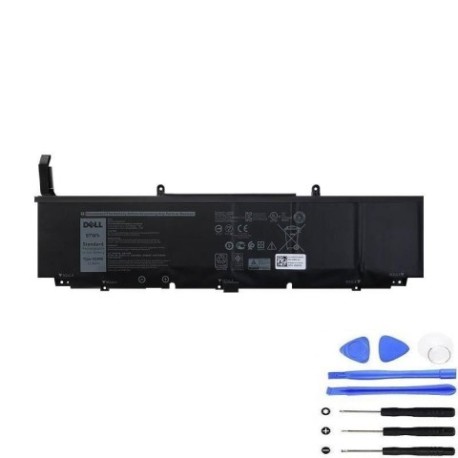
Battery models & part numbers
| Reference / P/N |
|---|
| 001RR3 |
| 0F8CPG |
| 0XG4K6 |
| 5XJ6R |
| Dell-XG4K6-97Wh |
| F8CPG |
| OF8CPG |
| OXG4K6 |
| XG4K6 |
Compatible laptop models
| Model |
|---|
| Dell Precision 17 (5750) |
| Dell Precision 17 (5750-KVPMY) |
| Dell Precision 17 (5750-W2DMX) |
| Dell Precision 17 (5760) |
| Dell Precision 17 (5760-8FPWM) |
| Dell Precision 17 (5760-CY4YK) |
| Dell Precision 17 (5760-G8WDW) |
| Dell Precision 17 (5760-J4XW3) |
| Dell Precision 17 (5760-YM7K6) |
| Dell Precision 17 (5770) |
| Dell XPS 17 (9700) |
| Dell XPS 17 (9700-0398) |
| Dell XPS 17 (9700-1JF8C) |
| Dell XPS 17 (9700-1VDR8) |
| Dell XPS 17 (9700-3635) |
| Dell XPS 17 (9700-3NJ83) |
| Dell XPS 17 (9700-5FH48) |
| Dell XPS 17 (9700-81XHT) |
| Dell XPS 17 (9700-91WX4) |
| Dell XPS 17 (9700-C9T5T) |
| Dell XPS 17 (9700-CKK0G) |
| Dell XPS 17 (9700-FKGGX) |
| Dell XPS 17 (9700-GDXC8) |
| Dell XPS 17 (9700-M0W6G) |
| Dell XPS 17 (9700-NRG3R) |
| Dell XPS 17 (9700-YHC1H) |
| Dell XPS 17 (9710) |
| Dell XPS 17 (9710-23PDK) |
| Dell XPS 17 (9710-2CJ19) |
| Dell XPS 17 (9710-4162) |
| Dell XPS 17 (9710-7T53W) |
| Dell XPS 17 (9710-9XMHG) |
| Dell XPS 17 (9710-DP62V) |
| Dell XPS 17 (9710-G26DV) |
| Dell XPS 17 (9710-GNVM5) |
| Dell XPS 17 (9710-H0M9W) |
| Dell XPS 17 (9710-KCP53) |
| Dell XPS 17 (9710-MMHCN) |
| Dell XPS 17 (9710-MN8PR) |
| Dell XPS 17 (9710-TX14R) |
| Dell XPS 17 (9710-WP78T) |
| Dell XPS 17 (9710-YH1XT) |
| Dell XPS 17 (9720) |
| Dell XPS 17 (9720-7F7FN) |
| Dell XPS 17 (9720-89DR9) |
| Dell XPS 17 (9720-8G1Y7) |
| Dell XPS 17 (9720-NJN98) |
| Dell XPS 17 (9720-RGWJ1) |
| Dell XPS 17 (9730) |
Common signs you need a replacement
| Symptom | Cause | Verification | Recommendation |
|---|---|---|---|
| Battery drains quickly | Reduced capacity from age/cycles | Check battery health in system settings | Consider replacement if under 50% capacity |
| Laptop won’t hold charge | Failed battery cells | Test with power adapter disconnected | Replace immediately for reliable use |
| Battery swelling | Internal damage or overheating | Visual inspection of battery compartment | Replace urgently – safety hazard |
| Overheating during use | Battery degradation | Monitor temperature with system tools | Replace to prevent further damage |
How to check compatibility
To ensure the Dell XG4K6 97Wh battery fits your laptop:
- Check your laptop’s model number on the bottom case or in system information
- Verify against our compatibility tables above
- Cross-reference with your current battery’s part number
- Contact our support team if unsure about specific model variants
When to replace
Replace your Dell battery when you notice:
- Battery life has significantly decreased (less than 2 hours)
- Your laptop shuts down unexpectedly when unplugged
- The battery shows physical swelling or damage
- System reports “consider replacing your battery”
- Battery is over 2-3 years old with regular use
Installation guide (overview)
Replacing your Dell battery is straightforward:
- Power down your laptop and disconnect all cables
- Remove the bottom case (consult your model’s service manual)
- Disconnect the battery connector from the motherboard
- Remove any screws securing the battery