Fujitsu FMVNBP178 56Wh Battery Replacement Guide
Find the right replacement battery for your Fujitsu laptop with our comprehensive compatibility guide and expert installation advice.
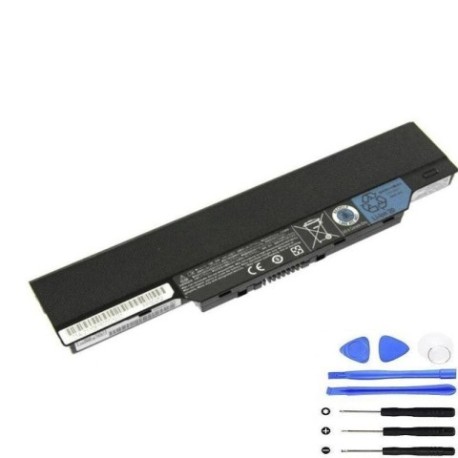
Battery models & part numbers
| Reference / P/N |
|---|
| 38010750 |
| CP293550-01 |
| CP293550-02 |
| CP293550-03 |
| CP293551-02 |
| CP470833-01 |
| CP470833-XX |
| FMVNBP199 |
| FPB0131 |
| FPB0250 |
| FPCBP145 |
| FPCBP219 |
| FPCBP281 |
| FPCBP282 |
| Fujitsu-FMVNBP178-56Wh |
| FUJ:CP470833-XX |
Compatible laptop models
| Model |
|---|
| Fujitsu Celsius H720 |
| Fujitsu LifeBook E752 |
| Fujitsu LifeBook E-8310 |
| Fujitsu LifeBook P770 |
| Fujitsu LifeBook P8110 |
| Fujitsu LifeBook S752 |
| Fujitsu LifeBook S781 |
| Fujitsu LifeBook T580 |
Introduction
The Fujitsu FMVNBP178 56Wh battery is a high-quality replacement power solution designed for various Fujitsu laptop models. This genuine-compatible battery ensures reliable performance and extended usage time for your mobile computing needs.
Common signs you need a replacement
| Symptom | Cause | Verification | Recommendation |
|---|---|---|---|
| Battery drains quickly | Reduced capacity from age/cycles | Check battery health in system settings | Consider replacement if under 50% capacity |
| Laptop won’t hold charge | Failed battery cells | Test with power adapter disconnected | Immediate replacement needed |
| Battery swelling/bulging | Internal chemical breakdown | Visual inspection of battery compartment | Replace immediately for safety |
| Overheating during use | Inefficient power delivery | Monitor temperature with software tools | Replace to prevent damage |
How to check compatibility
Verify your laptop’s compatibility by checking the model number on the bottom casing or in system information. Compare against our comprehensive compatibility tables above. For additional confirmation, remove your current battery and match the part number with our listed references.
When to replace
Replace your Fujitsu battery when you notice significant runtime reduction (less than 2 hours), the battery fails to hold charge, physical swelling occurs, or your laptop indicates “consider replacing your battery” in system diagnostics. Most laptop batteries last 2-3 years with regular use.
Installation guide (overview)
1. Power off your laptop and disconnect the AC adapter
2. Remove any external power sources
3. Locate the battery release latch or screws
4. Carefully remove the old battery
5. Insert the new FMVNBP178 battery, ensuring proper alignment
6. Secure the battery in place
7. Charge fully before first use
Usage & care tips
• Avoid extreme temperatures (ideal range 10°C to 35°C)
• Calibrate your battery monthly by fully discharging then charging
• Store at 40-60% charge if not using for extended periods
• Use only authorised Fujitsu chargers
• Keep battery contacts clean and free from debris
Safety & recycling in AU/NZ
In Australia and New Zealand, lithium-ion batteries must be recycled responsibly. Do not dispose of in household waste. Use dedicated battery recycling services available at most electronics retailers or local council waste centres. Damaged or swollen batteries should be handled with care and recycled immediately.
FAQ
How long does this battery last on a full charge?
Depending on usage and laptop model, expect 3-5 hours of typical use.
Is this battery genuine Fujitsu?
This is a high-quality compatible replacement that meets or exceeds original specifications.
What warranty is provided?
Check with the retailer for specific warranty terms, typically 12-24 months.
How do I properly dispose of my old battery?
Take it to an authorised battery recycling centre in your area.
Can I use this battery with different Fujitsu models?
Only use with compatible models listed in our tables above.
How long does delivery take in Australia/NZ?
Typically 3-7 business days depending on your location.
What if the battery doesn’t fit my laptop?
Double-check compatibility and contact customer support for assistance.