Battery models & part numbers
| Reference / P/N |
|---|
| 34037484 |
| 34045895 |
| 34050040 |
| 34051117 |
| 38010750 |
| 38017114 |
| 38018054 |
| 38018055 |
| 38023044 |
| CP293530-01 |
| CP293530-03 |
| CP293550-01 |
| CP293550-02 |
| CP293550-03 |
| CP293550-XX |
| CP293551-02 |
| CP293570-01 |
| CP293590-01 |
| CP293590-02 |
| CP458102-01 |
| CP458102-XX |
| CP470833-01 |
| CP470833-XX |
| CP470834-XX |
| CP483691-02 |
| CP518202-01 |
| CP518202-XX |
| CP518584-XX |
| CP556150-01 |
| CP556150-02 |
| CP556150-XX |
| CP669832-01 |
| CP669832-XX |
| CP689834-01 |
| CP704821-01 |
| CP704821-XX |
| CP707714-01 |
| CP707714-XX |
| FMVNBP146 |
| FMVNBP178 |
| FMVNBP198 |
| FMVNBP199 |
| FMVNBP210 |
| FMVNBP242 |
| FPB0131 |
| FPB0221 |
| FPB0250 |
| FPB0262 |
| FPB0333S |
| FPCBP145 |
| FPCBP219 |
| FPCBP281 |
| FPCBP282 |
| FPCBP325 |
| FPCBP519 |
| FUJ:CP293530-03 |
| FUJ:CP293550-XX |
| FUJ:CP293570-01 |
| FUJ:CP293590-01 |
| FUJ:CP458102-XX |
| FUJ:CP470833-XX |
| FUJ:CP470834-XX |
| FUJ:CP518202-XX |
| FUJ:CP556150-XX |
| FUJ:CP669832-XX |
| FUJ:CP704821-XX |
| FUJ:CP707714-XX |
| Fujitsu-FMVNBP178-67Wh |
| S26391-F514-L200 |
| S26391-F956-L100 |
Compatible laptop models
| Model |
|---|
| Celsius H720 |
| Celsius H730 |
| LifeBook E751 |
| LifeBook E752 |
| LifeBook E781 |
| LifeBook E782 |
| LifeBook P701 |
| LifeBook P702 |
| LifeBook P770 |
| LifeBook P771 |
| LifeBook P772 |
| LifeBook P8110 |
| LifeBook S-4110 |
| LifeBook S710 |
| LifeBook S7110 |
| LifeBook S-7111 |
| LifeBook S751 |
| LifeBook S752 |
| LifeBook S760 |
| LifeBook S761 |
| LifeBook S781 |
| LifeBook S782 |
| LifeBook S792 |
| LifeBook T580 |
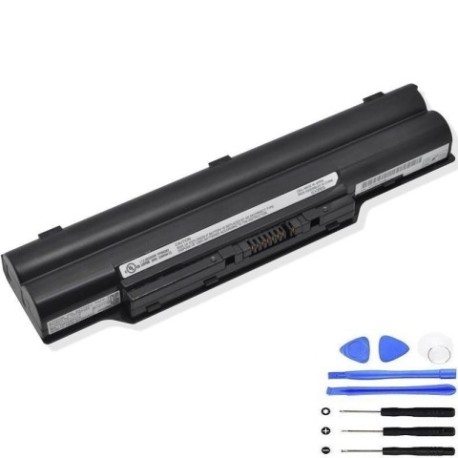
Introduction
Keep your Fujitsu laptop running at peak performance with our genuine replacement battery. The FMVNBP178 67Wh battery is designed to meet or exceed original specifications, ensuring reliable power for your work and personal computing needs across Australia and New Zealand.
Common signs you need a replacement
| Symptom | Cause | Verification | Recommendation |
|---|---|---|---|
| Short battery life | Ageing cells, reduced capacity | Check power settings, monitor usage time | Consider replacement if under 2 hours |
| Laptop won’t hold charge | Battery degradation, faulty cells | Test with different power outlet | Replace immediately if persistent |
| Battery swelling | Internal damage, overheating | Visual inspection, measure thickness | Replace urgently – safety hazard |
| Unexpected shutdowns | Voltage drops, poor connection | Monitor battery health software | Replace to prevent data loss |
| Slow charging | Worn charging circuit | Time charging from 0-100% | Replace if taking over 4 hours |
How to check compatibility
Verify your laptop model matches our compatibility list above. Check your current battery’s part number (usually printed on the battery) against our reference numbers. For Australian and New Zealand customers, ensure your replacement meets local safety standards and comes with proper warranty coverage.
When to replace
Replace your battery when it holds less than 50% of its original capacity, shows physical damage, or causes system instability. Most laptop batteries last 2-3 years with regular use. In AU/NZ’s varied climate conditions, consider replacement sooner if you notice performance issues.
Installation guide (overview)
Power down your laptop completely. Disconnect from mains power. Remove the old battery by releasing the locking mechanism (consult your laptop’s manual for specific instructions). Align the new battery correctly and secure it in place. Charge fully before first use for optimal performance.
Usage & care tips
Avoid extreme temperatures – store between 15-25°C. Don’t leave your laptop plugged in constantly. Calibrate your battery monthly by draining to 10% then charging to 100%. Use authorised chargers only. In AU/NZ’s warmer regions, ensure proper ventilation during use.
Safety & recycling in AU/NZ
Never attempt to open or modify the battery. Dispose of old batteries at authorised recycling centres – most electronics retailers in Australia and New Zealand offer free battery recycling services. Check with your local council for specific disposal guidelines in your area.
FAQ
How long does shipping take to Australia/New Zealand?
Most orders arrive within 5-10 business days depending on your location. Express shipping options are available for faster delivery.
Is this battery compatible with my specific Fujitsu model?
Check the compatibility tables above – if your laptop model or battery part number appears, it’s compatible. Still unsure? Contact our support team with your laptop’s exact model number.
What warranty do you offer for AU/NZ customers?
We provide a 12-month warranty covering manufacturing defects. Our batteries meet Australian and New Zealand safety standards.
How do I maximise battery life?
Avoid complete discharges, keep between 20-80% charge when possible, and store in cool, dry conditions. Update your laptop’s power management settings for optimal efficiency.
Can I use this battery if my original had different specifications?
Only use batteries matching your laptop’s original specifications. Using incompatible batteries can damage your device and void warranties.
What if my laptop isn’t on the compatibility list?
Contact us with your laptop’s exact model number and current battery part number. We may have alternative compatible options available.
Are these batteries certified for use in Australia and New Zealand?
Yes, all our batteries meet relevant Australian and New Zealand regulatory requirements for safety and performance.