Fujitsu FPB0337S 45Wh Replacement Battery
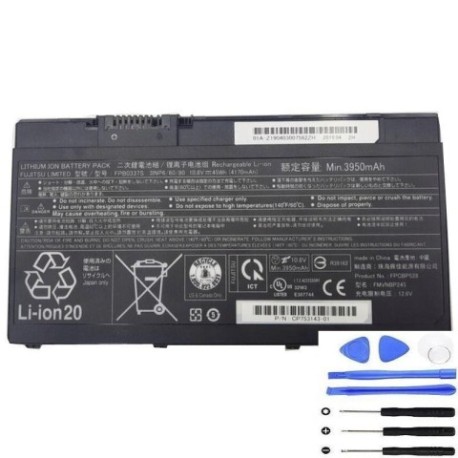
Battery models & part numbers
| Reference / P/N |
|---|
| 34057380 |
| 34068415 |
| 34079625 |
| CP715267-01 |
| CP715267-XX |
| CP734927-XX |
| CP753143-01 |
| CP753143-XX |
| CP790916-XX |
| CP809642-01 |
| CP809642-XX |
| FMVNBP245 |
| FPCBP528 |
| FUJ:CP715267-XX |
| FUJ:CP734927-XX |
| FUJ:CP753143-XX |
| Fujitsu-FPB0337S-45Wh |
Compatible laptop models
| Model |
|---|
| Fujitsu LifeBook E752 |
| Fujitsu LifeBook U727 |
| Fujitsu LifeBook U728 |
| Fujitsu LifeBook U729 |
Introduction
The Fujitsu FPB0337S 45Wh battery is a genuine replacement power solution for various Fujitsu laptop models. This high-quality battery delivers reliable performance and extended run time for your mobile computing needs across Australia and New Zealand.
Common signs you need a replacement
| Symptoms | Causes | Verification | Recommendation |
|---|---|---|---|
| Battery won’t charge | Ageing cells, faulty charging circuit | Check power adapter, try different outlet | Replace battery if adapter works |
| Short battery life | Reduced capacity from cycle wear | Check battery health in system settings | Replace if capacity below 60% |
| Laptop shuts down unexpectedly | Voltage drops under load | Monitor battery percentage during use | Immediate replacement needed |
| Battery swelling | Internal gas buildup, safety hazard | Visual inspection, laptop won’t sit flat | Stop using immediately and replace |
| Overheating during charging | Internal short circuits | Feel battery temperature, check vents | Replace to prevent damage |
How to check compatibility
Verify your laptop’s compatibility by checking the part number on your current battery or consulting your laptop’s documentation. Cross-reference with our compatibility tables above. For Fujitsu laptops, the part number is typically located on a label on the battery itself or in the system information within your operating system.
When to replace
Replace your battery when you notice significant performance degradation, typically after 2-3 years of regular use or 300-500 charge cycles. Other indicators include the battery not holding charge, swelling, or your laptop shutting down unexpectedly even with charge remaining. In Australia and New Zealand’s varying climates, extreme temperatures can accelerate battery wear.
Installation guide (overview)
1. Power off your laptop and disconnect the AC adapter
2. Remove the old battery by releasing the locking mechanism
3. Align the new battery with the connector and slide into place
4. Secure the battery lock and connect the AC adapter
5. Charge fully before first use for optimal performance
Usage & care tips
• Avoid complete discharges – recharge when battery reaches 20-30%
• Store in cool, dry conditions between 15-25°C
• Remove battery if laptop will be connected to power for extended periods
• Calibrate battery monthly by fully charging then discharging to maintain accuracy
• Use only authorised Fujitsu chargers and accessories
Safety & recycling in AU/NZ
In Australia and New Zealand, lithium-ion batteries must be disposed of properly at designated recycling centres. Never dispose of batteries in household waste. Look for battery recycling programs at electronics retailers or local council waste facilities. Damaged or swollen batteries should be handled with care and recycled immediately.
FAQ
How long does this battery last on a single charge?
Depending on usage and laptop model, expect 3-6 hours of typical use.
Is this battery compatible with my Fujitsu laptop?
Check the part numbers and models listed above – if your laptop or battery part number matches, it’s compatible.
Does this come with a warranty?
Yes, this battery includes a standard warranty – check product details for specific terms.
How do I properly dispose of my old battery?
Take it to an authorised battery recycling centre in your area – many electronics retailers offer this service.
Can I use this battery with other laptop brands?
No, this battery is specifically designed for compatible Fujitsu laptop models only.
How long does delivery take in Australia/New Zealand?
Typically 3-7 business days depending on your location and shipping method.
What if the battery doesn’t fit my laptop?
Double-check your laptop model and battery part number against our compatibility list. Contact customer support if issues persist.