Battery models & part numbers
| Reference / P/N |
|---|
| 34045899 |
| 34055117 |
| 34078142 |
| 38046571 |
| CP651077-02 |
| CP651077-XX |
| CP672845-01 |
| CP703451-01 |
| CP703451-XX |
| CP801974-01 |
| CP801974-XX |
| FMVNBP232 |
| FPB0315S |
| Fujitsu-FPCBP425-45Wh |
| FUJ:CP651077-XX |
| FUJ:CP672845-XX |
| FUJ:CP703451-XX |
| FUJ:CP709325-XX |
| FUJ:CP801974-XX |
Compatible laptop models
| Model |
|---|
| Fujitsu LifeBook T904 |
| Fujitsu LifeBook T935 |
| Fujitsu LifeBook T936 |
| Fujitsu LifeBook U745 |
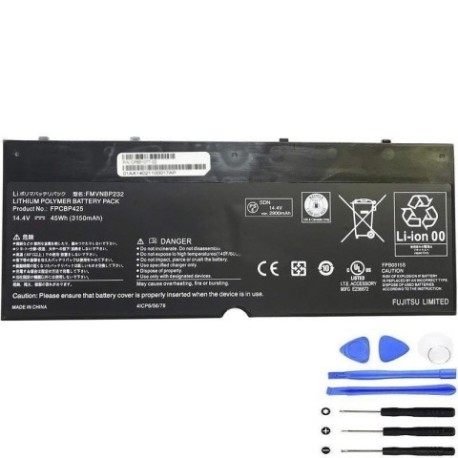
Introduction
Keep your Fujitsu LifeBook running at peak performance with our genuine replacement battery. This 45Wh power solution is designed specifically for your device, ensuring reliable power delivery and extended usage time.
Common signs you need a replacement
| Symptom | Cause | Verification | Recommendation |
|---|---|---|---|
| Battery drains quickly | Reduced capacity from age/cycles | Check battery health in system settings | Consider replacement if under 60% capacity |
| Laptop shuts down unexpectedly | Battery cannot hold charge | Monitor battery percentage drops | Replace immediately to prevent data loss |
| Battery won’t charge fully | Internal cell degradation | Check charging indicator and percentage | Replace battery for reliable performance |
| Battery swelling or overheating | Internal damage or failure | Visual inspection, temperature check | Replace urgently – safety hazard |
How to check compatibility
Verify your laptop model matches our compatible models list above. Check your current battery’s part number against our reference numbers. For Fujitsu LifeBook T904, T935, T936, and U745 models, this battery is the authorised replacement.
When to replace
Replace your battery when it holds less than 60% of its original capacity, shows physical damage, or causes unexpected shutdowns. Most laptop batteries need replacement after 2-3 years of regular use.
Installation guide (overview)
Power off your laptop and disconnect from power. Remove the bottom panel, disconnect the old battery, install the new battery, and reassemble. Always refer to your device’s service manual for detailed instructions.
Usage & care tips
Avoid extreme temperatures (ideal range 15-25°C). Don’t leave your laptop plugged in constantly. Calibrate your battery monthly by fully charging then discharging. Store in cool, dry conditions if not used for extended periods.
Safety & recycling in AU/NZ
Never attempt to open or modify the battery. Dispose of old batteries at authorised recycling centres. In Australia, use Batteryback or council collection services. In New Zealand, utilise accredited e-waste recyclers. Never dispose of batteries in household waste.
FAQ
How long does this battery last?
Typically 2-3 years with normal use, or 500-800 charge cycles.
Is this battery genuine Fujitsu?
This is a high-quality replacement battery compatible with Fujitsu laptops.
What’s the warranty period?
Check the product page for current warranty details – typically 12-24 months.
How do I check my battery health?
Use your laptop’s power management tools or third-party battery monitoring software.
Can I use this battery with other laptop models?
Only use with compatible models listed above to ensure safety and performance.
How long for delivery in Australia/NZ?
Delivery times vary by location – check the website for current shipping estimates.
What if the battery doesn’t fit my laptop?
Verify your laptop model and part number compatibility before purchase.