HP BT04XL 52Wh Battery Replacement Guide
Find the perfect replacement battery for your HP EliteBook in Australia and New Zealand. Our genuine-compatible HP BT04XL 52Wh battery delivers reliable performance for your business needs.
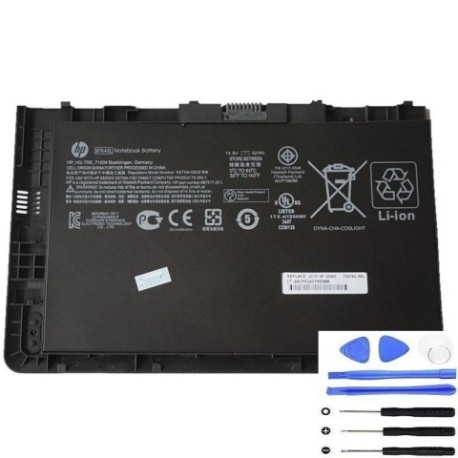
Battery models & part numbers
| Reference / P/N |
|---|
| HP BT04052XL-PL |
| HP H4Q47AA |
| HP H4Q47ET |
| HP HSTNN-IB3Z |
| HP-BT04XL-52Wh |
Compatible laptop models
| Model |
|---|
| HP 687517-1C1 |
| HP 687945-001 |
| HP 696621-001 |
| HP EliteBook Folio 9470M Ultrabooks |
| HP EliteBook Folio 9470ms |
| HP Elitebook Folio 9480ms |
| HP Elitebook Folio 9480s |
Introduction
Keep your HP EliteBook running at peak performance with our compatible HP BT04XL 52Wh replacement battery. Designed specifically for Australian and New Zealand business users, this battery provides reliable power for your mobile computing needs.
Common signs you need a replacement
| Symptom | Cause | Verification | Recommendation |
|---|---|---|---|
| Battery drains quickly | Ageing cells, reduced capacity | Check battery health in system settings | Replace if capacity below 60% |
| Laptop won’t hold charge | Failed battery circuit | Test with power adapter removed | Immediate replacement needed |
| Battery swelling | Internal gas buildup | Visual inspection, uneven surface | Replace immediately for safety |
| Overheating during use | Internal resistance increase | Monitor temperature, feel case heat | Replace to prevent damage |
How to check compatibility
Verify your laptop’s compatibility by checking the model number on the bottom case or under the battery compartment. Compare against our compatible models list above. You can also check your current battery’s part number – it should match one of the reference numbers provided.
When to replace
Replace your HP battery when you notice significant runtime reduction (less than 2 hours), the battery won’t hold charge, or physical swelling occurs. Most HP batteries last 2-3 years with regular use in Australian conditions.
Installation guide (overview)
1. Power off your laptop and disconnect the AC adapter
2. Remove the bottom cover (consult your model’s service manual)
3. Disconnect the battery connector from the motherboard
4. Remove any screws securing the battery
5. Install the new HP BT04XL battery in reverse order
6. Allow full charge cycle before first use
Usage & care tips
• Avoid complete discharges – recharge when battery reaches 20%
• Store in cool, dry conditions (15-25°C ideal)
• Calibrate monthly by fully charging then discharging to 5%
• Remove battery if using AC power continuously for extended periods
• Keep contacts clean and free from dust
Safety & recycling in AU/NZ
In Australia and New Zealand, battery recycling is mandatory. Do not dispose of lithium-ion batteries in household waste. Use authorised collection points at electronics retailers or council recycling centres. Damaged or swollen batteries should be handled with care and recycled immediately.
FAQ
How long does shipping take in Australia?
Most orders ship within 1-2 business days with delivery typically 3-7 days across AU/NZ.
Is this battery genuine HP?
This is a high-quality compatible battery that meets or exceeds OEM specifications.
What warranty do you offer?
Our HP BT04XL batteries come with a 12-month replacement warranty.
Will this battery work with my specific EliteBook model?
Yes, if your model appears in our compatibility list above, this battery is designed to work perfectly.
How do I check my current battery health?
In Windows, type “battery report” in Command Prompt or check Power Options in Control Panel.
Can I use this battery internationally?
Yes, the battery operates on standard laptop power requirements worldwide.
What if my laptop isn’t charging with the new battery?
Ensure proper installation and allow 2-3 full charge cycles for optimal performance.