HP CA06 55Wh Battery Replacement Guide
Find the perfect replacement battery for your HP laptop with our comprehensive AU/NZ guide. Check compatibility, installation tips, and local recycling information.
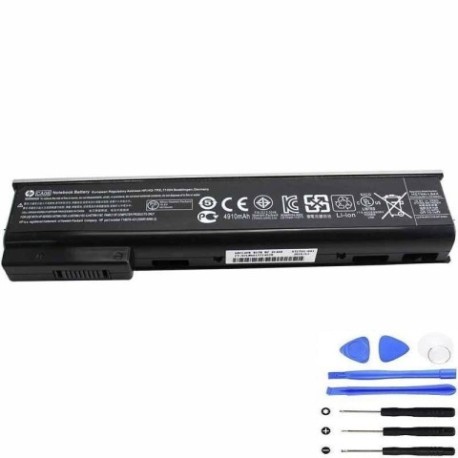
Battery models & part numbers
| Reference / P/N |
|---|
| HP 011220-D1T33G01 |
| HP 718677-141 |
| HP 718677-422 |
| HP 718678-421 |
| HP 718754-001 |
| HP 718755-001 |
| HP 718756-001 |
| HP 718757-001 |
| HP CA03033-CL |
| HP CA06055-CL |
| HP CA06055XL-CL |
| HP CA06XL |
| HP CA09 |
| HP CA09100-CL |
| HP D9E27AV |
| HP E7U21AA |
| HP E7U21ET |
| HP E7U22AA |
| HP E7U22ET |
| HP HSTNN-DB4Y |
| HP HSTNN-I15C-4 |
| HP HSTNN-I15C-5 |
| HP HSTNN-I16C |
| HP HSTNN-LB4X |
| HP HSTNN-LB4Y |
| HP HSTNN-LB4Z |
| HP-CA06-55Wh |
Compatible laptop models
| Model |
|---|
| HP mt41 Mobile Thin Clients |
| HP ProBook 640 G1s |
| HP ProBook 645 G1s |
| HP ProBook 650 G1s |
| HP ProBook 655 G1s |
Introduction
The HP CA06 55Wh battery is a high-quality replacement power solution designed for various HP business laptops and mobile thin clients. This genuine-compatible battery offers reliable performance and extended usage time for Australian and New Zealand users.
Common signs you need a replacement
| Symptoms | Causes | Verification | Recommendation |
|---|---|---|---|
| Battery drains quickly | Ageing cells, reduced capacity | Check battery health in system settings | Consider replacement if under 50% capacity |
| Laptop won’t hold charge | Failed battery cells | Test with power adapter disconnected | Immediate replacement needed |
| Battery swelling | Internal gas buildup | Visual inspection, uneven surfaces | Replace immediately for safety |
| Overheating during use | Inefficient power delivery | Monitor temperature, check vents | Replace to prevent damage |
How to check compatibility
Verify your laptop’s compatibility by checking the model number on the bottom casing or in system information. Cross-reference with our compatibility tables above. For HP business laptops, the part number is typically located in the battery compartment or on the original battery label.
When to replace
Replace your battery when it no longer holds a sufficient charge for your needs, shows physical damage, or reaches 2-3 years of regular use. Most lithium-ion batteries maintain optimal performance for 300-500 charge cycles.
Installation guide (overview)
1. Power off your laptop and disconnect the AC adapter
2. Remove the old battery by releasing the locking mechanism
3. Align the new HP CA06 55Wh battery with the connectors
4. Secure the battery in place and ensure proper connection
5. Charge fully before first use for optimal performance
Usage & care tips
• Avoid complete discharge – recharge when battery reaches 20-30%
• Store in cool, dry conditions between 15-25°C
• Use authorised HP chargers for optimal performance
• Calibrate battery monthly by fully charging and discharging
• Avoid extreme temperatures and direct sunlight
Safety & recycling in AU/NZ
In Australia and New Zealand, lithium-ion batteries must be recycled responsibly. Do not dispose of in household waste. Contact your local council for battery recycling drop-off points or visit authorised recycling centres. Damaged or swollen batteries should be handled with care and recycled immediately.
FAQ
How long does the HP CA06 55Wh battery last?
Typically 2-4 hours depending on usage, with approximately 300-500 charge cycles before noticeable capacity reduction.
Is this battery compatible with my HP ProBook?
Yes, if your model matches those listed in our compatibility tables above.
Do you ship to Australia and New Zealand?
Yes, we offer shipping to both Australia and New Zealand with local delivery options.
What warranty do you offer?
Our batteries come with a 12-month warranty covering manufacturing defects.
How do I recycle my old battery?
Contact your local council or visit an authorised recycling centre – never dispose of in regular waste.
Can I use this battery with different HP models?
Only with the compatible models listed – using with incompatible devices may cause damage.
What’s the difference between standard and XL versions?
XL versions typically offer higher capacity and longer runtime but may have slightly different physical dimensions.